- Mark as New
- Bookmark
- Subscribe
- Mute
- Subscribe to RSS Feed
- Permalink
- Report Inappropriate Content
06-17-2019 12:52 AM
I am looking to create a button on the Portal that links to a survey I have created. I have created the button and linked it to the Survey URL provided in Survey Definition. The issue I have is it sends the user to the back end of ServiceNow not the portal page.
I also would like users to submit feedback if they choose and not assign a survey to users.
Is this possible?
Thanks in advance.
Monique
Solved! Go to Solution.
- Labels:
-
Service Portal Development

- Mark as New
- Bookmark
- Subscribe
- Mute
- Subscribe to RSS Feed
- Permalink
- Report Inappropriate Content
06-17-2019 10:01 AM
Hi Monique,
If I'm understanding correctly, you would like for this Survey to be accessible by anyone in the Portal, and for the users to remain in the Portal while taking the Survey. If that's the case, this is what we can do.
ServiceNow has a Survey portal page and widgets already created, so thankfully this should be very simple!
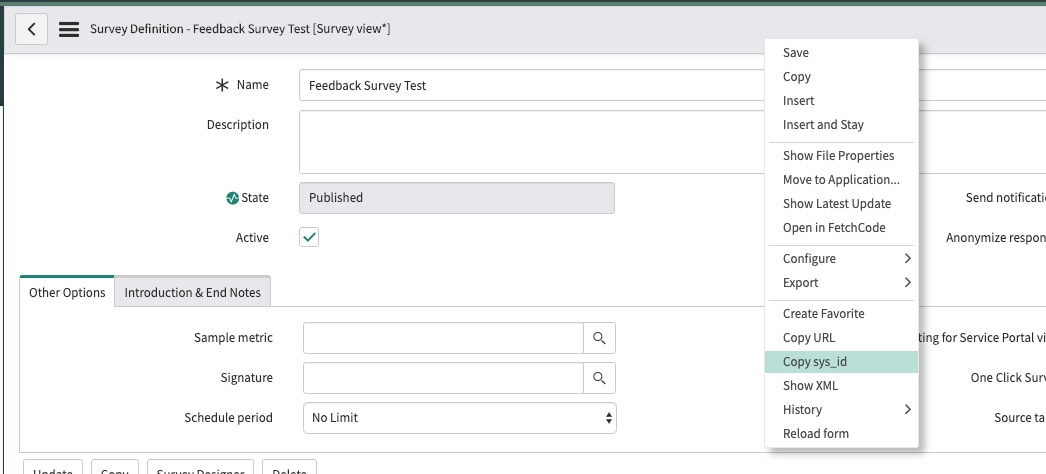
First, go to your Survey Definition, we'll need the Sys Id of that record. Right-click on the header and select "Copy sys_id"

Then on your "Feedback" button, set the URL to this, replacing the portions in [BRACKETS] with your values:
https://[INSTANCENAME].service-now.com/[PORTAL]?id=take_survey&type_id=[SYS ID OF SURVEY WE COPIED]Here's what mine looks like in a demo instance:

If my answer was helpful or answered your question, please mark it as 'Helpful' or 'Correct'
Thanks!
Josh
- Mark as New
- Bookmark
- Subscribe
- Mute
- Subscribe to RSS Feed
- Permalink
- Report Inappropriate Content
06-17-2019 10:01 AM
Hi Monique,
If I'm understanding correctly, you would like for this Survey to be accessible by anyone in the Portal, and for the users to remain in the Portal while taking the Survey. If that's the case, this is what we can do.
ServiceNow has a Survey portal page and widgets already created, so thankfully this should be very simple!
First, go to your Survey Definition, we'll need the Sys Id of that record. Right-click on the header and select "Copy sys_id"
Then on your "Feedback" button, set the URL to this, replacing the portions in [BRACKETS] with your values:
https://[INSTANCENAME].service-now.com/[PORTAL]?id=take_survey&type_id=[SYS ID OF SURVEY WE COPIED]Here's what mine looks like in a demo instance:
If my answer was helpful or answered your question, please mark it as 'Helpful' or 'Correct'
Thanks!
Josh
- Mark as New
- Bookmark
- Subscribe
- Mute
- Subscribe to RSS Feed
- Permalink
- Report Inappropriate Content
01-17-2022 02:34 PM
Is it possible to see what this looks like in a demo instance? I tried going to the link but it says the instance is hibernating. A screen shot would work for me
- Mark as New
- Bookmark
- Subscribe
- Mute
- Subscribe to RSS Feed
- Permalink
- Report Inappropriate Content
02-04-2021 11:57 PM
hi monique,
i have created the survey buttons(general & specific feedback) in survey portal menu but how can i connect that to survey i have created in survey designer for general feedback