- Mark as New
- Bookmark
- Subscribe
- Mute
- Subscribe to RSS Feed
- Permalink
- Report Inappropriate Content
09-08-2020 02:35 PM
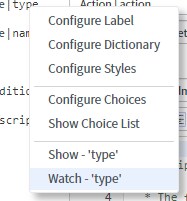
Trying to determine what controls the display context menus when right clicking next to a field in a form. Besides admin, I have a handful of users that are able to read / write the Configure Label and Configure Dictionary options. I am trying to find where that is controlled so I can remove their access.

Solved! Go to Solution.


- Mark as New
- Bookmark
- Subscribe
- Mute
- Subscribe to RSS Feed
- Permalink
- Report Inappropriate Content
09-08-2020 02:44 PM
It is based on the 'personalize'-roles
| personalize | Can configure forms, lists, rules, controls, scripts. |
| personalize_choices | Can configure choices and predefined responses for non-journal fields designated as choice or suggestion fields. |
| personalize_control | Can configure controls on lists, such as filters, links, and buttons. |
| personalize_dictionary | Can configure dictionary entries and labels. |
| personalize_form | Can configure forms. |
| personalize_list | Can configure lists and list calculations. |
| personalize_responses | Can configure predefined responses for journal fields designated as suggestion fields. |
| personalize_rules | Can configure business rules and scripts. This role contains the following specialized roles for granting selective, administrative access to rules and scripts:
|
| personalize_styles | Can configure field styles. |
| personalize_ui | Can configure forms and lists. |
For example the 'personalize_dictionary'-role
While Abel Tuter without the role:

With the role:

- Mark as New
- Bookmark
- Subscribe
- Mute
- Subscribe to RSS Feed
- Permalink
- Report Inappropriate Content
09-08-2020 02:44 PM
It is based on the 'personalize'-roles
| personalize | Can configure forms, lists, rules, controls, scripts. |
| personalize_choices | Can configure choices and predefined responses for non-journal fields designated as choice or suggestion fields. |
| personalize_control | Can configure controls on lists, such as filters, links, and buttons. |
| personalize_dictionary | Can configure dictionary entries and labels. |
| personalize_form | Can configure forms. |
| personalize_list | Can configure lists and list calculations. |
| personalize_responses | Can configure predefined responses for journal fields designated as suggestion fields. |
| personalize_rules | Can configure business rules and scripts. This role contains the following specialized roles for granting selective, administrative access to rules and scripts:
|
| personalize_styles | Can configure field styles. |
| personalize_ui | Can configure forms and lists. |
For example the 'personalize_dictionary'-role
While Abel Tuter without the role:
With the role:
- Mark as New
- Bookmark
- Subscribe
- Mute
- Subscribe to RSS Feed
- Permalink
- Report Inappropriate Content
09-21-2021 07:16 AM
Thank you for specifying the roles that are required to right click and configure! Very helpful!


- Mark as New
- Bookmark
- Subscribe
- Mute
- Subscribe to RSS Feed
- Permalink
- Report Inappropriate Content
09-08-2020 02:47 PM
Context Menus - Please check if this is customized in your instance https://docs.servicenow.com/bundle/orlando-platform-administration/page/administer/navigation-and-ui...
and as Willem mentioned there are few Personalize roles documented here which grants access to the user https://docs.servicenow.com/bundle/orlando-platform-administration/page/administer/roles/reference/r...
- Mark as New
- Bookmark
- Subscribe
- Mute
- Subscribe to RSS Feed
- Permalink
- Report Inappropriate Content
09-08-2020 03:14 PM
Thanks guys. That did it...