- Mark as New
- Bookmark
- Subscribe
- Mute
- Subscribe to RSS Feed
- Permalink
- Report Inappropriate Content
07-17-2025 05:55 AM
Hi Everyone ,
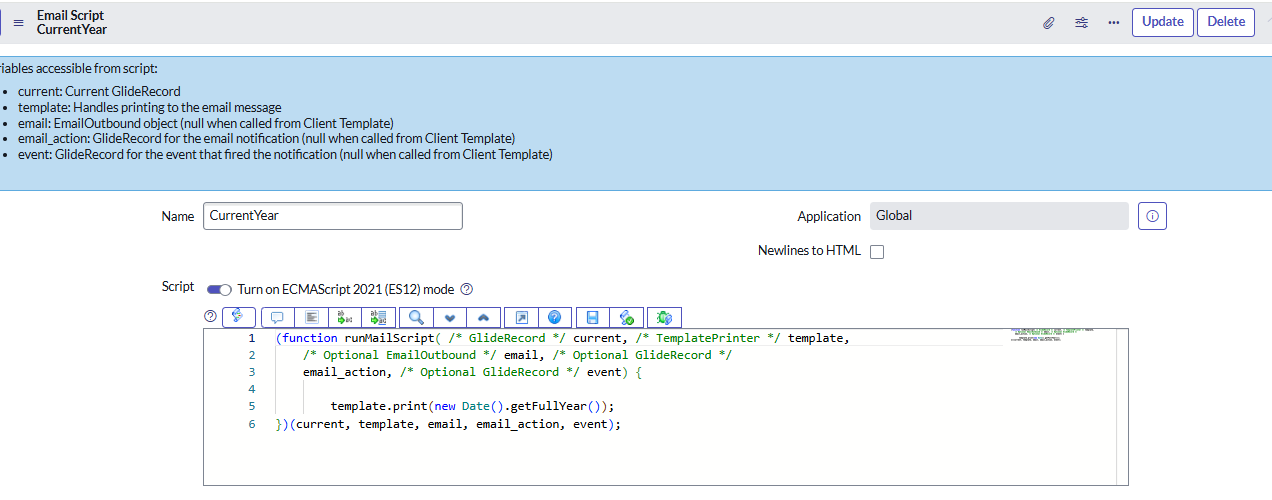
I have written an email notification with email script which show the current year in signature like @2025 for this year how to check for next year . I have attached my email script and notification below . can anyone check my code is it correct or not .
Thank you
Solved! Go to Solution.

- Mark as New
- Bookmark
- Subscribe
- Mute
- Subscribe to RSS Feed
- Permalink
- Report Inappropriate Content
07-17-2025 06:04 AM - edited 07-17-2025 06:06 AM
Hi @AkashKushwah,
just add +1 as seen below:
var currentYear = new Date().getFullYear();
var nextYear = currentYear + 1;
gs.info(nextYear);

✂-----Cutting-out-the---✦AI-noise✦---All-replies-written-and-vouched-for-by-GlideFather---
- Mark as New
- Bookmark
- Subscribe
- Mute
- Subscribe to RSS Feed
- Permalink
- Report Inappropriate Content
07-17-2025 06:31 AM
Hi @AkashKushwah ,
This script may help, it prints the next year dynamically in the email signature:
(function runMailScript( /* GlideRecord */ current, /* TemplatePrinter */ template,
    /* Optional EmailOutbound */
    email, /* Optional GlideRecord */ email_action,
    /* Optional GlideRecord */
    event) {


    var gdt = new GlideDateTime();
    var curYear = gdt.getLocalDate().getYear(); // safely gets current year as number
    var nextYear = curYear + 1;


    template.print("@" + nextYear);

})(current, template, email, email_action, event);


- Mark as New
- Bookmark
- Subscribe
- Mute
- Subscribe to RSS Feed
- Permalink
- Report Inappropriate Content
07-20-2025 07:26 AM
Hi @AkashKushwah
my response was the same and I replied earlier than the accepted one, can you please tell me why did you decide to accept this solution and not mine? thank you
✂-----Cutting-out-the---✦AI-noise✦---All-replies-written-and-vouched-for-by-GlideFather---
- Mark as New
- Bookmark
- Subscribe
- Mute
- Subscribe to RSS Feed
- Permalink
- Report Inappropriate Content
07-17-2025 06:04 AM - edited 07-17-2025 06:06 AM
Hi @AkashKushwah,
just add +1 as seen below:
var currentYear = new Date().getFullYear();
var nextYear = currentYear + 1;
gs.info(nextYear);
✂-----Cutting-out-the---✦AI-noise✦---All-replies-written-and-vouched-for-by-GlideFather---

- Mark as New
- Bookmark
- Subscribe
- Mute
- Subscribe to RSS Feed
- Permalink
- Report Inappropriate Content
07-17-2025 06:05 AM
Hi @AkashKushwah I think it won’t automatically switch to 2026 unless you modify the logic to handle the next year.
(function runMailScript(current, template, email, email_action, event) {
    // Get the current year
    var currentYear = new Date().getFullYear();
    // Optionally set next year for testing or future use
    var nextYear = currentYear + 1; // e.g., 2026
    template.print(nextYear); // Use nextYear instead of currentYear for 2026
})(current, template, email, email_action, event);
HTML -
- Mark as New
- Bookmark
- Subscribe
- Mute
- Subscribe to RSS Feed
- Permalink
- Report Inappropriate Content
07-17-2025 06:11 AM
Yes , you are right but how to switch automatically like 2026,2027 or 2028. If you have any idea please let me know.

- Mark as New
- Bookmark
- Subscribe
- Mute
- Subscribe to RSS Feed
- Permalink
- Report Inappropriate Content
07-17-2025 06:31 AM
It will automatically fetch current year as 2026 when this code will run next year, no need to add any logic to increase the year for every subsequent year.