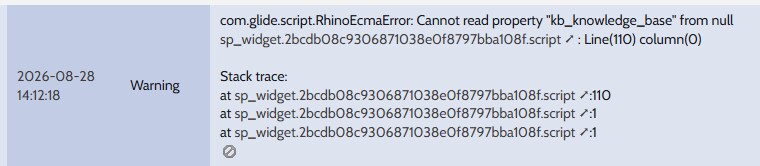
GlideRecord cannot be called from server script in widget editor

- Mark as New
- Bookmark
- Subscribe
- Mute
- Subscribe to RSS Feed
- Permalink
- Report Inappropriate Content
06-11-2024 12:17 AM
I would like to use the value of a field in a record called from a knowledge table in a widget.
But the value is not assigned to gr.
Server Script
(function() {
	var gr = new GlideRecord('kb_knowledge');
	if (gr.next()) {
		var shortDescription = gr.short_description;
		gs.info('shortDescription: ' + shortDescription);
		data.shortDescription = shortDescription;
	} else {
		// Knowledge Base record not found.
		gs.info('Knowledgebase record not found.');
	}
})();
This server script will be “else”.
Is there any configuration I need to consider?
Please let me know if there is another way to do this!
- Mark as New
- Bookmark
- Subscribe
- Mute
- Subscribe to RSS Feed
- Permalink
- Report Inappropriate Content
08-27-2026 10:22 PM
- Mark as New
- Bookmark
- Subscribe
- Mute
- Subscribe to RSS Feed
- Permalink
- Report Inappropriate Content
08-30-2026 11:48 AM
Two things are wrong in that server script.
1) You never execute the query. new GlideRecord('kb_knowledge') only creates the object; gr.next() on an unqueried GlideRecord returns false, which is why you always land in the else branch. You need gr.query() (or gr.get(sys_id)) first.
2) Even with query(), kb_knowledge is filtered by knowledge Can Read user criteria plus ACLs, so an unqualified query can legitimately return nothing for the logged-in portal user. Target a specific article and confirm the user can read it.
Working server script:
(function() {
var gr = new GlideRecord('kb_knowledge');
gr.addQuery('workflow_state', 'published');
gr.orderByDesc('sys_updated_on');
gr.setLimit(1);
gr.query();
if (gr.next()) {
data.shortDescription = gr.getValue('short_description');
} else {
data.shortDescription = '';
gs.info('kb_knowledge: no readable record found');
}
})();
If you already know the article, use: if (gr.get('<sys_id>')) { data.shortDescription = gr.getValue('short_description'); }
Other points: use getValue() rather than assigning gr.short_description directly, because the raw assignment puts a GlideElement on data and it will not serialise cleanly to the client. gs.info output goes to System Logs, not the browser console - check syslog, or use gs.addInfoMessage while debugging. In the widget HTML reference it as {{data.shortDescription}} (or {{c.data.shortDescription}} with a controller alias), and remember the server script runs once on widget load, so if you need it refreshed use c.server.update().
If it still returns nothing while running as admin but empty as an end user, it is user criteria on the knowledge base - then either grant the criteria or read it in a scoped/elevated context with a GlideRecordSecure-aware design decision made deliberately.

- Mark as New
- Bookmark
- Subscribe
- Mute
- Subscribe to RSS Feed
- Permalink
- Report Inappropriate Content
08-30-2026 10:18 PM
Hello @hibiayumu ,
Have you queried the table ? If yes then only you will get data then you can use that in your widget .
If in variable you are getting object then You just need add toString() function to get value in variable .
var shortDescription = gr.short_description.toString();
If this helps you then mark it as helpful and accept as solution.
Regards,
Aditya