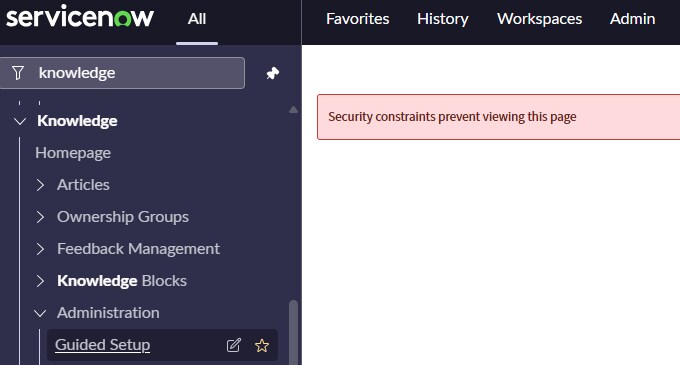
Guided Setup stops working

- Mark as New
- Bookmark
- Subscribe
- Mute
- Subscribe to RSS Feed
- Permalink
- Report Inappropriate Content
01-22-2026 07:31 AM
Hi Everyone,
I am in the middle of a training course which has been using guided setup. It all of the sudden gives me an error saying "Security constraints prevent viewing this setup". I cannot move along the training without completing the tasks that are listed. Can someone help in resolving this issue?
Thank you.

- Mark as New
- Bookmark
- Subscribe
- Mute
- Subscribe to RSS Feed
- Permalink
- Report Inappropriate Content
01-22-2026 10:27 PM
Hi Buddy,
This isn’t anything you did wrong — it’s almost always a roles / elevation issue, and it’s common in training labs.
What that message really means is:
your user doesn’t currenttly have permission to run that Guided Setup, even though you can still see it in the menu.
Why it suddenly shows up:
Your admin role is no longer elevated (very common after a refresh or re-login)
A required Knowledge role isn’t active
The lab reset roles in the background
First thing to try (this fixes it most of the time):
Click Admin in the top right
Click Elevate Roles
Select admin
Refresh the page
Go back to Knowledge → Administration → Guided Setup
If that still doesnt work:
Open your user record
Check that you have:
admin
knowledge_admin (sometimes knowledge_manager)
If a role is missing and you cant add it, its a lab provisioning issue, not a configuration problem.
Why this is confusing I think:
Guided Setup is more locked down than normal pages
The menu stays visible even when access is blocked
The error message doesn’t tell you which role is missing
At end of Day:
You’re blocked by permissions, not by the training itself. Elevating admin or restoring the Knowledge roles will unblock Guided Setup so you can continue the course.
@Trpatel08 - Please mark Accepted Solution and Thumbs Up if you find helpful!

- Mark as New
- Bookmark
- Subscribe
- Mute
- Subscribe to RSS Feed
- Permalink
- Report Inappropriate Content
01-23-2026 02:04 AM
Hi @Trpatel08,
it seems that you might be impersonating a user without admin role.
If you want to know who can access what module, hover your mouse to the right and there's edit icon:

And from there you can see that this module is accessible for admins only:

Most likely you will not see the edit option there which would be another indicator that you don't have admin rights.
To see what are your currently assigned roles, update the URL accordingly and check this table it shows roles of the currently logged in person:
https://yourinstance.service-now.com/sys_user_has_role_list.do?sysparm_query=userDYNAMIC90d1921e5f510100a9ad2572f2b477fe
If you cannot access the table, you don't have access, try to log out and log in or stop impersonating..
@Matthew_13, Admin role cannot be elevated, a user simply does have it or doesn't. It would be clear if you would open a PDI and validated yourself.
What you refer to with elevating role is security_admin and it's unrelated to the screenshot attached.
✂-----Cutting-out-the---✦AI-noise✦---All-replies-written-and-vouched-for-by-GlideFather---

- Mark as New
- Bookmark
- Subscribe
- Mute
- Subscribe to RSS Feed
- Permalink
- Report Inappropriate Content
01-22-2026 10:40 PM
Hello @Trpatel08 ,
I think you impersonate user who dont have access to that module or table thats why acls are restricting that acess. Once please check that .If still get restricted then it there will other acl/access role issue.
If this helps you then mark it as helpful and accept as solution.
Regards,
Aditya,
technical Consultant