- Mark as New
- Bookmark
- Subscribe
- Mute
- Subscribe to RSS Feed
- Permalink
- Report Inappropriate Content
04-17-2022 11:20 PM
Hello all!
I tried to follow this https://support.servicenow.com/kb?id=kb_article_view&sysparm_article=KB0714594

.field-has-reference > .add-on{
 display:none;
}
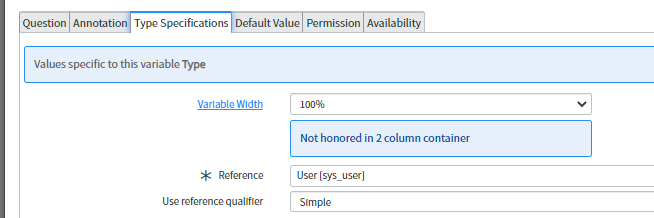
However this broke the layout (the name has become to 20% of the whole field?)..

I tried to adjust the variable width, not working.

This is different from the KB. the KB shows a screenshot of full nice layout (see the X of the field):

Anyone able to help on this please?
Solved! Go to Solution.

- Mark as New
- Bookmark
- Subscribe
- Mute
- Subscribe to RSS Feed
- Permalink
- Report Inappropriate Content
04-18-2022 12:52 AM
Found one relevant article for your issue:
https://community.servicenow.com/community?id=community_question&sys_id=e02fc3e1dbdcdbc01dcaf3231f96191f
Feel free to drop thumbs up, if this helps 🙂
Aman Kumar
- Mark as New
- Bookmark
- Subscribe
- Mute
- Subscribe to RSS Feed
- Permalink
- Report Inappropriate Content
04-18-2022 12:52 AM
Found one relevant article for your issue:
https://community.servicenow.com/community?id=community_question&sys_id=e02fc3e1dbdcdbc01dcaf3231f96191f
Feel free to drop thumbs up, if this helps 🙂
Aman Kumar
- Mark as New
- Bookmark
- Subscribe
- Mute
- Subscribe to RSS Feed
- Permalink
- Report Inappropriate Content
04-18-2022 01:13 AM
.add-on > button.lookup {
  display:none !important;
}
In the page https://community.servicenow.com/community?id=community_question&sys_id=e02fc3e1dbdcdbc01dcaf3231f96191f
it has many answers, i used this code in Rome and works.
Thanks Amman!
- Mark as New
- Bookmark
- Subscribe
- Mute
- Subscribe to RSS Feed
- Permalink
- Report Inappropriate Content
04-18-2022 02:08 AM
Great, just for understanding and future visitors:
What is !important?
The !important rule in CSS is used to add more importance to a property/value than normal.
In fact, if you use the !important rule, it will override ALL previous styling rules for that specific property on that element!
Aman Kumar