- Mark as New
- Bookmark
- Subscribe
- Mute
- Subscribe to RSS Feed
- Permalink
- Report Inappropriate Content
12-10-2025 02:43 AM
Dear ServiceNow Developer Community Colleagues,
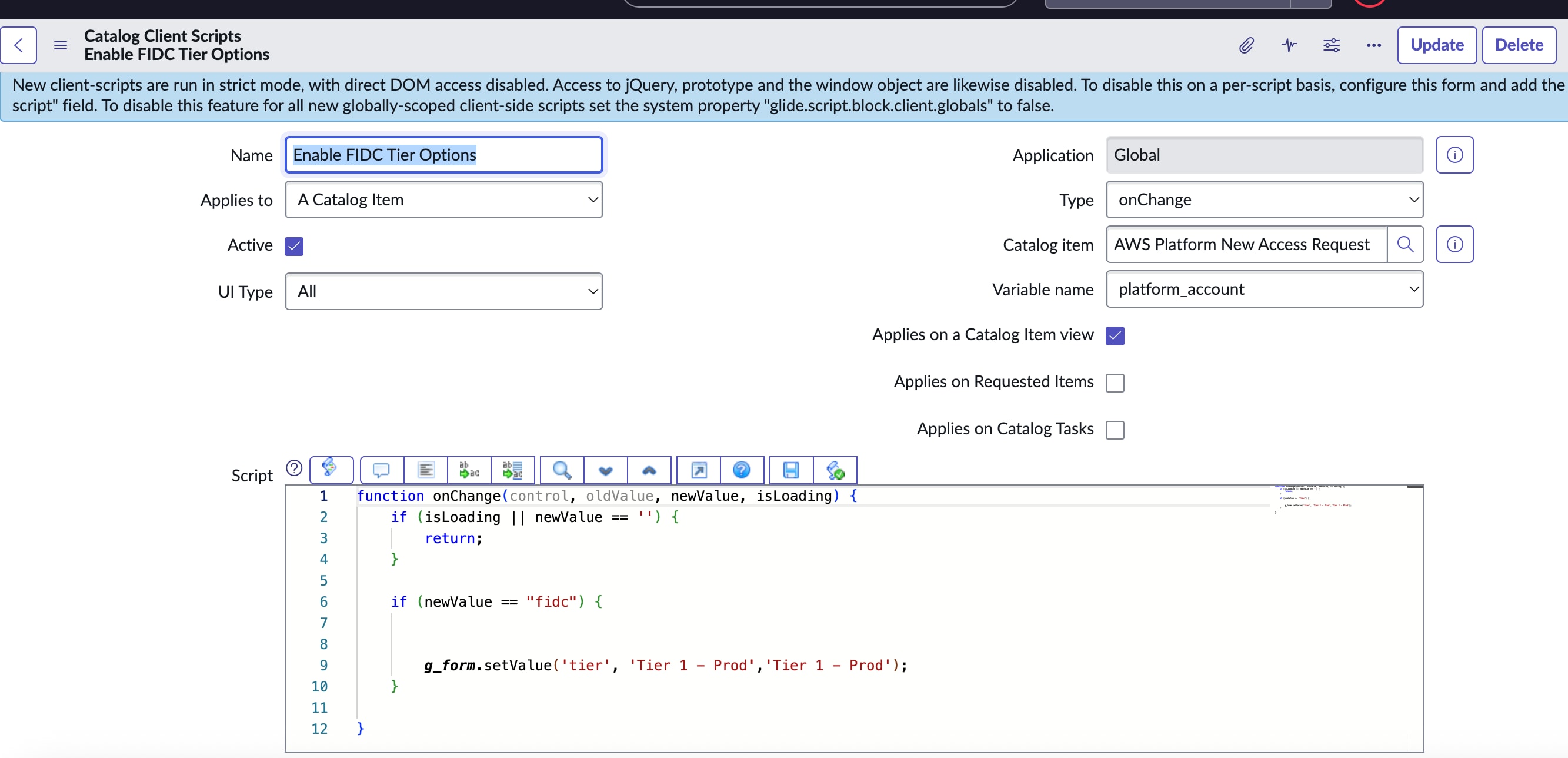
Please can I kindly ask for you assistance on how to achieve the following in an On Change Catalog Client Script (please see attached screenshot as back up).
I have established an On Change Catalog Client Script, so that if the New Value = 'FIDC' within Variable Name 'platform_account' this will set the Value in the 'Tier' field on my Catalog Form to be 'Tier 1 - Prod'.
But what I need to add further to this, is a further statement so that it works for IF AND.
I have another Form Field Variable called 'Requested Role' (requested_role), and I want the On Change Client script to work IF the 'platform_account' changes to FIDC AND If the 'requested role' on the Catalog Form = "developer".
How can I incorporate the IF AND statement into what I have done already (see attached), so that it only triggers if 'platform_account' changes to "FIDC" AND the 'requested_role' selected on the catalog form = "developer".
Please mention the Client Script I would need to use, to achieve this.
I would greatly appreciate any help on this, many thanks developer community.
Solved! Go to Solution.

- Mark as New
- Bookmark
- Subscribe
- Mute
- Subscribe to RSS Feed
- Permalink
- Report Inappropriate Content
12-10-2025 03:22 AM
if (newValue == 'FIDC' && g_form.getValue('requested_role') == 'developer') {
...
- Mark as New
- Bookmark
- Subscribe
- Mute
- Subscribe to RSS Feed
- Permalink
- Report Inappropriate Content
12-10-2025 03:22 AM
use this script on change of platform_account and create another onChange on requested_role and use same script
function onChange(control, oldValue, newValue, isLoading) {
    if (isLoading || newValue == '')
        return;

    if (g_form.getValue('platform_account') == "fidc" && g_form.getValue('requested_role') == 'developer')
        g_form.setValue('otherVariableNameHere', "value you want to set");
    else
        g_form.clearValue('otherVariableNameHere');

}
💡 If my response helped, please mark it as correct ✅ and close the thread 🔒— this helps future readers find the solution faster! 🙏
Ankur
✨ Certified Technical Architect || ✨ 10x ServiceNow MVP || ✨ ServiceNow Community Leader
- Mark as New
- Bookmark
- Subscribe
- Mute
- Subscribe to RSS Feed
- Permalink
- Report Inappropriate Content
12-10-2025 03:22 AM
if (newValue == 'FIDC' && g_form.getValue('requested_role') == 'developer') {
...- Mark as New
- Bookmark
- Subscribe
- Mute
- Subscribe to RSS Feed
- Permalink
- Report Inappropriate Content
12-10-2025 09:38 AM
Thanks very much @Brad Bowman I appreciate your help, this also works for me, much appreciated Brad.
- Mark as New
- Bookmark
- Subscribe
- Mute
- Subscribe to RSS Feed
- Permalink
- Report Inappropriate Content
12-10-2025 03:22 AM
use this script on change of platform_account and create another onChange on requested_role and use same script
function onChange(control, oldValue, newValue, isLoading) {
    if (isLoading || newValue == '')
        return;

    if (g_form.getValue('platform_account') == "fidc" && g_form.getValue('requested_role') == 'developer')
        g_form.setValue('otherVariableNameHere', "value you want to set");
    else
        g_form.clearValue('otherVariableNameHere');

}
💡 If my response helped, please mark it as correct ✅ and close the thread 🔒— this helps future readers find the solution faster! 🙏
Ankur
✨ Certified Technical Architect || ✨ 10x ServiceNow MVP || ✨ ServiceNow Community Leader
- Mark as New
- Bookmark
- Subscribe
- Mute
- Subscribe to RSS Feed
- Permalink
- Report Inappropriate Content
12-10-2025 09:04 AM
@Ankur Bawiskar thanks so much for your help, I am trying this in my Catalog Client Script, but it doesn't seem to work. I have attached a screenshot, does it look correct? Many thanks Ankur.