How to add the Filter Icon and filtering on a simple list widget

- Mark as New
- Bookmark
- Subscribe
- Mute
- Subscribe to RSS Feed
- Permalink
- Report Inappropriate Content
02-11-2020 10:15 AM
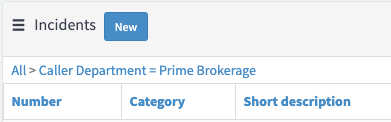
I am struggling with how to add the filter funnel icon on a simple list widget
I want to have this funnel so they can filter the list based on opened date of created date

This is my Widget SImple List

- Labels:
-
Service Portal Development


- Mark as New
- Bookmark
- Subscribe
- Mute
- Subscribe to RSS Feed
- Permalink
- Report Inappropriate Content
02-11-2020 10:23 AM
Check below for solution
Regards,
Sachin

- Mark as New
- Bookmark
- Subscribe
- Mute
- Subscribe to RSS Feed
- Permalink
- Report Inappropriate Content
02-11-2020 10:29 AM
Please take a look at below article:
https://hi.service-now.com/kb_view.do?sysparm_article=KB0687054
Please mark my response as correct and helpful if it helped solved your question.
-Thanks
- Mark as New
- Bookmark
- Subscribe
- Mute
- Subscribe to RSS Feed
- Permalink
- Report Inappropriate Content
02-11-2020 12:56 PM

- Mark as New
- Bookmark
- Subscribe
- Mute
- Subscribe to RSS Feed
- Permalink
- Report Inappropriate Content
09-21-2020 09:52 PM
Hi triciav
Did you find a resolution to that {{currentField}} display issue?
I have certain users getting the same thing, seems to be browser / computer based rather than user based.