
- Mark as New
- Bookmark
- Subscribe
- Mute
- Subscribe to RSS Feed
- Permalink
- Report Inappropriate Content
10-12-2022 12:52 PM

I need to customize the view that we see when we click on "i" icon in the Configuration Item field. It opens the CI in new tab, but I am not sure how to customize it.
I tried opening the same in legacy view, but when I go and select the hamburger icon I don't see Workspace View (like we get for incident).

Thank you.
Solved! Go to Solution.

- Mark as New
- Bookmark
- Subscribe
- Mute
- Subscribe to RSS Feed
- Permalink
- Report Inappropriate Content
10-12-2022 01:49 PM
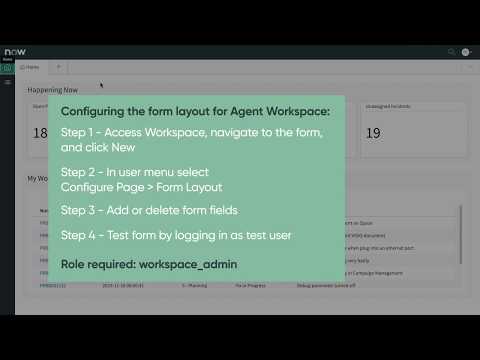
This video will definitely help you. Once you configure the layout you want, when you click the "i" it will automatically open that layout.
- Mark as New
- Bookmark
- Subscribe
- Mute
- Subscribe to RSS Feed
- Permalink
- Report Inappropriate Content
10-12-2022 01:20 PM
OOTB when you click on the "i" in a workspace, it does open in a new workspace tab. What happens when you click it? Can you send a screenshot.
- Mark as New
- Bookmark
- Subscribe
- Mute
- Subscribe to RSS Feed
- Permalink
- Report Inappropriate Content
10-12-2022 01:25 PM - edited 10-12-2022 01:28 PM
when I click on that, it show me the CI form, however, my question is how can I customize it? Basically, how to change UI of the workspace tab. I am not sharing it's screenshot as it's not relevant and I need to change it. Thank you.
- Mark as New
- Bookmark
- Subscribe
- Mute
- Subscribe to RSS Feed
- Permalink
- Report Inappropriate Content
10-12-2022 01:28 PM
Got it, create a new view called Workspace
- Mark as New
- Bookmark
- Subscribe
- Mute
- Subscribe to RSS Feed
- Permalink
- Report Inappropriate Content
10-12-2022 01:41 PM
Please explain. create new view from where? and how can I associate it with the "i" button on the incident form.
Further, the new view requires showing related records too, can we do in the new view?

