- Mark as New
- Bookmark
- Subscribe
- Mute
- Subscribe to RSS Feed
- Permalink
- Report Inappropriate Content
3 weeks ago - last edited 3 weeks ago

Thanks in Advance!!
Solved! Go to Solution.
- Mark as New
- Bookmark
- Subscribe
- Mute
- Subscribe to RSS Feed
- Permalink
- Report Inappropriate Content
3 weeks ago
Hello @Sachin G K1
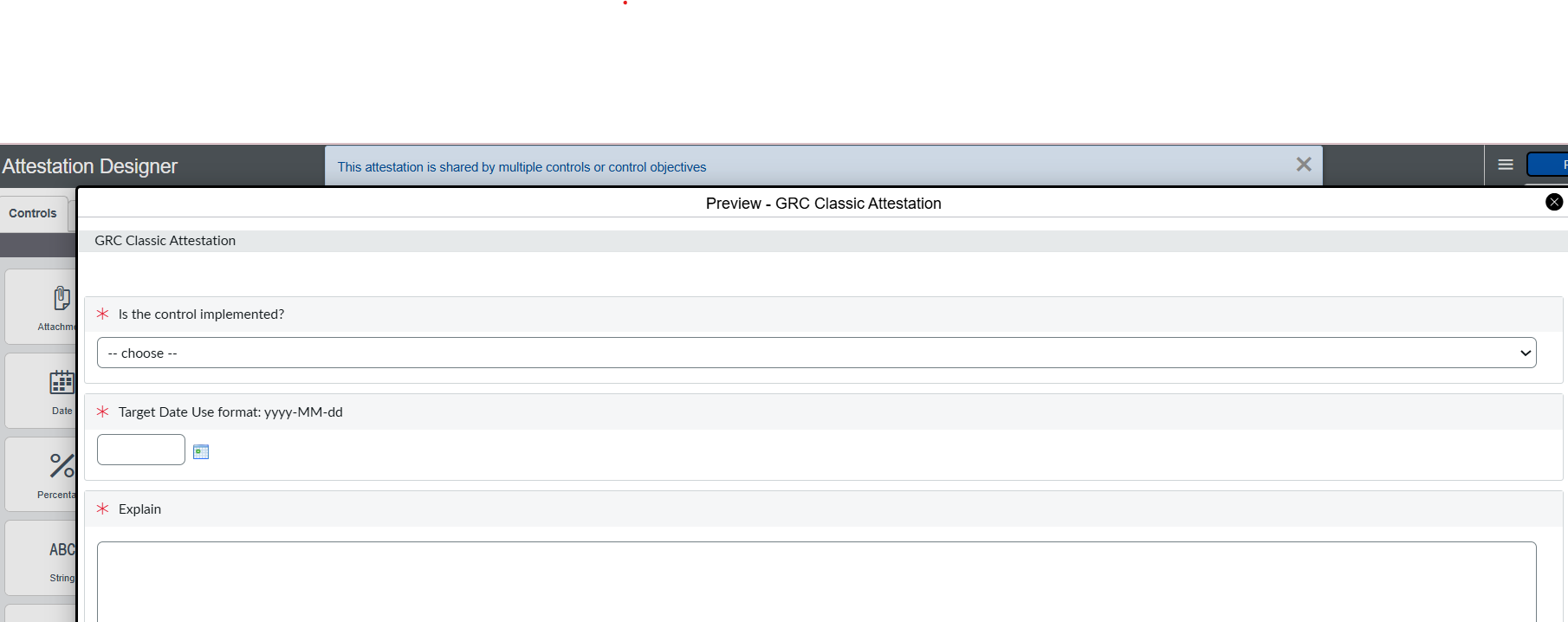
I Replicated this in my PDI by adding a Date Question "Target Date" just to match your Screenshot.(Refer Screenshot1)
What I found:
1. The designer has no date Validation: A Date question's Properties are only Name, Question, Active, Mandatory and Details. No script field to write Validations (Refer Screenshot2)
2. I first tried a before-rule on asmt_assessment_instance_question that aborts when the date is in the past. The error message appears, but the attestation still completes, with the mandatory Target Date left empty. The take page enforces Mandatory only in the browser, and the submit doesn't re-check it on the server.
The Approach that worked for me:
A before-update Business rule on asmt_assessment_instance
Refer Screenshots for Business rule(Screenshot3 & Screenshot4)
- When: before, Update
- Filter: State changes to Complete AND Metric type is your attestation metric type
(function executeRule(current, previous) {
var q = new GlideRecord('asmt_assessment_instance_question');
q.addQuery('instance', current.getUniqueValue());
q.addQuery('metric', '<sys_id of your Target Date metric>');
q.query();
if (!q.next())
return;
var picked = q.getValue('string_value'); // stored as yyyy-MM-dd
var today = new GlideDateTime().getLocalDate().getValue(); // yyyy-MM-dd, user's time zone
if (!picked || picked < today) {
gs.addErrorMessage('Target Date cannot be empty or in the past. Please update it and submit again.');
current.setAbortAction(true);
}
})(current, previous);
Test Results in my PDI:
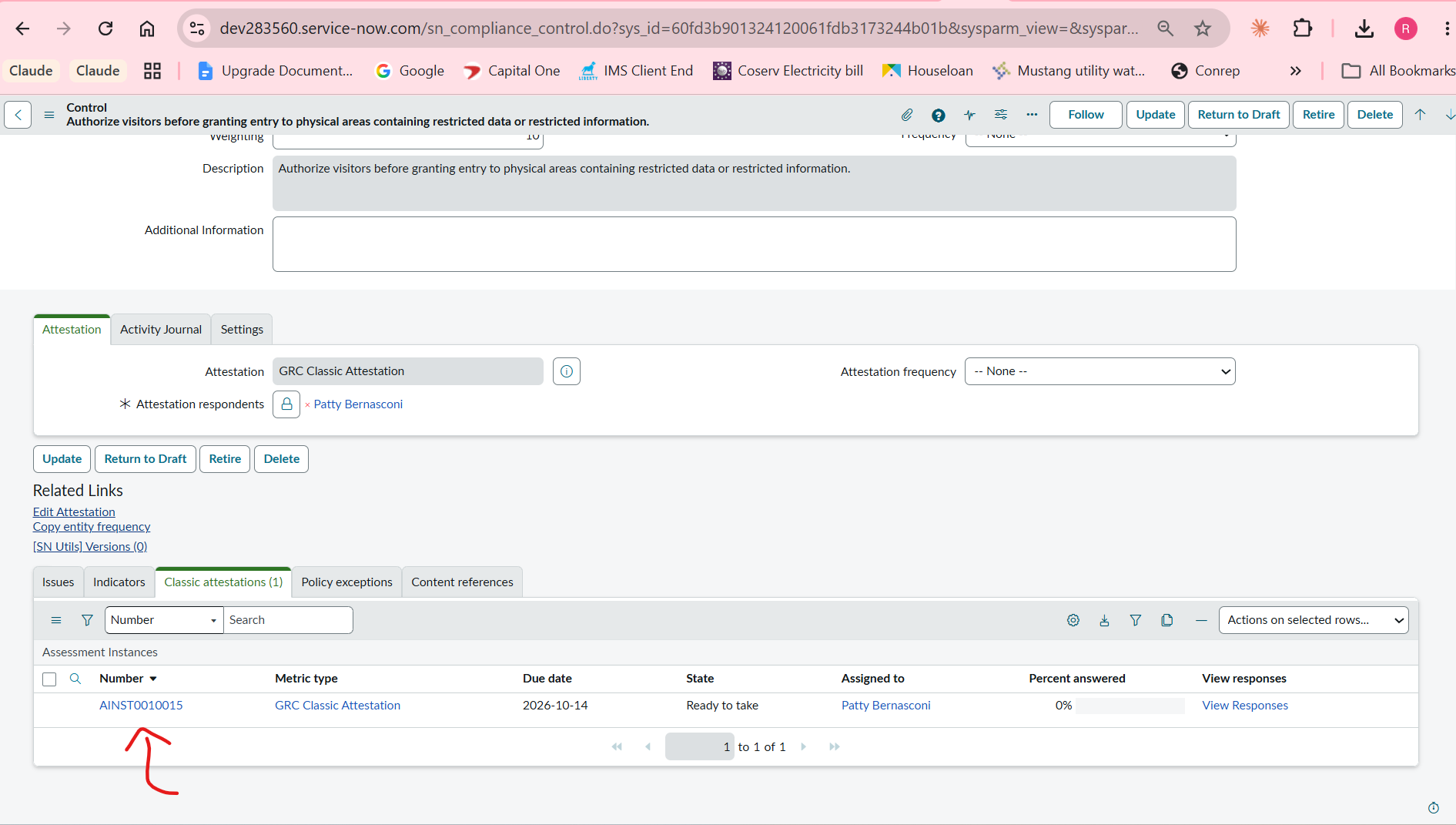
-->I picked a CTRL0010011 Record in PDI(Refer Screenshot5)
-->Clicked on "Attest" UI Action. which created a Classic Attestation(Refer Screenshot6)
--> impersonate as "Patty" Attestation Responder and open the assessment instance and fill the target as past date(Refer screenhot7 & screenshot8)
---> Now end impersonation and go to the CTRL0010011 Record, check that the Assessment instance state is still "Ready to take" not complete(Refer screenshot9) ---> This proves that our business rule worked
---> if you want to test the other way around, select the future date and you can notice that Assessment state will be in complete state.
One limitation: after a blocked submit, the thanks page shows the error and "You have completed this attestation." The record isn't completed, but the message is misleading, so it's worth telling attesters about.
Clearing the field in the browser, as you described, would mean customizing the assessment_take2 UI page. I haven't tested that. Because it's a platform page, it would add upgrade risk, so I'd treat the server-side rule as the enforcement either way.
If my reply helped, please mark it as Helpful and Accept as Solution
Regards
Raghavendra G
- Mark as New
- Bookmark
- Subscribe
- Mute
- Subscribe to RSS Feed
- Permalink
- Report Inappropriate Content
3 weeks ago
Hello @Sachin G K1
I Replicated this in my PDI by adding a Date Question "Target Date" just to match your Screenshot.(Refer Screenshot1)
What I found:
1. The designer has no date Validation: A Date question's Properties are only Name, Question, Active, Mandatory and Details. No script field to write Validations (Refer Screenshot2)
2. I first tried a before-rule on asmt_assessment_instance_question that aborts when the date is in the past. The error message appears, but the attestation still completes, with the mandatory Target Date left empty. The take page enforces Mandatory only in the browser, and the submit doesn't re-check it on the server.
The Approach that worked for me:
A before-update Business rule on asmt_assessment_instance
Refer Screenshots for Business rule(Screenshot3 & Screenshot4)
- When: before, Update
- Filter: State changes to Complete AND Metric type is your attestation metric type
(function executeRule(current, previous) {
var q = new GlideRecord('asmt_assessment_instance_question');
q.addQuery('instance', current.getUniqueValue());
q.addQuery('metric', '<sys_id of your Target Date metric>');
q.query();
if (!q.next())
return;
var picked = q.getValue('string_value'); // stored as yyyy-MM-dd
var today = new GlideDateTime().getLocalDate().getValue(); // yyyy-MM-dd, user's time zone
if (!picked || picked < today) {
gs.addErrorMessage('Target Date cannot be empty or in the past. Please update it and submit again.');
current.setAbortAction(true);
}
})(current, previous);
Test Results in my PDI:
-->I picked a CTRL0010011 Record in PDI(Refer Screenshot5)
-->Clicked on "Attest" UI Action. which created a Classic Attestation(Refer Screenshot6)
--> impersonate as "Patty" Attestation Responder and open the assessment instance and fill the target as past date(Refer screenhot7 & screenshot8)
---> Now end impersonation and go to the CTRL0010011 Record, check that the Assessment instance state is still "Ready to take" not complete(Refer screenshot9) ---> This proves that our business rule worked
---> if you want to test the other way around, select the future date and you can notice that Assessment state will be in complete state.
One limitation: after a blocked submit, the thanks page shows the error and "You have completed this attestation." The record isn't completed, but the message is misleading, so it's worth telling attesters about.
Clearing the field in the browser, as you described, would mean customizing the assessment_take2 UI page. I haven't tested that. Because it's a platform page, it would add upgrade risk, so I'd treat the server-side rule as the enforcement either way.
If my reply helped, please mark it as Helpful and Accept as Solution
Regards
Raghavendra G

- Mark as New
- Bookmark
- Subscribe
- Mute
- Subscribe to RSS Feed
- Permalink
- Report Inappropriate Content
3 weeks ago
Hello @Sachin G K1 ,
OOTB metrics also have no client-side validation for the Date data type.
What might works a before Business Rule on the answer record as user's answer is saved to asmt_assessment_instance_question, so validate there.
Create a BR :
Table: Assessment Instance Question (asmt_assessment_instance_question)
When: before, Insert + Update
Filter condition: Metric is Target Date
Script :
(function executeRule(current, previous /*null when async*/ ) {

    // Add your code here
    var val = current.getValue('string_value');
    if (!val) return;

    var picked = new GlideDate();
    picked.setDisplayValue(val); // answer is stored in the user's date format
    var today = new GlideDate(); // today's date

    if (picked.getNumericValue() < today.getNumericValue()) {
        current.string_value = '';
        current.value = '';
        gs.addErrorMessage('Target Date cannot be in the past. Please select today or a future date.');
		//current.setAbortAction(true);
    }

})(current, previous);
So got this when tested:

The Assessment gets submits but the value does not stored in answer table :

While submitting :

If my response helped mark as helpful and accept the solution.