- Mark as New
- Bookmark
- Subscribe
- Mute
- Subscribe to RSS Feed
- Permalink
- Report Inappropriate Content
10-25-2022 02:34 PM
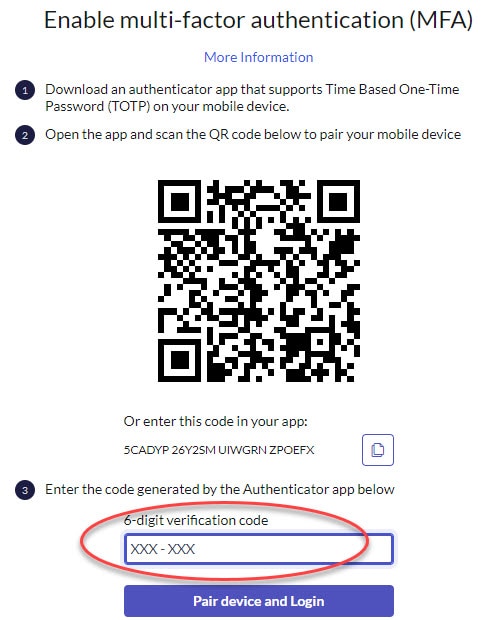
After upgrading to Tokyo, the MFA screen shows 'Enter the code generated by the Authenticator app below' then a field which prompts the user for a 6-digit verification code.
The issue is there is a mask on the field which shows the user to enter XXX-XXX.
If user enters the dash, as per instructions, the authentication fails.
Can we change it to show XXXXXX? without the dash.
Solved! Go to Solution.
- Mark as New
- Bookmark
- Subscribe
- Mute
- Subscribe to RSS Feed
- Permalink
- Report Inappropriate Content
10-28-2022 09:43 AM


- Mark as New
- Bookmark
- Subscribe
- Mute
- Subscribe to RSS Feed
- Permalink
- Report Inappropriate Content
10-25-2022 10:16 PM
HI
unfortunately there is no way to change this prefilled value.
Maik

- Mark as New
- Bookmark
- Subscribe
- Mute
- Subscribe to RSS Feed
- Permalink
- Report Inappropriate Content
10-26-2022 09:38 AM
I would suggest putting in a support case. Then hopefully a problem will get created so it gets fixed in a patch or another release.
- Mark as New
- Bookmark
- Subscribe
- Mute
- Subscribe to RSS Feed
- Permalink
- Report Inappropriate Content
10-28-2022 09:43 AM
Here is the solution provided by ServiceNow:
- Mark as New
- Bookmark
- Subscribe
- Mute
- Subscribe to RSS Feed
- Permalink
- Report Inappropriate Content
06-23-2025 09:39 AM
fire whoever invented this