- Mark as New
- Bookmark
- Subscribe
- Mute
- Subscribe to RSS Feed
- Permalink
- Report Inappropriate Content
05-23-2022 01:22 AM
After the creation of a Request Item in the Portal, the user is redirected to the Order Status of the REQ, according to this:

What I want to achieve, its that the user should be redirected to the Request Item-page: sp?id=ticket&table=sc_req_item&sys_id=xxxxxxxxx
If I select 'ticket' in the Page Route Map, the user is redirected to the REQ-ticket and not the RITM-ticket.
I see there are various ways to achieve this, one of the alternatives is to clone the SC Catalog Item-widget, and change the client script as described here: How to dynamically redirect users to Requested Item page instead of SC Order Status page? - Customer...
But I'm not sure if this is the right way?
Any step by step instructions to do this would be highly appreciated.
Solved! Go to Solution.
- Labels:
-
Service Portal Development
- Mark as New
- Bookmark
- Subscribe
- Mute
- Subscribe to RSS Feed
- Permalink
- Report Inappropriate Content
06-07-2022 09:42 AM
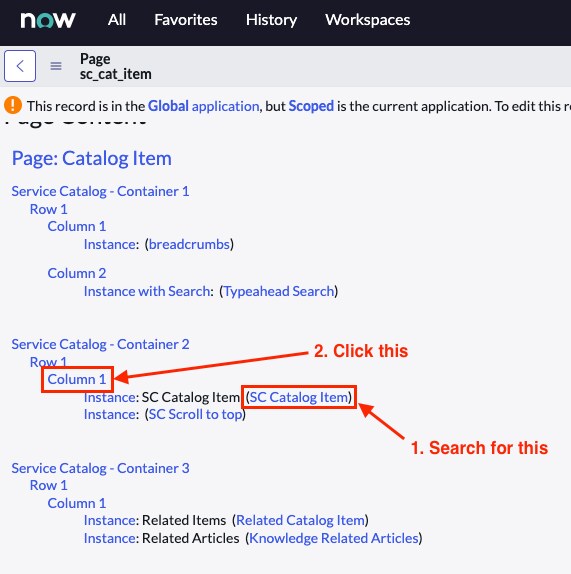
1.) Enter sp_page.list in the Filter Navigator and hit Enter
2.) Enter sc_cat_item in the ID column and hit Enter


3.) Open the record shown in the screenshot
4.) Scroll down and click the column that holds the SC Catalog Item-Widget

5.) Copy the Sys ID of the Column Page

6.) Enter sp_instance.do in the Filter Navigator
7.) Continue on step 2 of my previous post where it explains to set the column with the help of the sys_id you just copied.
Hope this helps you 🙂
- Mark as New
- Bookmark
- Subscribe
- Mute
- Subscribe to RSS Feed
- Permalink
- Report Inappropriate Content
06-20-2022 06:38 AM
I did find a solution, instead of redirecting like this:
$location.search(data.redirect_portal_url);I changed it to this:
location.search = data.redirect_portal_url;