Reload specific value in list view on celledit via client script

- Mark as New
- Bookmark
- Subscribe
- Mute
- Subscribe to RSS Feed
- Permalink
- Report Inappropriate Content
09-16-2016 09:17 PM
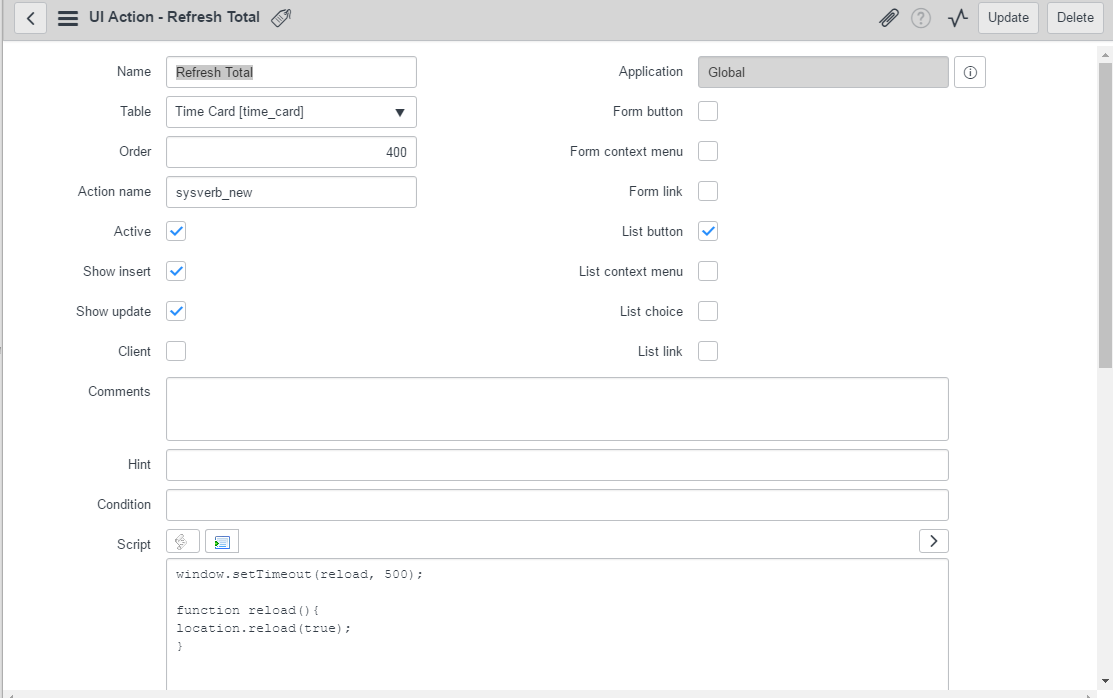
I am trying to get the total column to show the new value after a cell edit in list view on time cards. I'm able to do this with a reload on celledit of the entire page, but if there's a way to script just the reload of the total field itself, this would be much better. Does anyone know of a way to do this?
- Mark as New
- Bookmark
- Subscribe
- Mute
- Subscribe to RSS Feed
- Permalink
- Report Inappropriate Content
09-20-2016 06:52 AM
That works great, and is a good solution for us until there is a dynamic way to update the list. The problem I am running into is that the new UI Action is replacing the new button on the Time Card list. From what I can tell it doesn't like two sysverb_new buttons on the same page and is overwriting the default new button. I see in your screenshot you have both buttons on the list. How did you do that?


- Mark as New
- Bookmark
- Subscribe
- Mute
- Subscribe to RSS Feed
- Permalink
- Report Inappropriate Content
09-20-2016 07:29 AM

- Mark as New
- Bookmark
- Subscribe
- Mute
- Subscribe to RSS Feed
- Permalink
- Report Inappropriate Content
09-20-2016 07:38 AM
That did it! Thanks Jeff