- Mark as New
- Bookmark
- Subscribe
- Mute
- Subscribe to RSS Feed
- Permalink
- Report Inappropriate Content
11-06-2018 10:29 AM
We had a workflow that had approvals. A business rule caused a error and the workflow finished skipping the creation of the task and setting the RITM to closed Incomplete. Is there a way to restart the workflow?
Solved! Go to Solution.
- Mark as New
- Bookmark
- Subscribe
- Mute
- Subscribe to RSS Feed
- Permalink
- Report Inappropriate Content
11-06-2018 12:18 PM
I was looking though some code I help someone else if about a UI Action that would reopen tasks and was able to figure our I could just run this in the backgroud scrip.
var gr = new GlideRecord('sc_req_item');
gr.addQuery('sys_id', 'IN', 'fd4aa2e20f6d6304fe2342bce1050eed,d286161e0fe52304fe2342bce1050eba,db46121e0fe52304fe2342bce1050e56,2d1656da0fe52304fe2342bce1050ea3');
gr.query();
while (gr.next()){
new Workflow().restartWorkflow(gr, true);
gr.state = "1";
gr.stage = "fulfillment";
gr.active = true;
gr.update();
}
- Mark as New
- Bookmark
- Subscribe
- Mute
- Subscribe to RSS Feed
- Permalink
- Report Inappropriate Content
11-06-2018 10:36 AM
I had to setup a way to do this in Change, so maybe you can work with this (I'm not aware of an OOTB/easy way to do this).
UI Action:
Name: Reset Change
Action name: reset_chg
Client: true
OnClick: runClientCode()
Script:
function runClientCode(){
  if(!confirm("Performing this action will reset the associated workflow including all approvals. Are you sure you want to continue?")){
  return false;  //Abort submission
  }
  //Call the UI Action and skip the 'onclick' function
  gsftSubmit(null, g_form.getFormElement(), 'reset_chg'); //MUST call the 'Action name' set in this UI Action
}


//Code that runs without 'onclick'
//Ensure call to server-side function with no browser errors
if(typeof window == 'undefined')
  runBusRuleCode();


//Server-side function
function runBusRuleCode(){
	current.work_notes = 'Change Reset';
	current.approval = 'Reset';
	current.update();
	action.setRedirectURL(current);
}
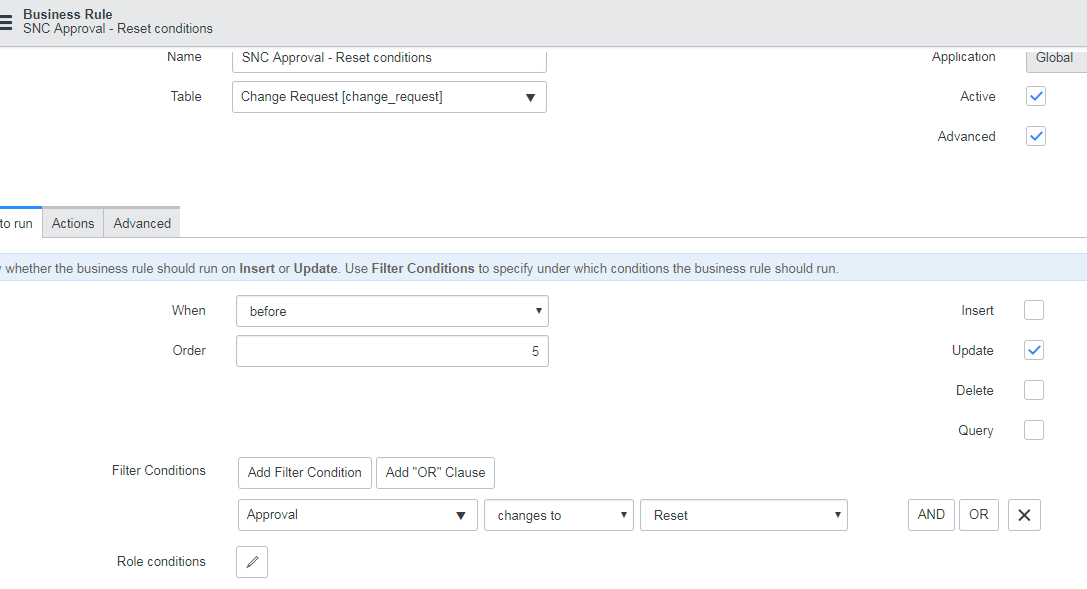
There is a OOTB BR called "SNC Approval - Reset conditions" that I updated to be triggered due to the UI Action being used:

Script from there:
// these are the conditions under which the change request approvals need to be canceled and reset
// steps to activate
// 1. enable this business rule
// 2. add some comments so the reset will be noted in the approval history
// 3. uncomment the code for restart or reset based on your requirements
// 4. define the reset condition in checkResetConditions function below
// 5. you must set doReset once you capture the change(s) you are interested in

var comment = 'Approval reset by ' + gs.getUserDisplayName(); //written to the approval_history
if (checkResetConditions()) {
   // create a global variable lock on the current record
   // this will prevent triggering a second reset while the first reset is still in progress
   // lock will be release in a late running business rule called 'Workflow Release Lock'
   if (typeof GlideRecordLock != 'undefined')
      chg_wf_lock = GlideRecordLock(current);
   else
      chg_wf_lock = new Packages.com.glide.script.RecordLock(current);
   chg_wf_lock.setSpinWait(50); //wait for lock
   if (chg_wf_lock.get()) {
      gs.print('SNC Approval conditions business rule is locking the ' + current.getDisplayValue() + ' during the workflow reset');

      // The following options are available for resetting the approvals:
      //
      // 1. Mark all existing approvals for the change as 'cancelled' and restart the workflow to create new approvals
      new WorkflowApprovalUtils().cancelAll(current, comment);
      new Workflow().restartWorkflow(current);
      //
      // 2. Delete all of the existing approvals for the change and restart the workflow to create new approvals
      // new WorkflowApprovalUtils().reset(current, comment);
      // gs.addInfoMessage('Workflow has been reset since key fields have been modified');
      //
      // 3. Leave the approvals for the change in their current state and restart the workflow.
      // (so that any new approvals that are required will be created)
      // if (comment)
      //    current.setDisplayValue('approval_history', comment);
      //    new Workflow().restartWorkflow(current, true);
      //

   }

   //Use this section to reset any necessary information on the Change request
   current.state = -5;
	current.u_cab_approver = '';
	current.u_cab_approval_date = '';
	current.work_notes = 'Change approvals and workflow reset by ' + gs.getUserDisplayName();
   current.approval = 'not requested';

   //Use this section to reset any necessary information on any associated Change tasks
   var tsk = new GlideRecord('change_task');
   tsk.addQuery('change_request', current.sys_id);
   tsk.query();
   while(tsk.next()){
      tsk.work_notes = 'Change request workflow reset.';
      tsk.update();
   }
   gs.addInfoMessage('Change approvals and workflow reset for ' + current.number + '.');
}

function checkResetConditions() {
   var doReset = false; //default to no reset
   //add reset conditions here such as:
   //if (current.assigned_to.changes())
   doReset = true; //enable the reset

   return doReset;
}- Mark as New
- Bookmark
- Subscribe
- Mute
- Subscribe to RSS Feed
- Permalink
- Report Inappropriate Content
11-06-2018 12:18 PM
I was looking though some code I help someone else if about a UI Action that would reopen tasks and was able to figure our I could just run this in the backgroud scrip.
var gr = new GlideRecord('sc_req_item');
gr.addQuery('sys_id', 'IN', 'fd4aa2e20f6d6304fe2342bce1050eed,d286161e0fe52304fe2342bce1050eba,db46121e0fe52304fe2342bce1050e56,2d1656da0fe52304fe2342bce1050ea3');
gr.query();
while (gr.next()){
new Workflow().restartWorkflow(gr, true);
gr.state = "1";
gr.stage = "fulfillment";
gr.active = true;
gr.update();
}
- Mark as New
- Bookmark
- Subscribe
- Mute
- Subscribe to RSS Feed
- Permalink
- Report Inappropriate Content
11-03-2020 05:07 AM
Hey,
what all sys_id's you are considsering for addQuery? I'm facing the same issue and want to restart the workflow
- Mark as New
- Bookmark
- Subscribe
- Mute
- Subscribe to RSS Feed
- Permalink
- Report Inappropriate Content
11-03-2020 08:43 AM
Its been awhile since I posted this but based on the table I have in the glide record. I would say that the sys_id are of the Request items I wanted to restart the workflow for. This was just run in the scripts background to fix the specific RITMs.