Restrict views based on role.

- Mark as New
- Bookmark
- Subscribe
- Mute
- Subscribe to RSS Feed
- Permalink
- Report Inappropriate Content
10-14-2020 01:33 AM
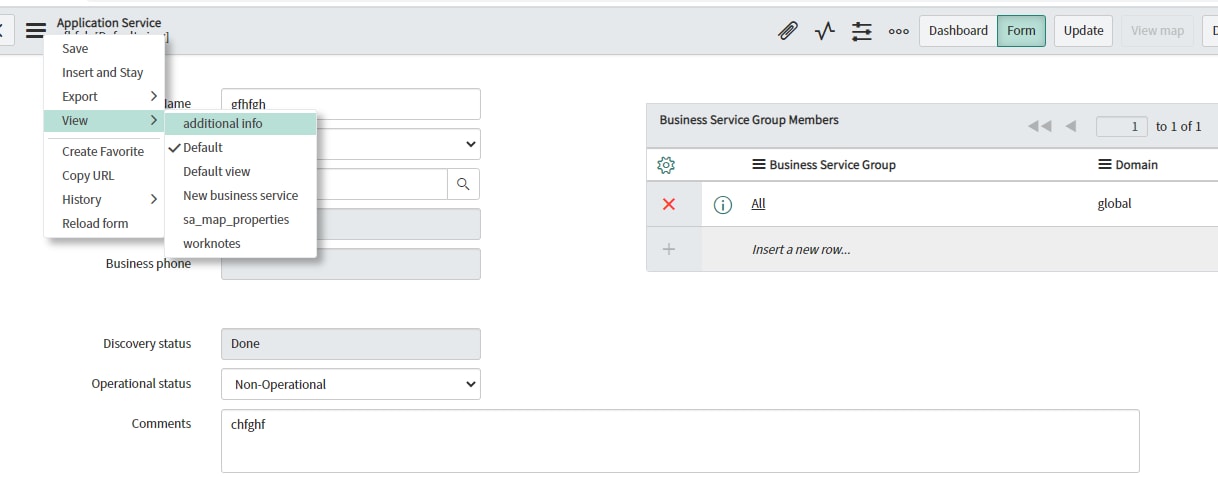
I had a requirement, based on roles the for views should be restricted. My requirement is if a user as 'itil' role, then he only 'additional info' view should be visible. Check below image.

I tried creating view rules with below code. But its not working. Please your inputs are appreciated.
(function overrideView(view, is_list) {
// Add your code here
if(gs.hasRole('itil')){
answer='additional_info';
}
else
answer = null; // set the new view to answer
})(view, is_list);
- Labels:
-
Scripting and Coding


- Mark as New
- Bookmark
- Subscribe
- Mute
- Subscribe to RSS Feed
- Permalink
- Report Inappropriate Content
10-14-2020 07:06 AM
you need to show what you have made, which is not working
- Mark as New
- Bookmark
- Subscribe
- Mute
- Subscribe to RSS Feed
- Permalink
- Report Inappropriate Content
10-14-2020 07:44 AM


- Mark as New
- Bookmark
- Subscribe
- Mute
- Subscribe to RSS Feed
- Permalink
- Report Inappropriate Content
10-14-2020 08:00 AM
Hi,
Your end users should be able allowed to change views
Secondly, the else part in your scripts returning 'view', you don't have a view by that name, return a proper view there
Remove the Else if
- Mark as New
- Bookmark
- Subscribe
- Mute
- Subscribe to RSS Feed
- Permalink
- Report Inappropriate Content
10-14-2020 09:21 AM
Tried below code, still no Luck!!
(function overrideView(view, is_list) {
//Add your code here
var itilrole = gs.hasRole("itil");
var appserviceadminrole = gs.hasRole("app_service_admin");
if(itilrole && !appserviceadminrole)
answer = "additional_info";
else
answer = "default";
})(view, is_list);
- Mark as New
- Bookmark
- Subscribe
- Mute
- Subscribe to RSS Feed
- Permalink
- Report Inappropriate Content
10-14-2020 09:28 AM
After using above code now am able to see the views but can't select. only 'default' view i can select.