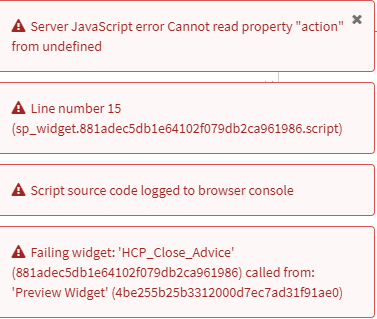
Server Javascript error Cannot read property “action” from undefined

- Mark as New
- Bookmark
- Subscribe
- Mute
- Subscribe to RSS Feed
- Permalink
- Report Inappropriate Content
02-11-2021 06:20 AM
Hey,
I created a little widget where I have a Select Box and a button. If I click the button the selected record should be updated.
Unfortunately I always get four error messages when the page is loading.

I'm working in my own Scoped Application but the table is also in this application.
HTML Template:
<div class="panel-body">
	<div>
		<b>${Ticket}: </b>
      <select style="width:300px" id='ticket' type='String' class="form-control" ng-model="c.data.tickets">
        <option ng-repeat="ticket in c.data.tickets" value="{{ticket}}">{{ticket}}</option>
      </select>
  		<button style="margin-top:10px" class="btn btn-primary rounded m-l-lg padder-xl" ng-click="c.uiAction('close')">
        	${Close Ticket}
      </button>
  </div>
</div>
Client Script:
function() {
  var c = this;
  c.uiAction = function(action){
		c.data.action = action;
 		c.data.training = document.getElementById('ticket').value;
 		c.server.update().then(function() {
 		c.data.action = undefined;
 		})
 }
}
Server Script:
(function() {
  /* populate the 'data' object */
  /* e.g., data.table = $sp.getValue('table'); */
	data.tickets = [];

	var gr = new GlideRecord('x_ntt47_human_care_medical_advice');
		gr.addQuery('state', '1');
		var grOr = gr.addQuery('patient', gs.getUserID());
		grOr.addOrCondition('attending_doctor', gs.getUserID());
		gr.query();
		while(gr.next()){
			data.tickets.push(gr.number.getDisplayValue());
		}

	if (input.action == 'close') {
		var gr2 = new GlideRecord('x_ntt47_human_care_medical_advice');
		gr2.addQuery('number', input.ticket);
		gr2.query();
		while(gr2.next()){
			gr2.state = '2';
			gr2.update();
			gs.addInfoMessage('Closed');
		}
	}
})();
- Mark as New
- Bookmark
- Subscribe
- Mute
- Subscribe to RSS Feed
- Permalink
- Report Inappropriate Content
02-11-2021 06:28 AM
Add data.action = ''; in server code just below ticket and try.
If the above doesn't work then hard code the action in client side and try
function() {
  var c = this;
  c.uiAction = function(){
		c.data.action = 'close';
 		c.data.training = document.getElementById('ticket').value;
 		c.server.update().then(function() {
 		c.data.action = '';
 		})
 }
}
- Mark as New
- Bookmark
- Subscribe
- Mute
- Subscribe to RSS Feed
- Permalink
- Report Inappropriate Content
02-11-2021 06:34 AM
Doesn't work. I get still the error messages.
- Mark as New
- Bookmark
- Subscribe
- Mute
- Subscribe to RSS Feed
- Permalink
- Report Inappropriate Content
02-11-2021 06:38 AM
You also need to change the HTML
<button style="margin-top:10px" class="btn btn-primary rounded m-l-lg padder-xl" ng-click="c.uiAction()">
Check this link also
https://serviceportal.io/communicating-between-the-client-script-and-the-server-script-of-a-widget/
- Mark as New
- Bookmark
- Subscribe
- Mute
- Subscribe to RSS Feed
- Permalink
- Report Inappropriate Content
02-11-2021 06:42 AM
Still no change