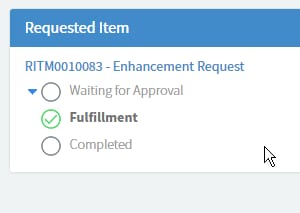
Service Portal displaying Requested Item

- Mark as New
- Bookmark
- Subscribe
- Mute
- Subscribe to RSS Feed
- Permalink
- Report Inappropriate Content
08-25-2016 12:33 AM
Hi all,
Trying to make it a bit easier for navigation between REQ/RITM for the end users via the Service Portal.
Our users seem to have some dificulty finding their RITM details when they head into a REQ. so I would like to edit the requested Items widget that displays this info.
How it is by default:

How I would like it: (edited with Chromes Inspect feature)

my javascript is non existent (looking to work on it I swear), so not sure where I should be making the changes? Below is the server script (default Requested Items widget). I have created a copy of the widget.
// populate the 'data' variable provided by caller
(function() {
var gr = new GlideRecord("sc_req_item"); // does ACL checking for us
gr.addQuery("request", $sp.getParameter("sys_id"));
options.secondary_fields = options.secondary_fields || "";
options.secondary_fields = options.secondary_fields.split(",");
if (options.order_direction == "asc")
gr.orderBy(options.order_by);
else
gr.orderByDesc(options.order_by);
if (options.maximum_entries > 0)
gr.setLimit(options.maximum_entries);
gr.query();
data.actions = [];
data.list = [];
while (gr.next()) {
if (!gr.canRead())
continue;
if (gr.getRowCount() == 1)
data.conversation_title = gr.request.getDisplayValue() + " - " + gr.getValue("short_description");
var record = {};
record.sys_id = gr.sys_id.getDisplayValue();
if (options.image_field) {
record.image_field = gr.getDisplayValue(options.image_field);
if (!record.image_field)
record.image_field = "/noimage.pngx";
}
if (options.display_field)
record.display_field = gr.getDisplayValue(options.display_field);
record.secondary_fields = [];
options.secondary_fields.forEach(function(f) {
record.secondary_fields.push(getField(gr, f));
});
if (options.sp_page_dv)
record.url = "?id="+options.sp_page_dv+"&table="+options.table+"&sys_id="+record.sys_id+"&view=sp";
else
record.url = "";
record.stage = gr.getValue("stage");
// get appropriate Stage choices for this requested item
var cl = new GlideChoiceList();
GlideController.putGlobal("answer", cl);
GlideController.putGlobal("current", gr);
sc_req_item_stageGetChoices();
record.cl = JSON.parse(cl.toJSON());
data.list.push(record);
}
if (gr.getRowCount() > 1)
data.conversation_title = gr.request.getDisplayValue() + " - " + gr.getRowCount() + " items";
function getField(gr, name) {
var f = {};
f.display_value = gr.getDisplayValue(name);
f.value = gr.getValue(name);
var ge = gr.getElement(name);
f.type = ge.getED().getInternalType()
f.label = ge.getLabel();
return f;
}
})();

- Mark as New
- Bookmark
- Subscribe
- Mute
- Subscribe to RSS Feed
- Permalink
- Report Inappropriate Content
10-10-2017 03:54 AM
HI Brain,
Requested Items widget is on sc_request page and not on ticket page. Better you change the RITM link in My Requests menu point to sc_request page.

- Mark as New
- Bookmark
- Subscribe
- Mute
- Subscribe to RSS Feed
- Permalink
- Report Inappropriate Content
10-10-2017 12:16 PM
At the time we where not giving them the sc_request everything was directly to the Requested item or incident. We have since reverted it back to show the Request.

- Mark as New
- Bookmark
- Subscribe
- Mute
- Subscribe to RSS Feed
- Permalink
- Report Inappropriate Content
01-08-2018 01:02 PM
I don't know what I'm doing wrong here, but I can't get this widget to even show up. I've created the widget based on all of the input given here and nada. If anyone can export a working version of the widget (or put it on Share) I'd appreciate it!
I copied the 'Requested Items' widget.
Replaced the HTML with:
<div ng-if="item.cl.length > 0" ng-show="!item.expand" class="requested-items-flex-container">
<div class="flex-item" ng-click="toggle($event, item)"><img src="images/filter_hide16.gifx" /></div>
<div class="flex-item">
<span ng-repeat="stage in item.cl">
<span ng-if="stage.value == item.stage && item.active=='true' && stage.value !='request_approved'">
<img src="/images/heisenberg_icons/stage_icons/icon-arrow-right.png" data-toggle="tooltip" data-placement="top" ng-attr-title="{{stage.label}}" />
</span>
<span ng-if="stage.value !='request_approved' && (indexByKeyValue(item.cl,'value',item.stage) > $index || item.active=='false')">
<img src="/images/sp-icon-check-circle.png" data-toggle="tooltip" data-placement="top" ng-attr-title="{{stage.label}}" />
</span>
<span ng-if="indexByKeyValue(item.cl,'value',item.stage) < $index && indexByKeyValue(item.cl,'value',item.stage) && item.active=='false'">
<img src="/images/sp-icon-empty-circle.png" data-toggle="tooltip" data-placement="top" ng-attr-title="{{stage.label}}" />
</span>
</span>
</div>
</div>
<div ng-if="item.cl.length > 0" ng-show="item.expand" class="requested-items-flex-container">
<div class="flex-item" ng-click="toggle($event, item)"><img src="images/filter_reveal16.gifx" /></div>
<div class="flex-item">
<div ng-repeat="stage in item.cl">
<div ng-if="stage.value !='request_approved'">
<div ng-if="stage.value == item.stage && item.active=='true'" class="stage-on">
<img src="/images/heisenberg_icons/stage_icons/icon-arrow-right.png" />
{{stage.label}}
</div>
<div ng-if="indexByKeyValue(item.cl,'value',item.stage) > $index || item.active=='false'" class="stage-on">
<img src="/images/sp-icon-check-circle.png" />
{{stage.label}}
</div>
<div ng-if="indexByKeyValue(item.cl,'value',item.stage) < $index && indexByKeyValue(item.cl,'value',item.stage) && item.active=='true'" class="stage-off text-muted">
{{stage.label}}
</div>
<div>
</div>
</div>
</div>
Updated the Client Script to:
function requestedItemsController($scope, $rootScope, $interpolate, $window) {
$scope.indexByKeyValue = function(arraytosearch, key, valuetosearch) {
for (var i = 0; i < arraytosearch.length; i++) {
if (arraytosearch[i][key] == valuetosearch) {
return i;
}
}
return null;
}
$scope.$watch("data.conversation_title", function() {
$rootScope.$broadcast('sp.conversation_title.changed', $scope.data.conversation_title);
})
$scope.onClick = function($event, item, url, action) {
$event.stopPropagation();
$event.preventDefault();
if (url) {
var link = $interpolate(url)(item);
$window.location = link;
} else {
var eventObj = {};
eventObj.url = url;
eventObj.table = $scope.data.table;
eventObj.record = item;
eventObj.rectangle_id = $scope.data.sys_id;
eventObj.action = action;
$rootScope.$broadcast('$sp.list.click', eventObj);
}
}
$scope.toggle = function($event, item) {
item.expand = !item.expand;
}
if ($scope.data.list.length == 1)
$scope.data.list[0].expand = true;
}
And added this to line 48 of the Server Script:
record.active = gr.active.toString();
As well as valuing the JSON as noted in the widget instance.
No errors, but the widget just doesn't show up on the page.
EDIT: I moved the widget around to try to get something to happen and finally got this, though I'm not sure how to resolve it:

- Mark as New
- Bookmark
- Subscribe
- Mute
- Subscribe to RSS Feed
- Permalink
- Report Inappropriate Content
01-09-2018 07:46 AM
export the complete widget xml and share here. I will put it on sc_request page and check the issue.
- Mark as New
- Bookmark
- Subscribe
- Mute
- Subscribe to RSS Feed
- Permalink
- Report Inappropriate Content
01-09-2018 07:53 AM