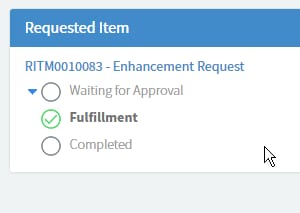
Service Portal displaying Requested Item

- Mark as New
- Bookmark
- Subscribe
- Mute
- Subscribe to RSS Feed
- Permalink
- Report Inappropriate Content
08-25-2016 12:33 AM
Hi all,
Trying to make it a bit easier for navigation between REQ/RITM for the end users via the Service Portal.
Our users seem to have some dificulty finding their RITM details when they head into a REQ. so I would like to edit the requested Items widget that displays this info.
How it is by default:

How I would like it: (edited with Chromes Inspect feature)

my javascript is non existent (looking to work on it I swear), so not sure where I should be making the changes? Below is the server script (default Requested Items widget). I have created a copy of the widget.
// populate the 'data' variable provided by caller
(function() {
var gr = new GlideRecord("sc_req_item"); // does ACL checking for us
gr.addQuery("request", $sp.getParameter("sys_id"));
options.secondary_fields = options.secondary_fields || "";
options.secondary_fields = options.secondary_fields.split(",");
if (options.order_direction == "asc")
gr.orderBy(options.order_by);
else
gr.orderByDesc(options.order_by);
if (options.maximum_entries > 0)
gr.setLimit(options.maximum_entries);
gr.query();
data.actions = [];
data.list = [];
while (gr.next()) {
if (!gr.canRead())
continue;
if (gr.getRowCount() == 1)
data.conversation_title = gr.request.getDisplayValue() + " - " + gr.getValue("short_description");
var record = {};
record.sys_id = gr.sys_id.getDisplayValue();
if (options.image_field) {
record.image_field = gr.getDisplayValue(options.image_field);
if (!record.image_field)
record.image_field = "/noimage.pngx";
}
if (options.display_field)
record.display_field = gr.getDisplayValue(options.display_field);
record.secondary_fields = [];
options.secondary_fields.forEach(function(f) {
record.secondary_fields.push(getField(gr, f));
});
if (options.sp_page_dv)
record.url = "?id="+options.sp_page_dv+"&table="+options.table+"&sys_id="+record.sys_id+"&view=sp";
else
record.url = "";
record.stage = gr.getValue("stage");
// get appropriate Stage choices for this requested item
var cl = new GlideChoiceList();
GlideController.putGlobal("answer", cl);
GlideController.putGlobal("current", gr);
sc_req_item_stageGetChoices();
record.cl = JSON.parse(cl.toJSON());
data.list.push(record);
}
if (gr.getRowCount() > 1)
data.conversation_title = gr.request.getDisplayValue() + " - " + gr.getRowCount() + " items";
function getField(gr, name) {
var f = {};
f.display_value = gr.getDisplayValue(name);
f.value = gr.getValue(name);
var ge = gr.getElement(name);
f.type = ge.getED().getInternalType()
f.label = ge.getLabel();
return f;
}
})();
- Mark as New
- Bookmark
- Subscribe
- Mute
- Subscribe to RSS Feed
- Permalink
- Report Inappropriate Content
04-11-2018 02:01 PM
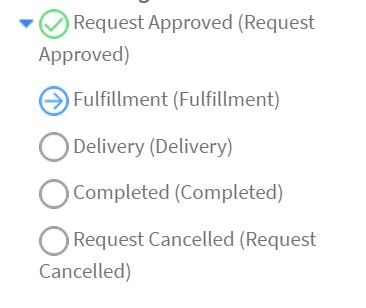
Hello - I am struggling trying to get this Requested Items widget updated to remove the first 'Request Approved' stage and also use the checkmarks on completed stages and the blue arrow on current stage. I am experiencing a similar issue that you were Shane, it is not even showing on the sc_request page.
I was hoping someone that has found a way to get a cloned version of the Requested Items widget working so that it does not show the initial Request Approved stage (off the Request level) and also shows the checkmark for completed stages, arrow for current stage, and empty circle for the stages not in progress or completed could please share their code.
Thanks!!

- Mark as New
- Bookmark
- Subscribe
- Mute
- Subscribe to RSS Feed
- Permalink
- Report Inappropriate Content
12-27-2018 01:48 AM
Here you need to follow few steps for getting the request item stages
1) Clone the widget in which you need to add stage for example if you want to add request item stage in approval record widget of approval page . Clone the approval record widget. call the OOB widget for request item workflow stages inside the cloned widget and display the result in html.
2) add the following lines in code
Server side :
var stageWidgetOptions={
// this is the request item sys id we are passing change it accordingly if you are changing in different widget
req_item_id: task.getUniqueValue(),
onload_expand_request_item_stages: false // this is boolean value for expanding (true) or collapsing (false) the stage if page is loading
};
data.stageWidget = $sp.getWidget("request_item_workflow_stages",stageWidgetOptions);
HTML:
<div ng-if="data.stageWidget">
Stages
</div>
<div ng-if="data.stageWidget">
<sp-widget widget="data.stageWidget" />
</div>
Please mark it as correct or helpful if its working for you.
I can able to get something like this in approval page as shown in the image below

Thanks,
Archana N

- Mark as New
- Bookmark
- Subscribe
- Mute
- Subscribe to RSS Feed
- Permalink
- Report Inappropriate Content
05-14-2019 11:24 AM