- Mark as New
- Bookmark
- Subscribe
- Mute
- Subscribe to RSS Feed
- Permalink
- Report Inappropriate Content
01-17-2020 06:16 AM
I am frustrated with a script. I want to show hide a field based on a checkbox. I thought I had it working then it does not.(I'm new to some of this part of SNow)
What I have is a form with 3 checkboxes with fields under them that I need to do the same thing to.
one example is
Field: Notification type (checkbox)
Field Notification_info type(string)
I have tried a client script, a UI Policy and nothing seems to work.
Logic i'm using:
when the form loads check
if the Notification Checkbox is checked,
then show Notification Info field,
else
hide the notification field.
The code I'm using:
function onCondition() {
var notifications = g_form.getValue('u_cr_notifications_t_f');
if(notifications == true){
	g_form.setDisplay('u_notification_info', true);
} else {
	g_form.setDisplay('u_notofication_info', false);
}

}
I believe the code is good, as it's just a simple If statement based on the value of notifications which if it's checked should be true and if unchecked should be false.
I don't know which is better a UI policy, a client script, a business rule (I doubt a business rule).
Could someone offer some sound advice as to what I can do to get this working.
Solved! Go to Solution.
- Labels:
-
Scripting and Coding
- Mark as New
- Bookmark
- Subscribe
- Mute
- Subscribe to RSS Feed
- Permalink
- Report Inappropriate Content
01-17-2020 06:44 AM
Hi Steve,
I think you should try it with UI Policy. No need to write script.
First set "when to run" condition as: Notification --> is --> true
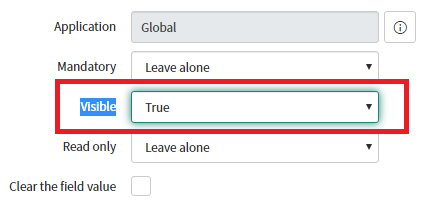
Then in "UI Policy Action" select the field to make it visible as: Field name=Notification info
and "

Please check it with UI Policy and let me know whether it is working or not.
--
Regards,
Onkar
- Mark as New
- Bookmark
- Subscribe
- Mute
- Subscribe to RSS Feed
- Permalink
- Report Inappropriate Content
01-17-2020 06:39 AM
Hello,
Is "u_notification_info" a mandatory field ?
If yes ,
then make it non-mandatory before hiding it .
function onCondition() {
var notifications = g_form.getValue('u_cr_notifications_t_f');
if(notifications == true){
        g_form.setMandatory('u_notofication_info', false);
	g_form.setDisplay('u_notification_info', true);
} else {
        g_form.setMandatory('u_notofication_info', false);
	g_form.setDisplay('u_notofication_info', false);
}

}
- Mark as New
- Bookmark
- Subscribe
- Mute
- Subscribe to RSS Feed
- Permalink
- Report Inappropriate Content
01-17-2020 06:44 AM
Hi Steve,
I think you should try it with UI Policy. No need to write script.
First set "when to run" condition as: Notification --> is --> true
Then in "UI Policy Action" select the field to make it visible as: Field name=Notification info
and "
Please check it with UI Policy and let me know whether it is working or not.
--
Regards,
Onkar
- Mark as New
- Bookmark
- Subscribe
- Mute
- Subscribe to RSS Feed
- Permalink
- Report Inappropriate Content
01-17-2020 06:52 AM
Where can I find an example on how to do that?
- Mark as New
- Bookmark
- Subscribe
- Mute
- Subscribe to RSS Feed
- Permalink
- Report Inappropriate Content
01-17-2020 06:56 AM
I have edited that reply. Please check.
- Mark as New
- Bookmark
- Subscribe
- Mute
- Subscribe to RSS Feed
- Permalink
- Report Inappropriate Content
01-17-2020 06:59 AM
Onkar, that was the trick, once I read through the form on what it was doing much easier to do that on this field.
Many thanks
Stephen