- Mark as New
- Bookmark
- Subscribe
- Mute
- Subscribe to RSS Feed
- Permalink
- Report Inappropriate Content
03-09-2021 02:37 AM
Hey I have a very important problem:
I have a table which was created by extending the task table called x_582999_my_tasks. This table has the fields my_tasks_start and my_tasks_end.
As well I added the Resource Plan table to the related list of my new table. Now I want to auto-populate the start_date and end_date field of the resource plan, I can create in the related list, with the gives dates of my related task.
How can I do this?
I´m new in Service Now Scripting so it would be very helpful if you may help me with full scripts and the place I need to insert them.
Thank you so much!
Solved! Go to Solution.
- Labels:
-
Instance Configuration
-
Integrations


- Mark as New
- Bookmark
- Subscribe
- Mute
- Subscribe to RSS Feed
- Permalink
- Report Inappropriate Content
03-09-2021 02:48 AM
Hi,
So on the table x_582999_my_tasks you have related list of Resource plan
I assume Resource plan has a reference field to your Custom table (x_582999_my_tasks)
So you can use this logic to set the value on Resource plan based on Start and end
Display Business rule on resource plan table
g_scratchpad.start = current.<field_which_refers_customTable>.my_tasks_start;

g_scratchpad.end = current.<field_which_refers_customTable>.my_tasks_end;
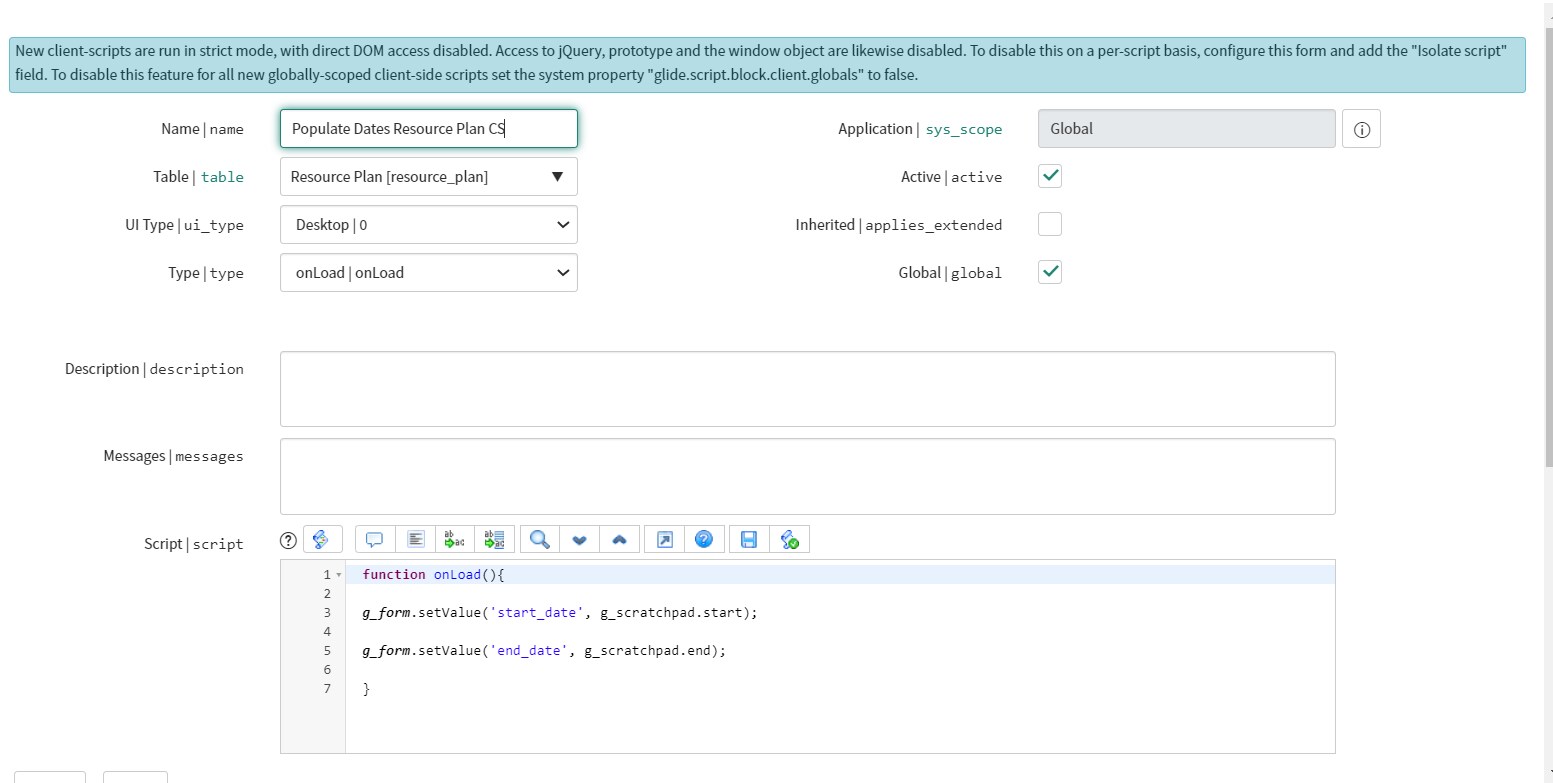
Client Script: on the resource plan table
function onLoad(){

g_form.setValue('start_date', g_scratchpad.start);

g_form.setValue('end_date', g_scratchpad.end);

}
Regards
Ankur
Ankur
✨ Certified Technical Architect || ✨ 10x ServiceNow MVP || ✨ ServiceNow Community Leader
- Mark as New
- Bookmark
- Subscribe
- Mute
- Subscribe to RSS Feed
- Permalink
- Report Inappropriate Content
03-09-2021 11:10 PM
Hi,
what came in the info message for the dates?
please share that screenshot
Are you using the correct scratchpad variables in client script
Regards
Ankur
Ankur
✨ Certified Technical Architect || ✨ 10x ServiceNow MVP || ✨ ServiceNow Community Leader
- Mark as New
- Bookmark
- Subscribe
- Mute
- Subscribe to RSS Feed
- Permalink
- Report Inappropriate Content
03-09-2021 11:21 PM

- Mark as New
- Bookmark
- Subscribe
- Mute
- Subscribe to RSS Feed
- Permalink
- Report Inappropriate Content
03-09-2021 11:24 PM
Hi,
I could see there is nothing in that scratchpad variable hence it is coming as undefined
so it means
1) you have used incorrect scratchpad variable
OR
2) the dates are empty
please share complete BR and client script here
Regards
Ankur
Ankur
✨ Certified Technical Architect || ✨ 10x ServiceNow MVP || ✨ ServiceNow Community Leader
- Mark as New
- Bookmark
- Subscribe
- Mute
- Subscribe to RSS Feed
- Permalink
- Report Inappropriate Content
03-09-2021 11:48 PM


- Mark as New
- Bookmark
- Subscribe
- Mute
- Subscribe to RSS Feed
- Permalink
- Report Inappropriate Content
03-09-2021 11:49 PM