- Mark as New
- Bookmark
- Subscribe
- Mute
- Subscribe to RSS Feed
- Permalink
- Report Inappropriate Content
07-06-2017 03:05 PM
Hi All,
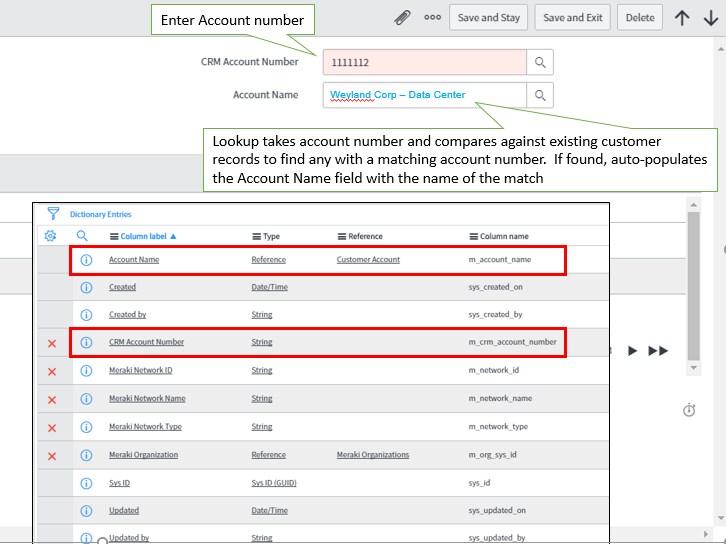
I would like to see if any of you can help with a challenge I am working through. I have a form where I am attempting to align a user supplied account number from one table, with the existing customer account record from another table and I am having trouble sorting out the best way to do this.
To give you some context, this is part of an import set which is retrieved on a scheduled basis and then a provisioning engineer needs to reconcile customer sites with their hardware using the account number supplied from the provisioning process.
The components are as follows:
Primary Table:
- m_network
- Fields:
- CRM Account Number (m_crm_account_number)
- Account Name - Reference - Customer Account
- Fields:
Reference Table:
- Customer Account (u_customer_account)
- Fields
- u_customer_account.u_customer_account_number
- u_customer_account.u_customer_account_name
- Fields

The idea is this:
- The user enters the CRM Account Number in the field
- onChange a lookup takes place which compares the "CRM Account Number" value with all known values in the existing Customer Accounts Table
- If there is a match, return the Name of the matching account and populate the Account Name form field
- If there is no match post an error
I am assuming this is best done in a server side script however I have tried various permutations of script includes, business rules and client scripts yet I cannot seem to get the results I am looking for. Either I only get List Lookup selections, "incorrect reference" messages or nothing...
Here are some samples of a few of the attempts just to see if I am on the right track or totally off the reservation...
Business Rule:
------------------------------------------------------------------------------------------------------------------------
function executeRule(current, previous /*null when async*/) {
// get the corrisponding customer account sys_id
var crmAccount = current.m_crm_account_number;
var custAccount_sys_id = current.m_account_name.u_customer_account_sys_id;
// check to see if a matching customer account exists in this system
var custLookup = new GlideRecord('cmdb');
custLookup.addQuery('u_customer_account_number', custAccount_sys_id);
custLookup.addQuery('u_customer_account_name', custAccount_sys_id);
custLookup.query();
var custAccountName = custLookup.u_customer_account_name;
if (crmAccount == custLookup.u_customer_account_number){
g_form.setValue('m_account_name', custAccountName);
gs.info('Success, the accounts match for CRM Account {0} and Customer Account {1}',crmAccount,custAccountName);
current.setAbortAction(true);
return;
}
return;
})(current, previous);
----------------------------------------------------------------------------------------------------------------------------------
Client Script:
-------------------------------------------------------------------------------------------------------------------------------------------------
function onChange(control, oldValue, newValue, isLoading) {
var crmAccount = g_form.getValue('m_crm_account_number', loadManf);
}
function loadManf(m_crm_account_number) {
if (m_crm_account_number.crmAccount.m_account_name != null)
g_form.setValue('m_account_name',m_crm_account_number.crmAccount.m_account_name);
}
-------------------------------------------------------------------------------------------------------------------------------------------------
Any help is much appreciated!!!
Thank you - DJ
Solved! Go to Solution.


- Mark as New
- Bookmark
- Subscribe
- Mute
- Subscribe to RSS Feed
- Permalink
- Report Inappropriate Content
07-06-2017 03:37 PM
Something like this:
OnChange for the CRM Account number:

And for your script include:

//Göran
- Mark as New
- Bookmark
- Subscribe
- Mute
- Subscribe to RSS Feed
- Permalink
- Report Inappropriate Content
07-07-2017 04:55 AM
Hi SAI,
Yes sorry about that. When I took the screenshot the CRM Account Number field was, in fact, a reference as a test.
Currently the tables and fields are as follows:
Primary Table:
- m_network
- Fields:
- CRM Account Number (m_crm_account_number) - Type: String
- Account Name - Type: Reference -> Customer Account
- Fields:
Reference Table:
- Customer Account (u_customer_account)
- Fields
- u_customer_account.u_customer_account_number - Type: String
- u_customer_account.u_customer_account_name - Type: String
- Fields
Thank you - DJ
- Mark as New
- Bookmark
- Subscribe
- Mute
- Subscribe to RSS Feed
- Permalink
- Report Inappropriate Content
07-07-2017 05:07 AM
Thanks for the responses, Still not getting any results in the "Account Name" field when entering the CRM Account value.. so I need to play with this a bit more. Working through a few small errors. Had to declare the AbstractAjaxProcessor as "global" due, I believe to the fact that this is a scoped application. Not completely sure if that is the source of the error however, no more errors there...
DJ