Widget: parse response from c.server.get

- Mark as New
- Bookmark
- Subscribe
- Mute
- Subscribe to RSS Feed
- Permalink
- Report Inappropriate Content
04-27-2017 10:14 AM
c.parameters = {sys_id: sys_id, action: "getCustomerBySysId"};
c.server.get(c.parameters).then(function(response) {
console.log("customer", response.data.customer);
console.log("name", response.data.customer.name);
console.log("status", response.data.customer.status);
});
This is the Client Script. Each console.log says that this is an object, but they are just Strings in the DB.
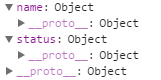
This is the Server Script:
var y = new GlideRecord('x_11111_customers');
y.addQuery('sys_id',input.sys_id);
y.query();
while(y.next())
{
data.customer = y;
}
}
How can I get name and status of a Customer in Client Script side ?
And how also can I get a Reference field (e.g. customer has "Manager" field which is Reference). How in this case I can get "name" from manager field ?
Thanks
- Mark as New
- Bookmark
- Subscribe
- Mute
- Subscribe to RSS Feed
- Permalink
- Report Inappropriate Content
04-28-2017 03:14 AM
This code works for me on Server Script side:
data.customer = {
         name: y.getDisplayValue('name'),
         status: y.getDisplayValue('status')
};
But in this case I need to get each field of Customer object.
That's the question: is there a way to get whole object instead of collecting each field using .getDisplayValue ?
Tomorrow I'll add a new field in the table - it will also be needed to adjust server script in a widget?
Thanks

- Mark as New
- Bookmark
- Subscribe
- Mute
- Subscribe to RSS Feed
- Permalink
- Report Inappropriate Content
04-28-2017 03:40 AM
Hi Ivan,
Not sure why your code is not working. But I have an alternative for your case. You can use glide on client side itself using callback function. Below is the sample for the same.
function() {
/* widget controller */
var c = this;
var sys ='f9e8027bdbb43200f5b27befbf961909';
var y = new GlideRecord('x_11111_customers');
y.addQuery('sys_id',sys);
y.query(function(y){
if(y.next()) {
c.data.customer = y.user_name;
}
});
}
Hope this helps.
Regards
Ujjawal
- Mark as New
- Bookmark
- Subscribe
- Mute
- Subscribe to RSS Feed
- Permalink
- Report Inappropriate Content
04-28-2017 03:55 AM
 This comes from firebug.
I've just copy/pasted your code to me Client Script.
And what means y.user_name; in your example?
- Mark as New
- Bookmark
- Subscribe
- Mute
- Subscribe to RSS Feed
- Permalink
- Report Inappropriate Content
04-28-2017 04:11 AM
replace with this
function() {
/* widget controller */
var c = this;
var sys ='f9e8027bdbb43200f5b27befbf961909';
var y = new GlideRecord('x_11111_customers');
y.addQuery('sys_id',sys);
y.query(function(y){
if(y.next()) {
c.data.customer = y.name;
}
});
}

- Mark as New
- Bookmark
- Subscribe
- Mute
- Subscribe to RSS Feed
- Permalink
- Report Inappropriate Content
05-16-2019 01:36 PM
Did you ever solve this?
I'm working on the same thing and found that client script needs a response variable in the function instantiation - then use that to get the returned value.
Here's my client script (still doing testing in my personal developer instance -- see the red circle in the function(r) then use r.data.variablename to get the value.

Here's the server script that sets the value to return in data.variablename

Please let me know if you have any questions.



