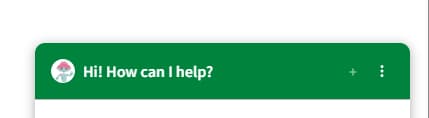
Replace ESS Virtual Agent Icon with ESC CLX Chat Branding

- Mark as New
- Bookmark
- Subscribe
- Mute
- Subscribe to RSS Feed
- Permalink
- Report Inappropriate Content
12-29-2025 09:59 PM
We got a requirement as, the Virtual Agent icon and entry point branding should be updated to ESC CLX Chat so that they can clearly understand that this is the enterprise-standard support chatbot and not the legacy ESS Virtual Agent, ensuring a consistent and modern user experience.
In the attached documents we want ess chat which is existing in ess portal to be changed as clx chat which is in esc portal.
the virtual agent icon in ess portal is configured by a widget but in esc portal it is configured by agent chat configuration.
please help me how to modify ess chat virtual agent icon and entry point branding.


- Mark as New
- Bookmark
- Subscribe
- Mute
- Subscribe to RSS Feed
- Permalink
- Report Inappropriate Content
12-29-2025 10:16 PM - edited 12-29-2025 10:18 PM
check this
How to change the Virtual Agent Icon in the Service Portal widget (sn-va-sp-widget)
also check this
How do I change the Virtual Agent icon
💡 If my response helped, please mark it as correct ✅ and close the thread 🔒— this helps future readers find the solution faster! 🙏
Ankur
✨ Certified Technical Architect || ✨ 10x ServiceNow MVP || ✨ ServiceNow Community Leader
- Mark as New
- Bookmark
- Subscribe
- Mute
- Subscribe to RSS Feed
- Permalink
- Report Inappropriate Content
12-30-2025 07:51 PM
Hope you are doing good.
Did my reply answer your question?
💡 If my response helped, please mark it as correct ✅ and close the thread 🔒— this helps future readers find the solution faster! 🙏
Ankur
✨ Certified Technical Architect || ✨ 10x ServiceNow MVP || ✨ ServiceNow Community Leader

- Mark as New
- Bookmark
- Subscribe
- Mute
- Subscribe to RSS Feed
- Permalink
- Report Inappropriate Content
12-29-2025 10:35 PM
Hi @chand12 ,
Good day!
Please check the Below link for the step by step instruction on the modification of the Chat Icon.
Link - https://servicenowguru.com/service-portal/customize-virtual-agent-chat-button-service-portal/
Thanks,
Afrith Shariff