
- Mark as New
- Bookmark
- Subscribe
- Mute
- Subscribe to RSS Feed
- Permalink
- Report Inappropriate Content
01-25-2022 08:52 AM
hello all,
I am very new to supporting my companies plate form on Quebec.
before the upgrade I build out a few workflows and are published well and running smoothly.
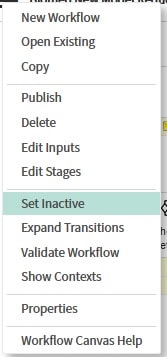
I was tasked to create a new one on Quebec and I hit the "Set inactive" button in the menu.
now i cant find where my build went.
I need help to know if there is a place to recover the build and or what happens to them when that inactive is set.
any help is greatly appreciated!
John
Solved! Go to Solution.
- Mark as New
- Bookmark
- Subscribe
- Mute
- Subscribe to RSS Feed
- Permalink
- Report Inappropriate Content
01-25-2022 09:51 AM
Hi,
When you click on the button "Set Inactive" what ServiceNow does is makes a copy of your Workflow and creates a version of it as checked out by under your Name.
So in order to republish it, Navigate to the module "Workflow Version" as shown below:

Search for your Workflow with Name contains your Workflow Name. For example shown below:

Open the One which has Published = False and checked out under your name. Once you open the record you can click on Show Workflow as shown below:

You will now get your Workflow version and you can publish it again.
Hope this helps. Please mark the answer as correct/helpful based on impact.
Regards,
Shloke


- Mark as New
- Bookmark
- Subscribe
- Mute
- Subscribe to RSS Feed
- Permalink
- Report Inappropriate Content
01-25-2022 09:07 AM



- Mark as New
- Bookmark
- Subscribe
- Mute
- Subscribe to RSS Feed
- Permalink
- Report Inappropriate Content
01-25-2022 09:08 AM
Hi,
Can you show a bigger screenshot to show where is that menu and Set inactive menu is?
-Anurag

- Mark as New
- Bookmark
- Subscribe
- Mute
- Subscribe to RSS Feed
- Permalink
- Report Inappropriate Content
01-25-2022 09:22 AM

- Mark as New
- Bookmark
- Subscribe
- Mute
- Subscribe to RSS Feed
- Permalink
- Report Inappropriate Content
01-25-2022 09:51 AM
Hi,
When you click on the button "Set Inactive" what ServiceNow does is makes a copy of your Workflow and creates a version of it as checked out by under your Name.
So in order to republish it, Navigate to the module "Workflow Version" as shown below:
Search for your Workflow with Name contains your Workflow Name. For example shown below:
Open the One which has Published = False and checked out under your name. Once you open the record you can click on Show Workflow as shown below:
You will now get your Workflow version and you can publish it again.
Hope this helps. Please mark the answer as correct/helpful based on impact.
Regards,
Shloke
