DPR and Version Management Understanding

- Mark as New
- Bookmark
- Subscribe
- Mute
- Subscribe to RSS Feed
- Permalink
- Report Inappropriate Content
09-08-2025 10:40 AM
Hello,
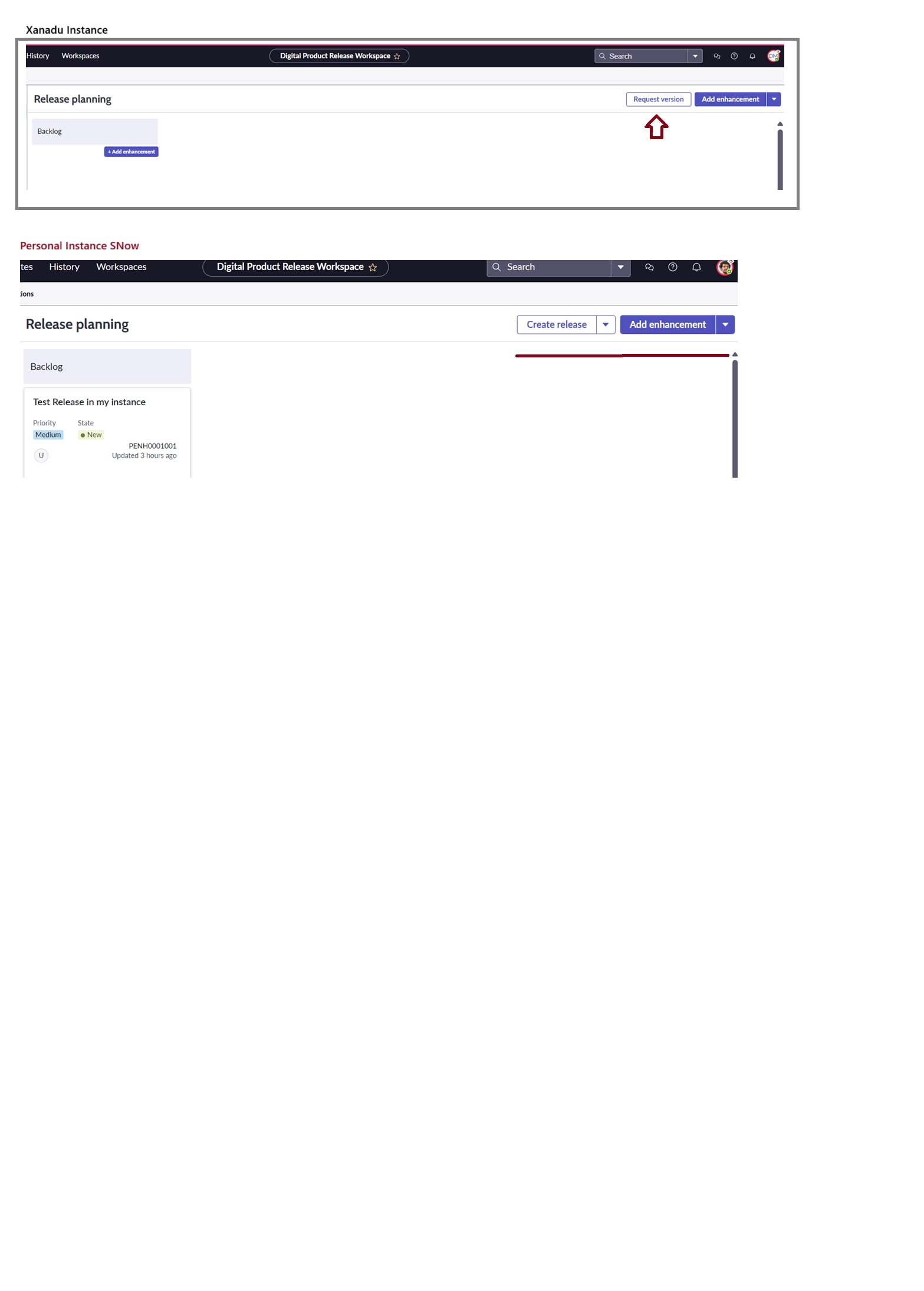
In my personal instance, I installed DPR version with latest version that is applicable for Xanadú, Zurich and Yokohama versions.
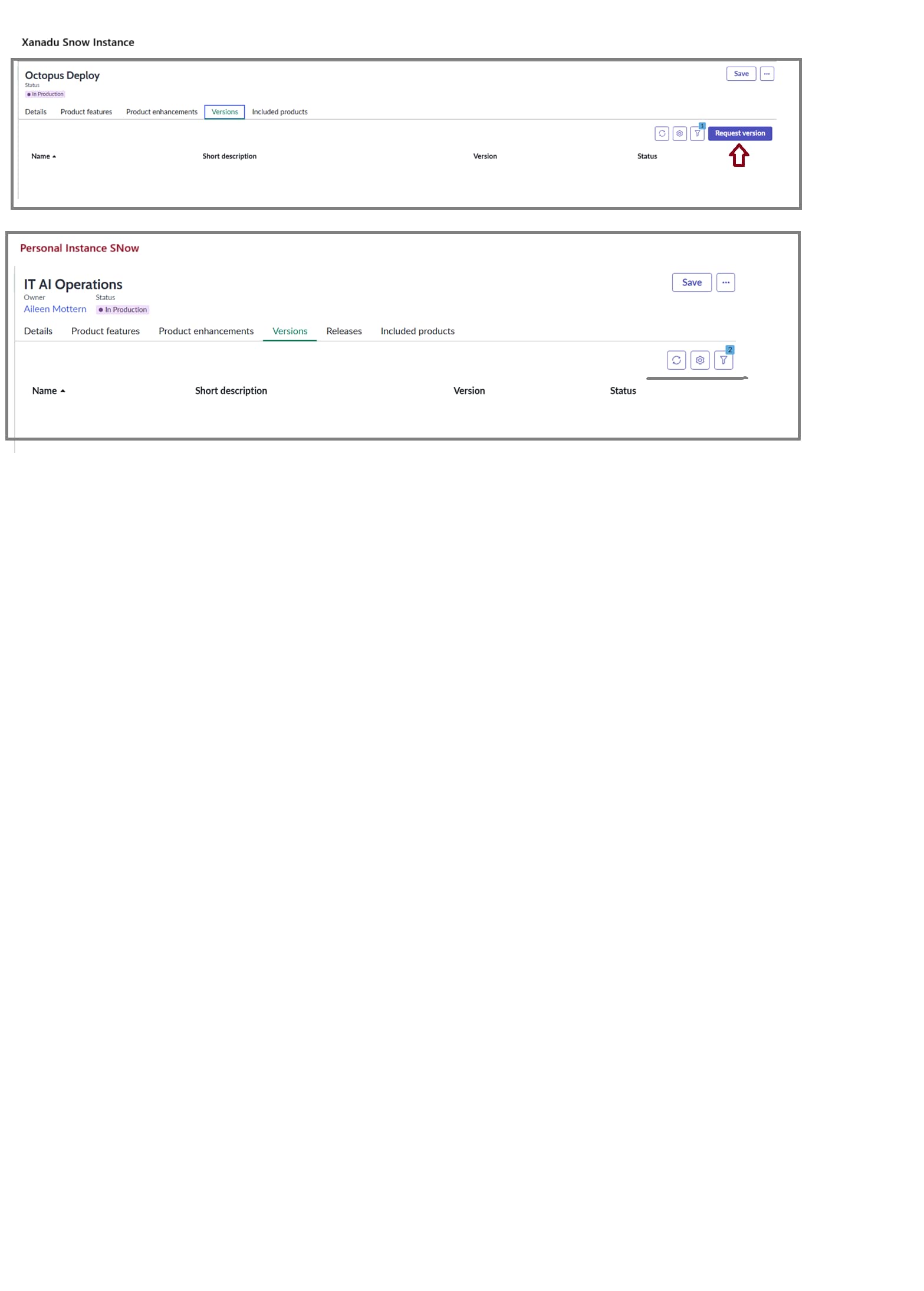
However, I see "Version" option is not available as part of Release Planning option (as previous versions) and It is not available on "Version" tab. Also, I cannot find a way to create a Version for my product enhancements to be included in a Release (as mandatory field)
I am working with user with Product Manager role.
I need your assistance for:
- could you please advise where can I found or configure this option and best practices for its management ?
- Is there any documentation available to understand Version management and relationship with Products ?
- How can I solve this issue? I reinstalled DPR but it is still the same.
Thanks!
#DPR
- Mark as New
- Bookmark
- Subscribe
- Mute
- Subscribe to RSS Feed
- Permalink
- Report Inappropriate Content
01-23-2026 11:06 AM - edited 01-23-2026 11:29 AM
Hey Suryakiran,
You mention cmdb_software_component_model table and I am trying find out the use/purpose of this table in relation to SAM. Unfortunately, the docs page says it is for "industries and use cases", but then only describes how it is auto-populated with the Zurich release from Discovery Maps. Can you help me understand where and how this table is meant to fit into the Software Asset Management flow/schema? How can I take advantage of this data to make my SAM efforts more accurate, efficient, etc.?
Thanks!

- Mark as New
- Bookmark
- Subscribe
- Mute
- Subscribe to RSS Feed
- Permalink
- Report Inappropriate Content
01-23-2026 06:46 PM
Hi @Josh P1 ,
How It Fits in SAM Flow?
1. DISCOVERY
│
▼
┌─────────────────────────────────────┐
│ Software Discovery Model │
│ (Raw data from discovery) │
│ Example: "Microsoft Office 16.0.1" │
└─────────────────────────────────────┘
│
│ Normalization + Business Rule
▼
┌─────────────────────────────────────┐
│ Software Component Model │
│ (Normalized versions) │
│ Example: │
│ - "Microsoft Office 16" (MAJOR) │
│ - "Microsoft Office 16.0.1" (FULL) │
└─────────────────────────────────────┘
│
│ Reference to Product
▼
┌─────────────────────────────────────┐
│ Software Product │
│ (Licensable product) │
│ Example: "Microsoft Office 365" │
└─────────────────────────────────────┘
│
│ License Calculations
▼
┌─────────────────────────────────────┐
│ License Compliance │
│ - Entitlements │
│ - Usage tracking │
│ - Compliance reporting │
└─────────────────────────────────────┘
Advantages:
1.Consolidation of Discovered Software
Multiple discovery records → Single normalized component:
Discovered:
├── "MS Office 16.0.14326.20454"
├── "MS Office 16.0.14326.20478"
├── "MS Office 16.0.14332.20303"
         │
         ▼
Software Component Model:
└── "Microsoft Office 16" (MAJOR version)
2.Accurate Compliance Reporting
| Without Component Model | With Component Model |
|---|---|
| 500 unique discovered versions | 10 normalized components |
| Hard to map to licenses | Easy to map to products |
| Inaccurate compliance | Accurate compliance |
- Mark as New
- Bookmark
- Subscribe
- Mute
- Subscribe to RSS Feed
- Permalink
- Report Inappropriate Content
01-24-2026 11:23 AM
I think this may need to be cross verified. Pretty sure that the software component model table was newly introduced over last year and is completely distinct from SAMs table schema
- Mark as New
- Bookmark
- Subscribe
- Mute
- Subscribe to RSS Feed
- Permalink
- Report Inappropriate Content
01-24-2026 11:13 AM
There is no relation to SAM. This software component model table was created specifically so that it stays separate from SAM. When DPR was introduced , versions indeed were getting created on the software model table used by SAM. The product team realized this gap, and last year, they moved the version table into this new software component model table, which is a child of system component model table.
- Mark as New
- Bookmark
- Subscribe
- Mute
- Subscribe to RSS Feed
- Permalink
- Report Inappropriate Content
09-03-2026 04:20 PM
Hi @snowdev8, Is this confirmed information from ServiceNow? Like @Josh P1 , I've been trying to understand how/if the cmdb_software_component_model table relates to SAM.
If it truly has no relation, then shame on ServiceNow for doing so many things to make it look like it does, like:
- Putting the Software Component Model table SN Docs page under SAM on the Docs site (Asset Management -> IT Asset Management -> Software Asset Management) -> Explore
- Putting the SAM - Generate software component model scheduled job in the Software Asset Management [sn_itam_samp] store app
- Putting the Create software component model business rule in the Software Asset Management [sn_itam_samp] store app
- Putting the SamComponentModelGenerator script include in the Software Asset Management [sn_itam_samp] store app
I tend to also believe your conclusion, after exploring what little info I can find on this table, looking at the code inside the business rule and script include, etc. But seeing these things created/documented under the umbrella of SAM, still gives me pause.