- Mark as New
- Bookmark
- Subscribe
- Mute
- Subscribe to RSS Feed
- Permalink
- Report Inappropriate Content
01-07-2026 04:46 AM
Hi Community,
I’m configuring Field Service Management and trying to associate a dispatch group with an assignment group so agents appear in the Dispatcher Workspace.
When I try to create the association, I get this error:
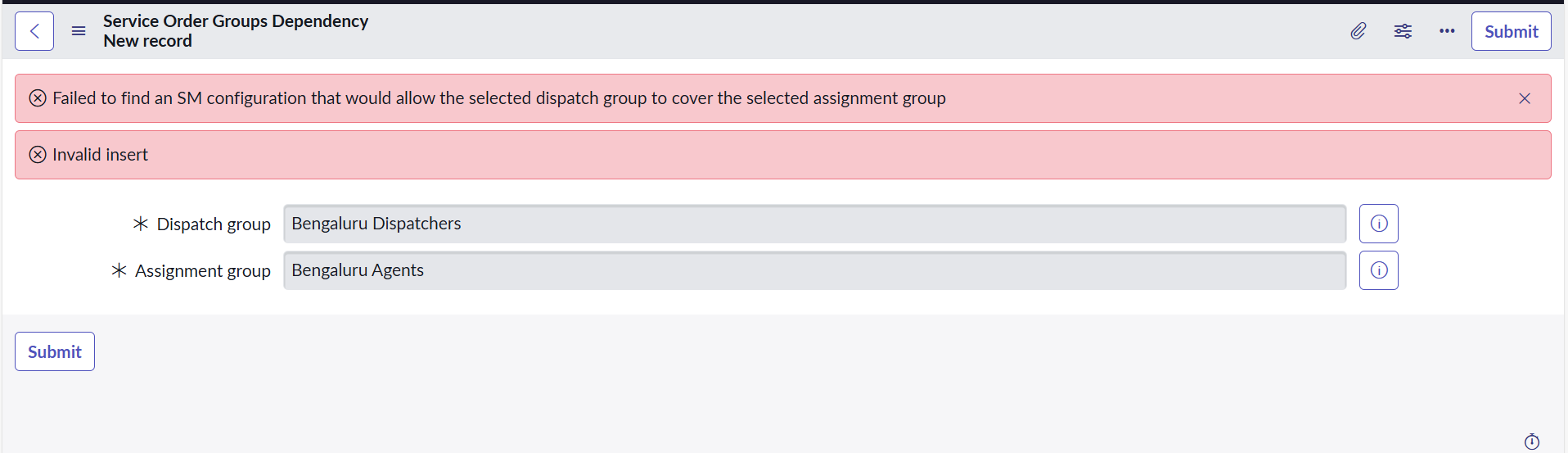
“Failed to find an SM configuration that would allow the selected dispatch group to cover the selected assignment group.”
Because of this, the record fails to save, and agents are not visible to dispatchers.
Could someone help me out with this issue?
Thanks in advance!
Solved! Go to Solution.
- Labels:
-
Tokyo

- Mark as New
- Bookmark
- Subscribe
- Mute
- Subscribe to RSS Feed
- Permalink
- Report Inappropriate Content
01-07-2026 06:15 AM
Hi Sneha,
This error occurs because the Field Service Configuration has a validation rule that restricts which groups can be used based on their Group Type.
The system is essentially saying: "I cannot find a Service Management application configuration that accepts these specific groups."
To fix this, you need to tag your groups with the correct type (usually "Work" for Field Service).
Here is the solution:
Update the Groups
Navigate to User Administration > Groups (or sys_user_group.list).
Open your Dispatch Group ("Bengaluru Dispatchers") and your Assignment Group ("Bengaluru Agents").
Locate the Type field on the form. (If you don't see it, configure the form layout to add it).
Add the type "Work" to both groups.
Save the records.
Retry the Association
Go back to the screen in your screenshot and try to submit the relationship again.
It should now save successfully because the SM Configuration recognizes these as valid Field Service groups.
Why this happens: The system uses the SMDependencyUtils script to check if the groups fit the criteria of the active Service Management Application. Since FSM is configured to only manage "Work" type groups by default, any group without this tag is rejected.
Hope this helps you get your agents visible in the Workspace!
If this response helps you solve the issue, please mark it as Accepted Solution.
This helps the community grow and assists others in finding valid answers faster.
Best regards,
Brandão.
- Mark as New
- Bookmark
- Subscribe
- Mute
- Subscribe to RSS Feed
- Permalink
- Report Inappropriate Content
01-07-2026 06:15 AM
Hi Sneha,
This error occurs because the Field Service Configuration has a validation rule that restricts which groups can be used based on their Group Type.
The system is essentially saying: "I cannot find a Service Management application configuration that accepts these specific groups."
To fix this, you need to tag your groups with the correct type (usually "Work" for Field Service).
Here is the solution:
Update the Groups
Navigate to User Administration > Groups (or sys_user_group.list).
Open your Dispatch Group ("Bengaluru Dispatchers") and your Assignment Group ("Bengaluru Agents").
Locate the Type field on the form. (If you don't see it, configure the form layout to add it).
Add the type "Work" to both groups.
Save the records.
Retry the Association
Go back to the screen in your screenshot and try to submit the relationship again.
It should now save successfully because the SM Configuration recognizes these as valid Field Service groups.
Why this happens: The system uses the SMDependencyUtils script to check if the groups fit the criteria of the active Service Management Application. Since FSM is configured to only manage "Work" type groups by default, any group without this tag is rejected.
Hope this helps you get your agents visible in the Workspace!
If this response helps you solve the issue, please mark it as Accepted Solution.
This helps the community grow and assists others in finding valid answers faster.
Best regards,
Brandão.

- Mark as New
- Bookmark
- Subscribe
- Mute
- Subscribe to RSS Feed
- Permalink
- Report Inappropriate Content
01-07-2026 06:31 AM
This error usually means the service territory setup does not match between the two groups.
Check that both the dispatch group and assignment group are linked to the same service territories.
Also, confirm there is at least one active service resource with the correct skills and territory.
If the territory model was recently changed, try re-saving the groups after verifying the links.
Once the territory coverage matches, the association should save correctly.