How to configure the document header for Control Attestations

- Mark as New
- Bookmark
- Subscribe
- Mute
- Subscribe to RSS Feed
- Permalink
- Report Inappropriate Content
06-06-2022 12:20 PM
For Control attestations, there is a default header that displays Entity and Control names.

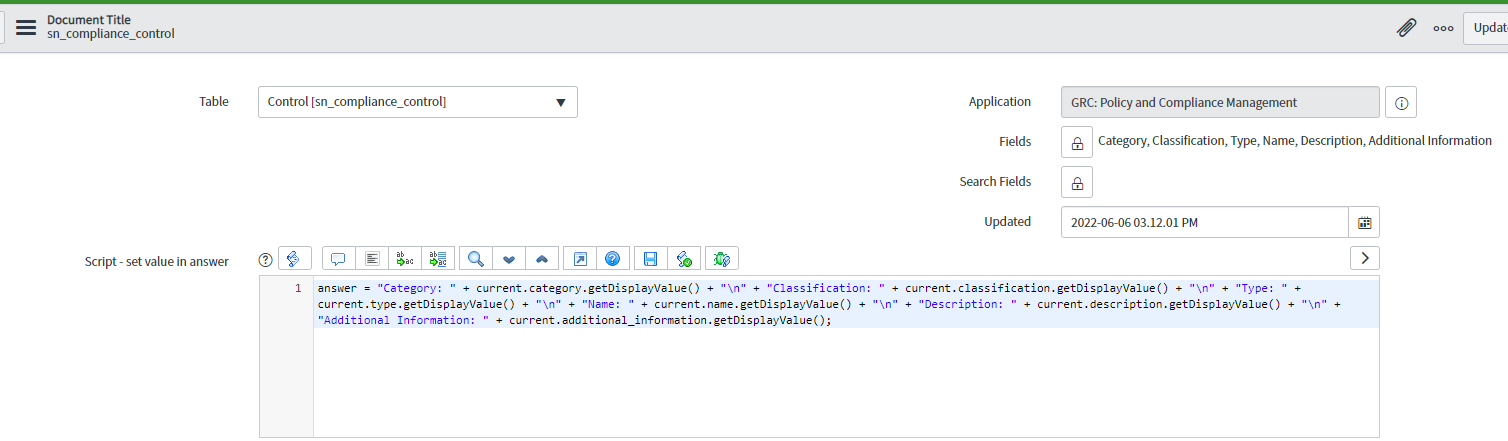
I'm aware of changing the additional description fields like Category, Classification, etc using the Document Title (screenshot below). I want to change the control name to the header's control description. Greatly appreciate your help.

- Labels:
-
Policy and Compliance Management
- Mark as New
- Bookmark
- Subscribe
- Mute
- Subscribe to RSS Feed
- Permalink
- Report Inappropriate Content
09-04-2024 07:24 AM
HI Sharan,
Did you got the answer for this. How to configure/edit the old Control and Entity name.
Thank you.
- Mark as New
- Bookmark
- Subscribe
- Mute
- Subscribe to RSS Feed
- Permalink
- Report Inappropriate Content
11-28-2023 01:40 PM
So I had the same issue and found a solution here!
- Mark as New
- Bookmark
- Subscribe
- Mute
- Subscribe to RSS Feed
- Permalink
- Report Inappropriate Content
07-11-2024 11:39 AM
Ok, I created a new record in the table to add the fields that I want to bring for the header, but it's not pulling them in and still see the old header. Is there any other changes than adding a new record in the sys_ui_title table?
- Mark as New
- Bookmark
- Subscribe
- Mute
- Subscribe to RSS Feed
- Permalink
- Report Inappropriate Content
04-23-2024 10:19 PM
Hi Krishna..
If you found the solution to modify the Entity and Control Name, please share. I understood what everyone is trying, is to add the additional information, though, my doubt is about the existing Entity and Control Name : Where is it configured ?

- Mark as New
- Bookmark
- Subscribe
- Mute
- Subscribe to RSS Feed
- Permalink
- Report Inappropriate Content
08-22-2024 09:20 AM
Hi,
Search the table name is "sys_ui_title". The entry does not exist automatically but you can create an entry that adds additional information to the existing header. Our attestation header looks like this by default:

And we wanted to add the Description

STEPS
- Change Application to GRC: Policy & Compliance Management
- Navigate to "sys_ui_title" list
- Select the "New" button
- Change the table name to "sn_compliance_control"
- Select the fields you want to add to the form (my image shows additional fields I'm not actually adding)
- Enter the answer = "[Your answer here]" into the Script box
- Save

Please refer the below link.
Regards,
Namrata