
- Mark as New
- Bookmark
- Subscribe
- Mute
- Subscribe to RSS Feed
- Permalink
- Report Inappropriate Content
04-24-2020 08:42 AM
I found an old post that provides information about Compliance Reports, in particular, SOC 1 TYPE 2 Report from ServiceNow
I looked at the https://www.servicenow.com/company/trust.html but could not find information there either.
There is no way to get to the CORE section that is mentioned here:
HOW TO GET ACCESS TO THE CORE
- A Community account and completion of a CORE registration survey is required to gain access to CORE
-
- Sign into the ServiceNow Community (https://community.servicenow.com)
- Click on GROUPS > SPECIAL INTEREST GROUPS
- Under TOPICS, click on ServiceNow CORE link (https://community.servicenow.com/community/special-interest-groups/core)
- Once inside the ServiceNow CORE, start with the “Directory of Topics and Documents” which lists all documents available grouped by common topic.
- Access is role-based and dependent upon detailed responses to the survey questions. Please make sure you provide COMPLETE answers in the survey and avoid the use of abbreviations.
It may take ServiceNow up to five days to grant you access to CORE. While waiting for access, we recommend that you read the e-book “Delivering Secure, Scalable, and Compliant Cloud Services” on the ServiceNow’s Trust Site (https://www.servicenow.com/company/trust.html) for an introduction to security, privacy, and compliance program.
Any help on getting the report will be very appreciated.
Thanks
Solved! Go to Solution.
- Labels:
-
Policy and Compliance Management

- Mark as New
- Bookmark
- Subscribe
- Mute
- Subscribe to RSS Feed
- Permalink
- Report Inappropriate Content
04-28-2020 11:24 AM
Make sure to create and login using company email. Otherwise request will be rejected.
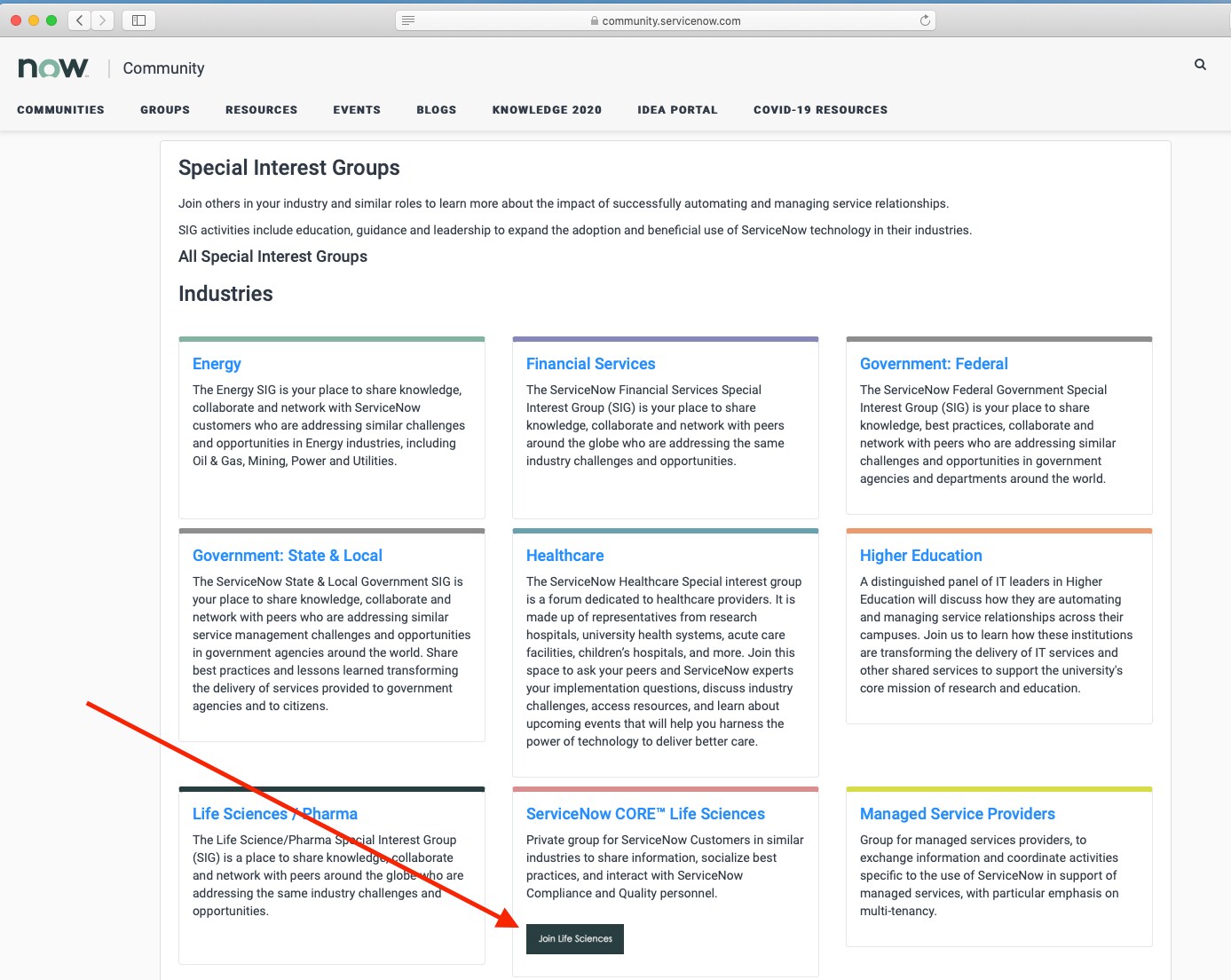
Go to Groups> Special Interest Groups (SIGs)
click on Join (see below)


- Mark as New
- Bookmark
- Subscribe
- Mute
- Subscribe to RSS Feed
- Permalink
- Report Inappropriate Content
04-24-2020 08:56 AM
Go to
fill out the form and submit the request once approved you will have access to all those reports.
- Mark as New
- Bookmark
- Subscribe
- Mute
- Subscribe to RSS Feed
- Permalink
- Report Inappropriate Content
04-28-2020 10:37 AM



- Mark as New
- Bookmark
- Subscribe
- Mute
- Subscribe to RSS Feed
- Permalink
- Report Inappropriate Content
04-28-2020 11:24 AM
Make sure to create and login using company email. Otherwise request will be rejected.
Go to Groups> Special Interest Groups (SIGs)
click on Join (see below)
- Mark as New
- Bookmark
- Subscribe
- Mute
- Subscribe to RSS Feed
- Permalink
- Report Inappropriate Content
04-29-2020 12:12 PM
Hi Mike,
Thanks for the detailed and appropriate response. I got to the ServiceNow Core and Join the group. I will keep you posted.
Very thankful for your time and help.
Best regards,
Alberto
