- Mark as New
- Bookmark
- Subscribe
- Mute
- Subscribe to RSS Feed
- Permalink
- Report Inappropriate Content
02-19-2020 07:22 AM
We are not currently using UCF with no immediate plans to purchase a license for integration. Unfortunately, all the GRC documentation only seems to refer to UCF and no other way to import controls. Is there a tutorial or some guidance that can be followed to setup some controls in a spreadsheet and import into GRC? I understand we'll have to create our own transform maps, unless there are some default available (which I haven't found) for GRC.
Solved! Go to Solution.

- Mark as New
- Bookmark
- Subscribe
- Mute
- Subscribe to RSS Feed
- Permalink
- Report Inappropriate Content
02-19-2020 08:58 AM
Hi,
UCF integration is a time saver if you want to follow internal/national standards or best practices, where all maintenance is the UCF Common Controls Hub responsibility. Probably the most used are:
- ISO/IEC 27701:2019 (242 citations)
- ISO/IEC 27002:2013 (382 citations)
- ISO 9001:2015 (700 citations)
- ISO 27001-2013 (632 citations)
- NIST SP 800-53 (1251 citations)
- FFIEC CAT (182 citations)
- CIS Controls (304 citations)
- EU GDPR (708 citations)
Having previous information in consideration, for a mid-term vision I would reconsider the UCF integration in your roadmap as soon as possible to help you to get up to speed. Imagine you have previous Authority Documents, I can't imagine how hard would be to maintain to 4401 citations up to date. Probably some may become depreciated over time, some may change between versions.
How can you manage your controls if you have the chance to been using out of date statements?
For a few customers, we have imported specific national laws due to the fact they weren't available in the Common Controls Hub but that was a particular scenario. As soon as you import that information, you own it and you are responsible for their maintenance. We always advise avoiding this scenario saving you time to focus your tasks.
Answering your question, there are several ways to import these, but the easiest is to use the Load Data menu and import the spreadsheet and map to the Policy Statement table and then generate your Controls.
Have in consideration:
- All your controls should be loaded in "Draft".
- If you assign an "Attestation", please ensure you have "Respondents". If you add an "Owner" it will be automatically copied as one of the respondents.
- If you want to move to other states, you need to respect the control lifecycle e.g. provide attestation, attest and then you can move to "Monitor".
- Respect the mandatory fields, don't forget to coalesce them.
Take a look at the following Training if you are new on this:
https://developer.servicenow.com/app.do#!/training/article/app_store_learnv2_importingdata_london_im...
If you have any doubt please let me know
Raf
- Mark as New
- Bookmark
- Subscribe
- Mute
- Subscribe to RSS Feed
- Permalink
- Report Inappropriate Content
02-19-2020 08:11 AM
Go to the controls list (All Controls) and Right Click on the Number column. Select Import.

Then click the "Create Excel Template" button. This will allow you to download a template that you can then add your controls to that template. It will provide guidance on where and what data you will need to add to the template.

Once you have updated the template, you can then follow the same process and select the template file you just updated to import. This will load your controls into the system.
- Mark as New
- Bookmark
- Subscribe
- Mute
- Subscribe to RSS Feed
- Permalink
- Report Inappropriate Content
02-20-2020 05:57 AM
Ha! I didn't think of trying it this way. I'll look over this template and see how to match it up with the NIST 800 controls we're testing. I'll mark this correct if this works. Thank you!
- Mark as New
- Bookmark
- Subscribe
- Mute
- Subscribe to RSS Feed
- Permalink
- Report Inappropriate Content
02-20-2020 06:18 AM
Using this approach you need to use 2 spreadsheets loaded directly to the Policy Statement table and then do the same for the Controls. I would suggest to use Transform Map but this works too 🙂
- Mark as New
- Bookmark
- Subscribe
- Mute
- Subscribe to RSS Feed
- Permalink
- Report Inappropriate Content
02-20-2020 08:02 AM
Yeah, it should work, but keep in mind what you are loading and where it should go.
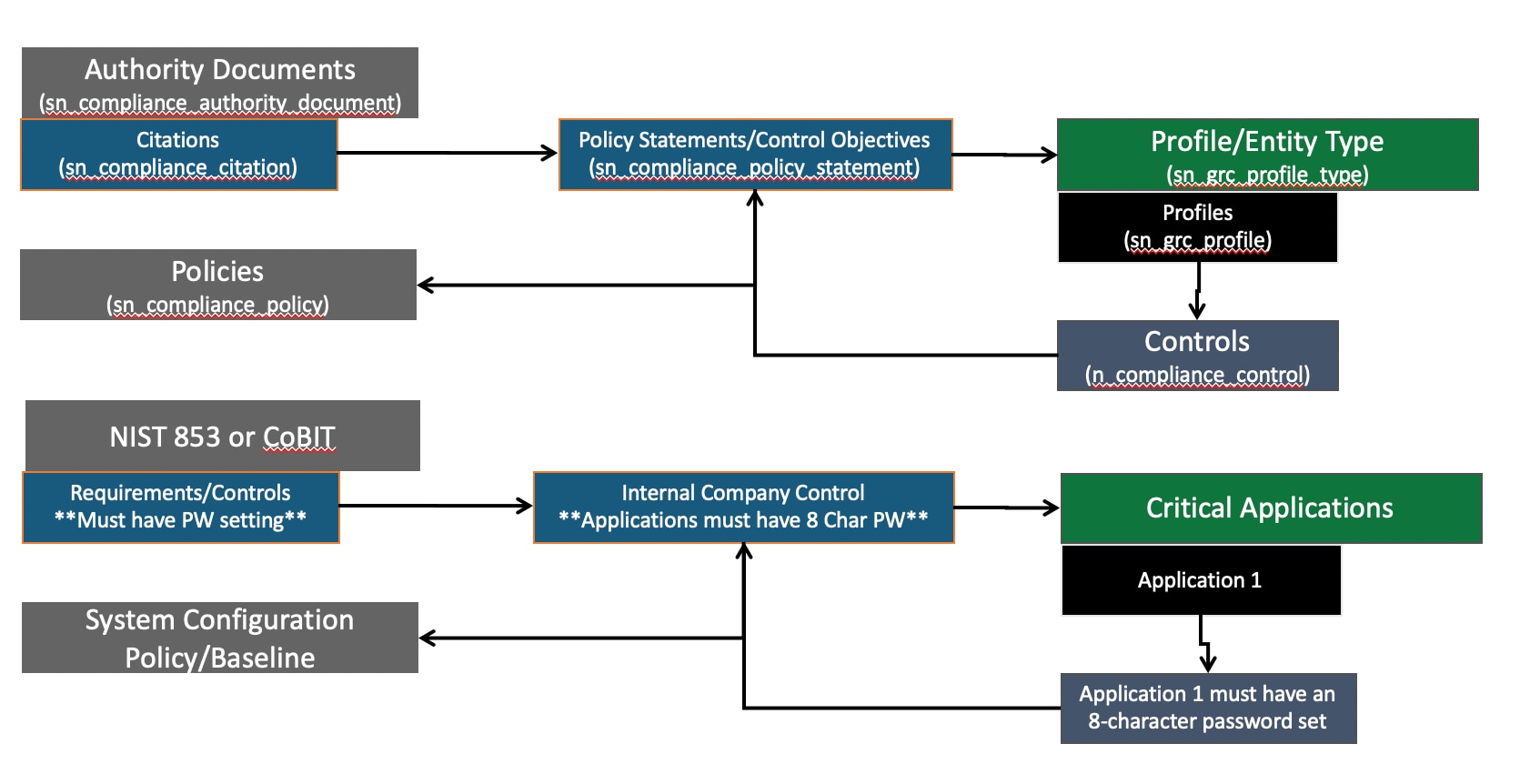
If you are not using the UCF and want to import NIST, create a record on the "Authority Docs" table and load the related NIST controls as "Citations." Then load your internal company controls on the "Policy Statement/Control Objective" table and do the mapping of the "Citation" to the "PS/CO".
When you assign them to what you actually want to monitor the control against(the Profile or Entity), the "Controls" will automatically be generated. I added a diagram below for you to look at as an example. Let me know if you have any other questions.
As an FYI, my example where to load was incorrect, you should not load directly to the "controls" table, but to the PS/CO table for your internal controls. The same process can still be done for the other referenced tables.
- Mark as New
- Bookmark
- Subscribe
- Mute
- Subscribe to RSS Feed
- Permalink
- Report Inappropriate Content
02-19-2020 08:58 AM
Hi,
UCF integration is a time saver if you want to follow internal/national standards or best practices, where all maintenance is the UCF Common Controls Hub responsibility. Probably the most used are:
- ISO/IEC 27701:2019 (242 citations)
- ISO/IEC 27002:2013 (382 citations)
- ISO 9001:2015 (700 citations)
- ISO 27001-2013 (632 citations)
- NIST SP 800-53 (1251 citations)
- FFIEC CAT (182 citations)
- CIS Controls (304 citations)
- EU GDPR (708 citations)
Having previous information in consideration, for a mid-term vision I would reconsider the UCF integration in your roadmap as soon as possible to help you to get up to speed. Imagine you have previous Authority Documents, I can't imagine how hard would be to maintain to 4401 citations up to date. Probably some may become depreciated over time, some may change between versions.
How can you manage your controls if you have the chance to been using out of date statements?
For a few customers, we have imported specific national laws due to the fact they weren't available in the Common Controls Hub but that was a particular scenario. As soon as you import that information, you own it and you are responsible for their maintenance. We always advise avoiding this scenario saving you time to focus your tasks.
Answering your question, there are several ways to import these, but the easiest is to use the Load Data menu and import the spreadsheet and map to the Policy Statement table and then generate your Controls.
Have in consideration:
- All your controls should be loaded in "Draft".
- If you assign an "Attestation", please ensure you have "Respondents". If you add an "Owner" it will be automatically copied as one of the respondents.
- If you want to move to other states, you need to respect the control lifecycle e.g. provide attestation, attest and then you can move to "Monitor".
- Respect the mandatory fields, don't forget to coalesce them.
Take a look at the following Training if you are new on this:
https://developer.servicenow.com/app.do#!/training/article/app_store_learnv2_importingdata_london_im...
If you have any doubt please let me know
Raf