Hardware asset refresh flow

- Mark as New
- Bookmark
- Subscribe
- Mute
- Subscribe to RSS Feed
- Permalink
- Report Inappropriate Content
04-10-2026 12:26 PM
Hi,
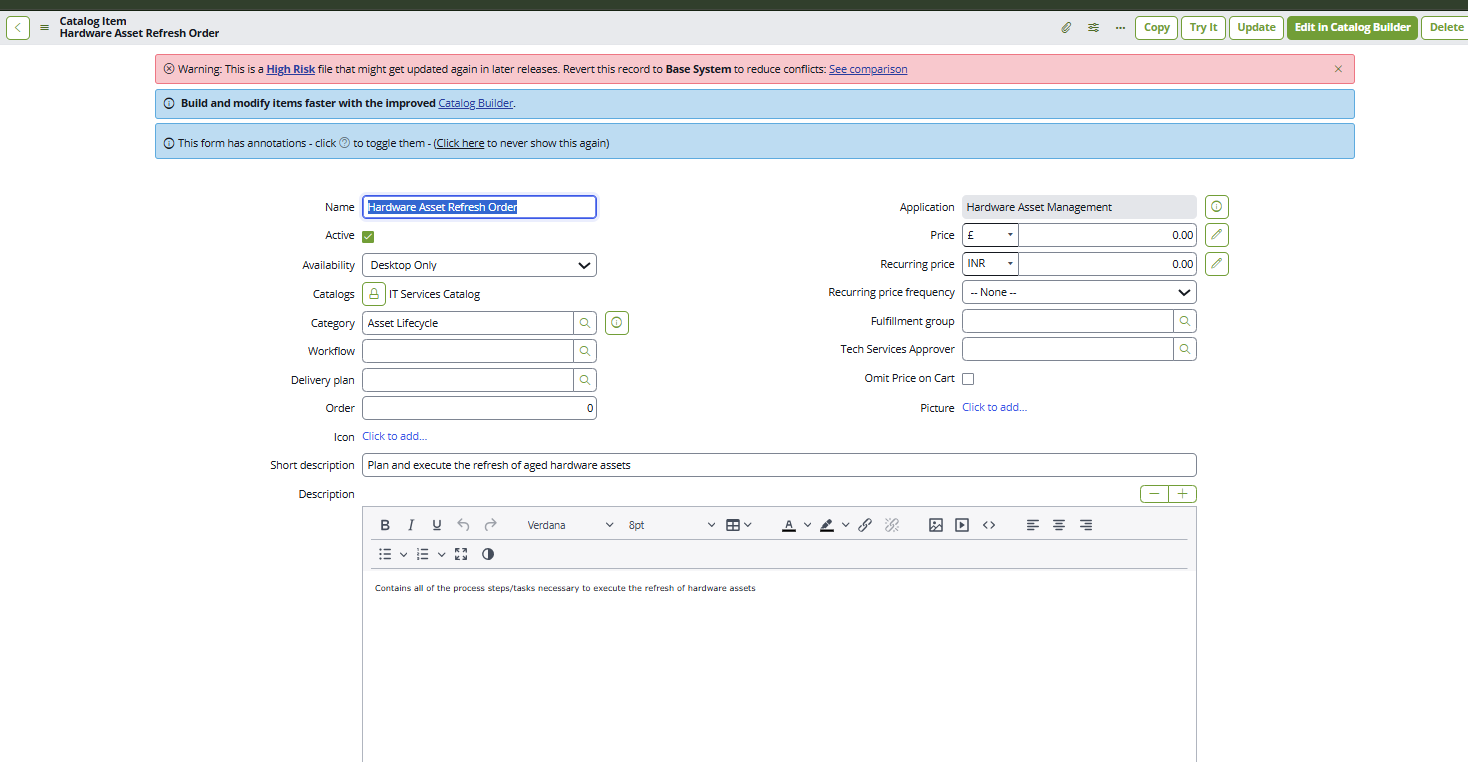
I’m trying to access an OOB feature from HAM Pro. There is an OOB catalog item called Hardware Asset Refresh Order, which has an associated flow. I activated the flow and tested it, but I’m getting stuck at the point where the sourcing task is supposed to be generated.
According to the ServiceNow Community video, once the request is approved, a sourcing task should be generated first, followed by four additional tasks. However, this is not happening in my case, and the flow is not progressing further.
I’ve attached the flow details for reference (PFA). I also tried making the Source field active through a script for testing purposes, but the sourcing task is still not getting generated.
Could you please help me understand what might be missing or misconfigured here, or guide me on how to proceed?

- Mark as New
- Bookmark
- Subscribe
- Mute
- Subscribe to RSS Feed
- Permalink
- Report Inappropriate Content
04-11-2026 01:57 AM
The "Hardware Asset Refresh Flow" itself does not create the sourcing task. After approval, a separate OOB flow called "Source Request" is responsible for generating the sourcing catalog task. This flow triggers based on the Sourceable field on the parent Request (sc_request) record — not the RITM.
The Sourceable field is set to true by an OOB business rule on the Request table, which checks whether the catalog item associated with the request item has a Model populated. If no model is linked to the catalog item, Sourceable stays false, and the Source Request flow never fires — meaning no sourcing task gets created.
Troubleshooting Steps:
-
Check if the "Source Request" flow/workflow is published and active. Search for "Source Request" in Flow Designer or Workflow Editor. If it's not published/active, the sourcing catalog task will never be created.
-
Verify that the catalog item has a Model field populated. The OOB "Hardware Asset Refresh Order" catalog item should be published from a hardware model. If the Model field on the catalog item is empty, the
Sourceableflag on the Request will not be set totrue. -
Inspect the
Sourceablefield on the parent Request (sc_request) record — not on the RITM. After submitting and getting approval, check ifSourceable = true. If it'sfalse, that confirms the Source Request flow was never triggered. -
Since you're using a "Copy of Hardware Asset Refresh Flow", make sure the original OOB flow is deactivated to avoid conflicts. Also verify that the "Update Sourcing set Variable" step in your copied flow is intact — the official documentation explicitly warns not to remove or customize this step.
-
Confirm the HAM Pro plugin (
com.snc.hamp) is properly activated. This is a store app that must be activated by ServiceNow personnel. The sourcing logic, lifecycle automation, and related business rules all live under this plugin.
Summary of the expected flow:
Catalog Item (with Model) → Request submitted → Approval → OOB Business Rule sets Sourceable = true on Request → Source Request flow triggers → Sourcing Catalog Task created → Procurement (Transfer Order / Purchase Order) → Sourced = true → Hardware Asset Refresh Flow proceeds past Step 3 → Refresh Line tasks generated (Schedule Refresh, Deploy New Asset, Reclaim Aged Asset).
References:
- KB1603021 — Request a Hardware Asset Refresh
- KB1603016 — Use a hardware asset request flow
- Mark as New
- Bookmark
- Subscribe
- Mute
- Subscribe to RSS Feed
- Permalink
- Report Inappropriate Content
04-12-2026 11:56 PM
hi @Naveen20 , PFA the model varaible is getting populated but still there is no task getting created and i checked it, "Source Request" flow is active and published. also HAM Pro plugin (com.snc.hamp) is also in active state. please let me know if i missing anything.
- Mark as New
- Bookmark
- Subscribe
- Mute
- Subscribe to RSS Feed
- Permalink
- Report Inappropriate Content
04-13-2026 04:46 AM
The Replacement model variable on the RITM being populated is not the same thing as the Model field on the Catalog Item record itself. These are two different things, and the OOB business rule checks the latter.
Let me verify this distinction further.This is a great find, Naveen. I found the actual OOB business rule script that controls the sourcing logic. This changes things — here's what's really going on.
The Real Mechanism
The OOB Business Rule is called "Can request be sourced" and it's part of the Procurement plugin. It runs on the sc_request table. Here's the critical logic from that business rule:
sourceable(current);
function sourceable(record) {
    var C_STOCK_ORDER_CAT_SYS_ID = '4109aa5fdb22001015a8ffefbf961984';
    var gr = new GlideRecord("sc_req_item");
    gr.addQuery("request", record.sys_id);
    var qc = gr.addNotNullQuery("cat_item.model");
    if (GlidePluginManager.isActive('com.sn_hamp')) {
        qc.addOrCondition("cat_item.sys_id", C_STOCK_ORDER_CAT_SYS_ID);
        qc.addOrCondition('variables.dbccd3f2b7621010189e22b5de11a90e', '!=', '');
        var qc1 = gr.addNotNullQuery("cat_item.model");
        qc1.addOrCondition("variables.6189629fdb22001015a8ffefbf96197f", "!=", "");
        qc1.addOrCondition('variables.dbccd3f2b7621010189e22b5de11a90e', '!=', '');
    }
    gr.setLimit(1);
    gr.query();
    if (gr.hasNext()) {
        // sets sourceable = true on sc_request
    }
}
When HAM Pro (com.sn_hamp) is active, the business rule checks:
cat_item.modelis not null on the catalog item record, OR- The catalog item is the Stock Order item, OR
- Specific HAM variables (by sys_id) are not empty — variable
6189629fdb22001015a8ffefbf96197fis likely the Replacement model variable
Since your Replacement model variable IS populated (Lenovo ThinkPad X1 Carbon), this business rule should be setting Sourceable = true. So the problem is likely upstream of this logic.
What to Check Now
1. Is the Procurement plugin active? This business rule belongs to the Procurement plugin, not HAM Pro. Go to sys_plugins.list and search for Procurement. If it's not active, this business rule doesn't exist in your instance, and Sourceable will never be set to true.
2. Is the "Can request be sourced" business rule active? Navigate to sys_script.list, filter by Name = Can request be sourced and Table = sc_request. Confirm it's active and not customized/overridden.
3. Check the Sourceable field on the parent sc_request record. Open your RITM → click the Request number (REQ) → look for the Sourceable field. If it's not visible, add it to the form layout or use the URL: sc_request.do?sys_id=<your_req_sys_id> and check the field. This tells you definitively whether the business rule fired.
4. Verify the variable sys_ids match. The business rule hard-codes variable sys_ids like 6189629fdb22001015a8ffefbf96197f. If your instance's Replacement model variable has a different sys_id (possible if the catalog item was copied or redeployed), the OR condition won't match. Check your variable's sys_id under the catalog item's Variables tab.
5. Check the Source Request workflow trigger conditions. When checking the Source Request workflow, you should also check the workflow conditions (Workflow Editor → Workflow → Hamburger → Properties). The conditions might not match your current request state.
Start with #1 and #3 — those are the most likely culprits. Let me know what you find.
- Mark as New
- Bookmark
- Subscribe
- Mute
- Subscribe to RSS Feed
- Permalink
- Report Inappropriate Content
04-13-2026 10:59 AM
1)yes procurement plug in is there
2)Can request be sourced" business rule in active state
3)you mean to say check it manually?
4) i opened BR and sys ids are not matching i didnt even touch it why would OOB values mismatch? ( i mean the sys id s are of Hardware Inventory Stock Order cat item) but here we have hardware asset refresh order catalog item