- Mark as New
- Bookmark
- Subscribe
- Mute
- Subscribe to RSS Feed
- Permalink
- Report Inappropriate Content
04-02-2026 11:12 AM - edited 04-02-2026 11:28 AM
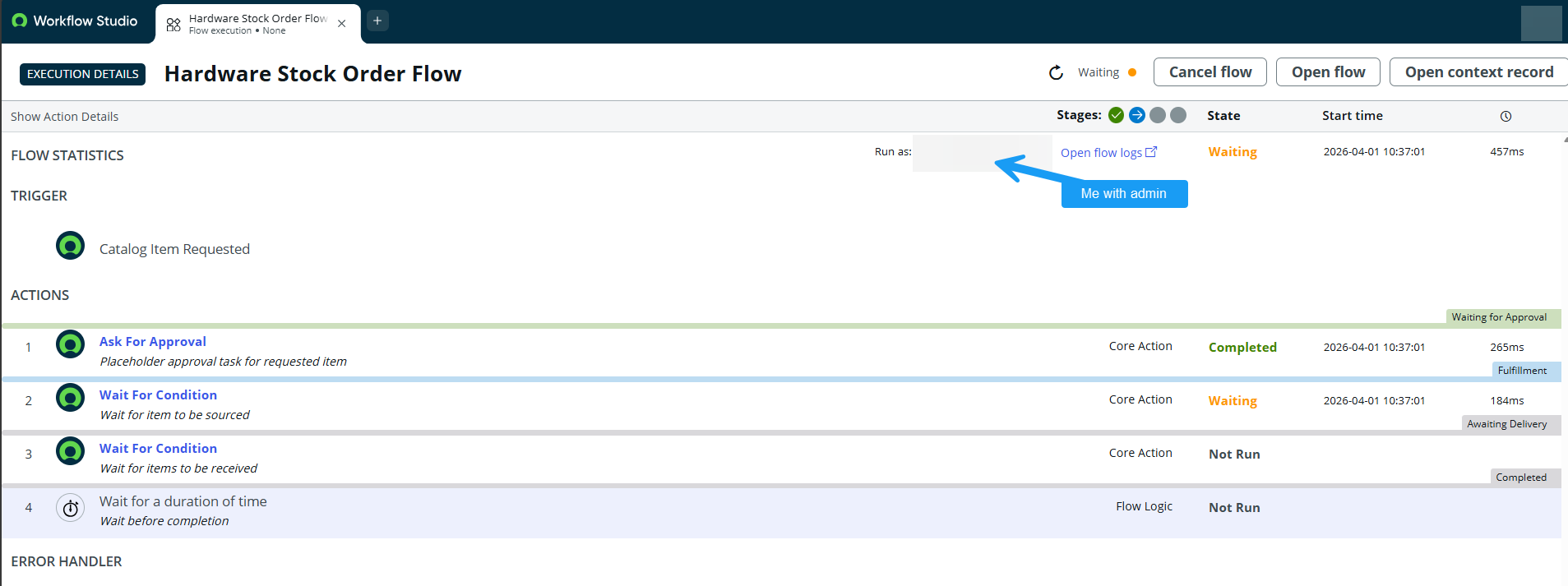
Hello! I am testing out the Hardware Inventory Stock Order catalog item. I submitted a test order and it skipped approvals (since we haven't configured the flow to have any approvals yet). But now the flow is stuck in the flow at step 2, waiting for the RITM to have the Sourced field set to true (see screenshot). However, I can't figure out what process sets the Sourced field on a RITM to true so that the Sourcing catalog task can be generated.
I've consulted the Product Docs, but it just says that a task will be generated after approval, not what is required for that to work: https://www.servicenow.com/docs/r/it-asset-management/hardware-asset-management/create-inventory-sto...
I've watched https://youtu.be/0rMCxaTbZ44?si=5xRjT054S4otYsR2, but it makes it look like the intent is to be checking the Backordered and Received checkboxes directly on the RITM record, which feels really wrong to me from my history working with RITMs, workflows/flows, and catalog tasks. There is nothing about how to advance to Sourcing.
I see in https://youtu.be/e1bcXPtO6zI?si=jX1xMAeUD2oTpYo1 there is a note that "The Source Request task is only available when the Procurement plugin has been installed". However, this dependency is not noted in the Product Documentation, and I do already have com.snc.procurement installed.
So, does anyone know technically and definitively what causes the Hardware Inventory Stock Order to be advanced? After submission, I am at a loss what to do with it next in the out-of-box flow. I know as an admin I can go in and customize it do whatever I want, but I'm trying to understand and walk through the intended out-of-box use for this catalog item and flow.
Solved! Go to Solution.
- Mark as New
- Bookmark
- Subscribe
- Mute
- Subscribe to RSS Feed
- Permalink
- Report Inappropriate Content
04-02-2026 11:35 AM
I had to do multiple Studio code searches to find it, but I believe I've found the answer now. There is a flow called "Source Request". It will create the catalog task you see at 2:30 of https://youtu.be/e1bcXPtO6zI?si=jX1xMAeUD2oTpYo1. That flow is triggered when a sc_request record is updated that has a value of Sourceable=true and Approval=Approved (which my RITM created through Hardware Inventory Stock Order that was auto-approved does). The next step is an action "to fetch value of system property 'com.sn_itam.enable_flow_designer.source_request'". This property must be set to true for the flow to advance into creating a catalog task for sourcing (not mentioned in any product documentation I could find: https://www.servicenow.com/docs/search?query=%2522com.sn_itam.enable_flow_designer.source_request%25...).
However, looking at our flow executions for the Source Request flow, they are all erroring. Looking at the flow engine context record gives me the necessary logs for troubleshooting my next steps.
- Mark as New
- Bookmark
- Subscribe
- Mute
- Subscribe to RSS Feed
- Permalink
- Report Inappropriate Content
04-02-2026 11:35 AM
I had to do multiple Studio code searches to find it, but I believe I've found the answer now. There is a flow called "Source Request". It will create the catalog task you see at 2:30 of https://youtu.be/e1bcXPtO6zI?si=jX1xMAeUD2oTpYo1. That flow is triggered when a sc_request record is updated that has a value of Sourceable=true and Approval=Approved (which my RITM created through Hardware Inventory Stock Order that was auto-approved does). The next step is an action "to fetch value of system property 'com.sn_itam.enable_flow_designer.source_request'". This property must be set to true for the flow to advance into creating a catalog task for sourcing (not mentioned in any product documentation I could find: https://www.servicenow.com/docs/search?query=%2522com.sn_itam.enable_flow_designer.source_request%25...).
However, looking at our flow executions for the Source Request flow, they are all erroring. Looking at the flow engine context record gives me the necessary logs for troubleshooting my next steps.

- Mark as New
- Bookmark
- Subscribe
- Mute
- Subscribe to RSS Feed
- Permalink
- Report Inappropriate Content
04-02-2026 12:00 PM - edited 04-02-2026 12:38 PM
Hi @Claire Ashdown2,
Yes, you’re correct that you need to install the procurement plugin to use the hardware asset request feature. This will add a procurement option in the Hardware Asset Workspace.

Once your request is approved. This will create a source catalog task where you can either transfer stock from a different stockroom with available stock or create a purchase order that can be processed manually in the procurement module.

The concept behind the OOTB workflow shipped with HAM is that you have fully functional processes that you can simply add your fulfillment groups to. However, if you have different requirements, I recommend copying the workflow and adapting it to your organizational needs.
Edit: If you have the chance to access the best practice library, you can search for the HAM process guide, it will explain all ootb processes and roles involved. It was also shown in the video you're referencing.
Hope this helps.
- Mark as New
- Bookmark
- Subscribe
- Mute
- Subscribe to RSS Feed
- Permalink
- Report Inappropriate Content
04-02-2026 12:38 PM
Thank you @fknell. In this case, the problem was that the sys ID for the role the Source Request flow is trying to use for Run with role(s) is not a valid role sys ID in our environment, hence the sourcing task was never getting created at all despite procurement being active.
Thank you for the link to the HAM process guide.
- Mark as New
- Bookmark
- Subscribe
- Mute
- Subscribe to RSS Feed
- Permalink
- Report Inappropriate Content
04-02-2026 01:23 PM
Actually, I still have a question if you have thoughts on it. So I got the sourcing task to generate by fixing the role issue, but when I close the ticket, the Sourced field on the RITM still did not get marked as true. Any thoughts why that would be?