
- Mark as New
- Bookmark
- Subscribe
- Mute
- Subscribe to RSS Feed
- Permalink
- Report Inappropriate Content
3 weeks ago
Hi everyone,
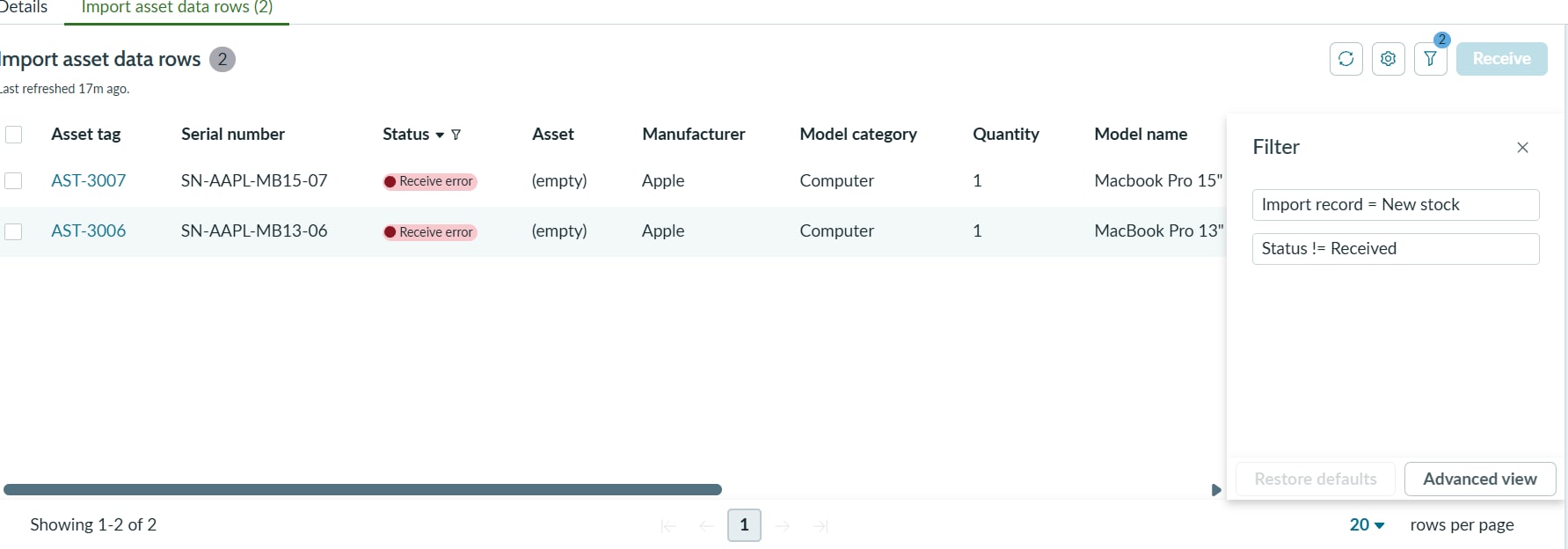
I am running into a UI issue in the Hardware Asset Workspace where I am completely unable to clear a default list filter, preventing me from viewing successfully imported assets.
I am importing hardware assets via the "Import receiving log" feature within a Stockroom. After the import processes and the assets are successfully received, they disappear from the list because of a default filter (Status != Received). I want to clear this filter to view my entire import history for that specific file, but the UI is not allowing me to remove it.
Solved! Go to Solution.


- Mark as New
- Bookmark
- Subscribe
- Mute
- Subscribe to RSS Feed
- Permalink
- Report Inappropriate Content
2 weeks ago
Hi @kanhaiyasin ,
Please set this filter default filter as Admin user (or Ask your admin to do this)
refer : https://support.servicenow.com/kb?id=kb_article_view&sysparm_article=KB2798104

- Mark as New
- Bookmark
- Subscribe
- Mute
- Subscribe to RSS Feed
- Permalink
- Report Inappropriate Content
2 weeks ago
yes, it works in workspace as well,
1. I set this as default filter in the native UI (Make sure you set this as default filter)

2. Same is reflecting in workspace:

- Mark as New
- Bookmark
- Subscribe
- Mute
- Subscribe to RSS Feed
- Permalink
- Report Inappropriate Content
2 weeks ago - last edited 2 weeks ago
Hi @Hemanth M
It is not working in my instance, Look -
1) I set the default filter

2) But in workspace it show the previous filter and i unable to remove the filter condition in workspace.

3) When i clicked on advanced view then there is no filter condition

- Mark as New
- Bookmark
- Subscribe
- Mute
- Subscribe to RSS Feed
- Permalink
- Report Inappropriate Content
2 weeks ago

- Mark as New
- Bookmark
- Subscribe
- Mute
- Subscribe to RSS Feed
- Permalink
- Report Inappropriate Content
2 weeks ago - last edited 2 weeks ago

- Mark as New
- Bookmark
- Subscribe
- Mute
- Subscribe to RSS Feed
- Permalink
- Report Inappropriate Content
2 weeks ago
Hi @kanhaiyasin ,
Please set this filter default filter as Admin user (or Ask your admin to do this)
refer : https://support.servicenow.com/kb?id=kb_article_view&sysparm_article=KB2798104
