
- Mark as New
- Bookmark
- Subscribe
- Mute
- Subscribe to RSS Feed
- Permalink
- Report Inappropriate Content
07-08-2022 06:06 AM
Hi everyone.
I created two date type fields( start date and end date ) now I have to add a condition saying end date should always be greater than the start date. Also whenever user select end date which is not greater than start date it should pop up a message saying please select correct end date something like that. please provide solutions for this.
thank you in advance.
Solved! Go to Solution.

- Mark as New
- Bookmark
- Subscribe
- Mute
- Subscribe to RSS Feed
- Permalink
- Report Inappropriate Content
07-08-2022 06:39 AM
Hi there,
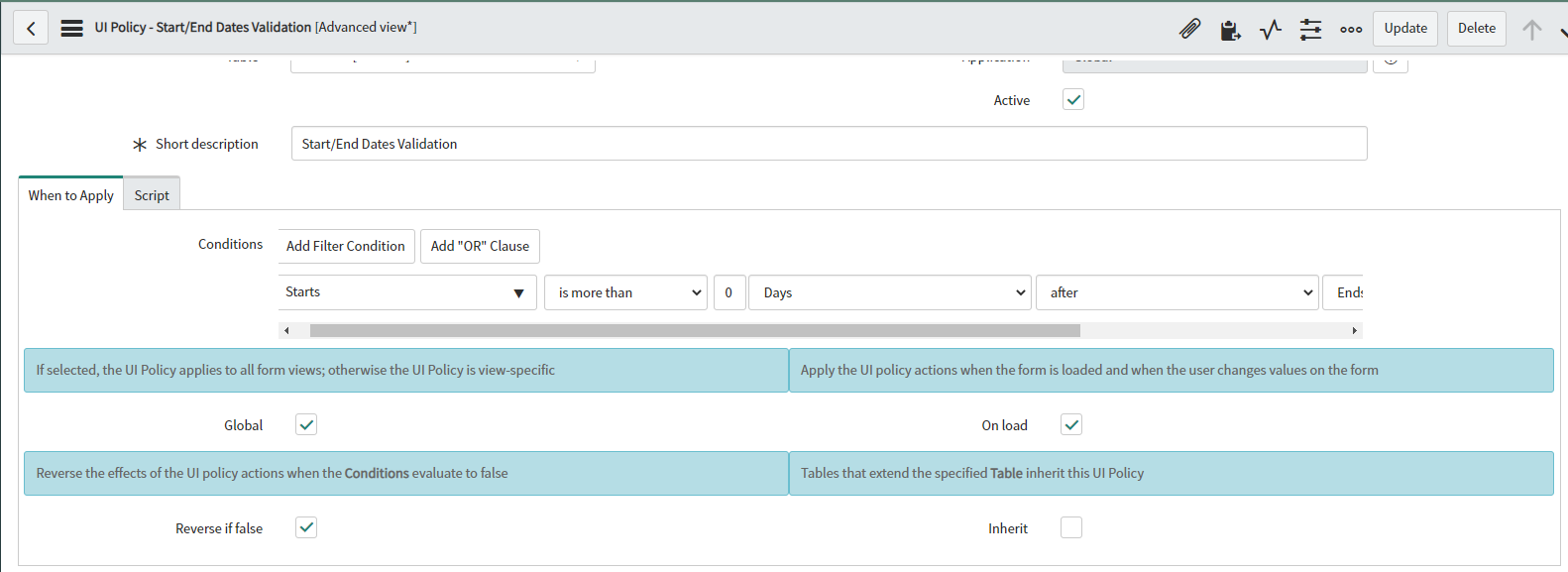
You can use a UI policy to accomplish your requirements. The When to Apply conditions should be Start Date is more than 0 Days after End Date, and then you can use the Run Scripts section and Execute if true code block to display your pop-up / other desired logic if the Start Date is indeed greater than the End Date.
UI Policy:


Result:

If this answer is helpful please mark correct and helpful!
Regards,
Christopher Perry


- Mark as New
- Bookmark
- Subscribe
- Mute
- Subscribe to RSS Feed
- Permalink
- Report Inappropriate Content
07-08-2022 06:39 AM
Hi there,
You can use a UI policy to accomplish your requirements. The When to Apply conditions should be Start Date is more than 0 Days after End Date, and then you can use the Run Scripts section and Execute if true code block to display your pop-up / other desired logic if the Start Date is indeed greater than the End Date.
UI Policy:
Result:
If this answer is helpful please mark correct and helpful!
Regards,
Christopher Perry
- Mark as New
- Bookmark
- Subscribe
- Mute
- Subscribe to RSS Feed
- Permalink
- Report Inappropriate Content
07-08-2022 06:41 AM
Hi
Please refer below article
Please mark my answer correct and helpful if this resolves your issue.
Regards,
Palak
