- Mark as New
- Bookmark
- Subscribe
- Mute
- Subscribe to RSS Feed
- Permalink
- Report Inappropriate Content
02-12-2021 06:54 AM
How do I auto approve the request in Flow Designer?
I want the Request to be automatically approved so it will go straight to asking for item approval.
My flow is working as expected except for the request part.
When I make test a request it says:
Approval = Not Yet Requested
Request State = Pending Approval
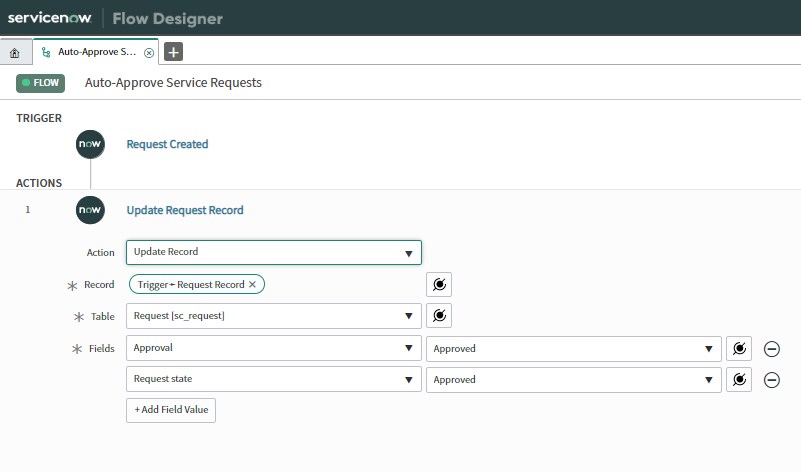
I've tried using the Action Update Request Record to change the Approval and Request State fields but it never does anything. Attached is screenshot of how I have it set up.
Solved! Go to Solution.
- Mark as New
- Bookmark
- Subscribe
- Mute
- Subscribe to RSS Feed
- Permalink
- Report Inappropriate Content
02-12-2021 08:01 AM
Hey,
Try creating the same on the lines of the workflow in FLow
Something like below:

- Mark as New
- Bookmark
- Subscribe
- Mute
- Subscribe to RSS Feed
- Permalink
- Report Inappropriate Content
02-23-2021 10:31 AM
Can you share the screenshot of the error you face? Is something popping up when raised through a customer?
- Mark as New
- Bookmark
- Subscribe
- Mute
- Subscribe to RSS Feed
- Permalink
- Report Inappropriate Content
02-23-2021 10:43 AM
There's no error. The request just isn't auto approved based on the flow I have set up when I submit a request as a customer/requestor role. When I test as admin role everything works as expected.
- Mark as New
- Bookmark
- Subscribe
- Mute
- Subscribe to RSS Feed
- Permalink
- Report Inappropriate Content
02-23-2021 10:52 AM