- Mark as New
- Bookmark
- Subscribe
- Mute
- Subscribe to RSS Feed
- Permalink
- Report Inappropriate Content
06-07-2019 06:56 AM
Hi ServiceNow Community,
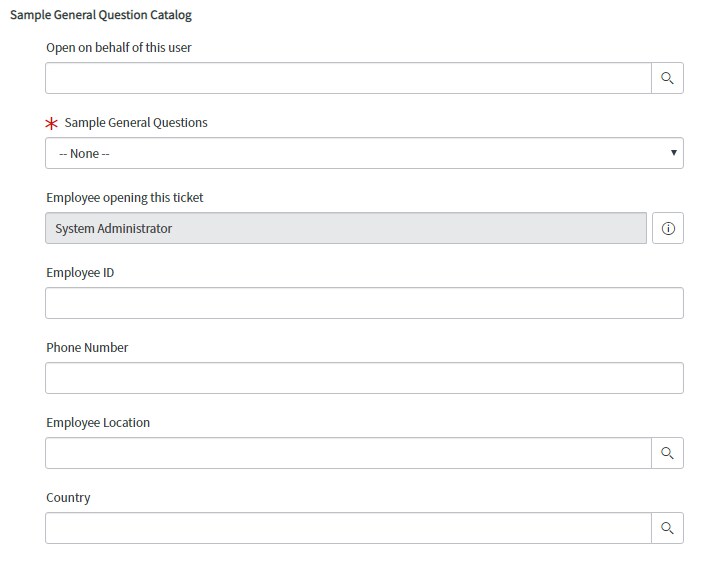
I need some help with my Country field, I want it to be auto populated based on selected user from my reference field, here is my form ...


Is there any way to get this? and how? Is it Client Script? Maybe you can also help me with scripting or is it Ui Policy?
Your help will be much appreciated. Thanks!
Solved! Go to Solution.
- Labels:
-
Best Practices
-
Service Catalog

- Mark as New
- Bookmark
- Subscribe
- Mute
- Subscribe to RSS Feed
- Permalink
- Report Inappropriate Content
06-08-2019 01:49 AM
why are using two client script here? if you wanna auto populate "Open on behalf of this user" details in other fields then one client script can solve this issue.
let me tell you why your script will not work here, you have dot walked more than one in call back function that's the reason user country did not populate. eg: caller.location.country ( this will not work)
as @mike has written the glide ajax try that way. In script include you can get other field values and then you can add them in your client script.
Updated Script:
Catalog Client Script:
function onChange(control, oldValue, newValue, isLoading) {
	if (isLoading || newValue === '') {
		return;
	}

	//Type appropriate comment here, and begin script below
	var user = g_form.getValue('u_open_on_behalf');  //make sure about the variable.
	var ga = new GlideAjax('userdetails');
	ga.addParam('sysparm_name','requestor_info');
	ga.addParam('sysparm_user_name',user);
	ga.getXML(HelloWorldParse);

	function HelloWorldParse(response) {
		var answer = response.responseXML.documentElement.getAttribute("answer");
		var ans = answer.evalJSON();
		for (var k = 0; k < ans.length; k++) {
			alert('Phone Number is ' +ans[k].phone);
			g_form.setValue('phone_number',ans[k].phone);
			g_form.setValue('employee_location',ans[k].location);
			g_form.setValue('employee_id',ans[k].emp);
                        g_form.setValue('employee_supervison',ans[k].manager);
			g_form.setValue('country ',ans[k].country_code);


		}
	}

}
Script Include: Make sure the script include should be client callable.
var userdetails = Class.create();
userdetails.prototype = Object.extendsObject(AbstractAjaxProcessor, {

	requestor_info: function() {

		var arr=[];
		var output='';
		var json = new JSON();
		var details=this.getParameter('sysparm_user_name');
		var user= new GlideRecord('sys_user');
		user.addQuery('sys_id',details);
		user.query();
		while(user.next())
			{

			var obj = {};
				obj.phone=user.mobile_phone.getDisplayValue();
				obj.location=user.location.getDisplayValue();
				obj.emp=user.emplpyee_number.getDisplayValue();
				obj.manager=user.manager.toString();
				obj.country_code=user.location.country.toString();


				arr.push(obj);
			}
			gs.log('value is :'+ json.encode(arr));
			return (json.encode(arr));

		},
		type: 'userdetails'
	});
- Mark as New
- Bookmark
- Subscribe
- Mute
- Subscribe to RSS Feed
- Permalink
- Report Inappropriate Content
06-08-2019 04:30 AM
is it possible if you can share your screen on google hangout? i can quickly solve this issue by screen-sharing
if yes connect me on hvrdhn88@gmail.com

- Mark as New
- Bookmark
- Subscribe
- Mute
- Subscribe to RSS Feed
- Permalink
- Report Inappropriate Content
06-07-2019 08:17 AM
To get user details when you enter user name in ServicePortal
Script Include:
var UserDetailsScript = Class.create();
UserDetailsScript.prototype = Object.extendsObject(AbstractAjaxProcessor, {
userdetailsfn: function(){
var obj={};
obj.location='';
obj.email='';
obj.manager='';
var id=this.getParameter('sysparm_nam');
var gr= new GlideRecord('sys_user');
gr.addQuery('sys_id',id);
gr.query();
// if(gr.get(id)){
if(gr.next()){
obj.country=gr.country.toString();
}
var json = new JSON();
var data = json.encode(obj);
return data;
},
type: 'UserDetailsScript'
});
client script:
function onChange(control, oldValue, newValue, isLoading) {
if (isLoading || newValue == '') {
g_form.setValue('countryvariable','');
}
// var nm=g_form.getValue('name');
var ga = new GlideAjax('UserDetailsScript');
ga.addParam('sysparm_name', 'userdetailsfn');
ga.addParam('sysparm_nam',newValue);
ga.getXML(CallBack);
function CallBack(response)
{
var answer = response.responseXML.documentElement.getAttribute("answer");
var user=JSON.parse(answer);
g_form.setValue('countryvariable', user.country);
}
}

- Mark as New
- Bookmark
- Subscribe
- Mute
- Subscribe to RSS Feed
- Permalink
- Report Inappropriate Content
06-08-2019 02:43 AM
Hi guys,
I guess I must be missing something here, but why is any scripting needed for this? Wouldn't you just add the Location.Country field and that's it?
cheers /Tommy
- Mark as New
- Bookmark
- Subscribe
- Mute
- Subscribe to RSS Feed
- Permalink
- Report Inappropriate Content
06-08-2019 02:53 AM
Hi Sir Tommy Sahlin, Advania,
How can I add the Location.Country field in record producer?
Your reponse will be much appreciated. Thanks!