
- Mark as New
- Bookmark
- Subscribe
- Mute
- Subscribe to RSS Feed
- Permalink
- Report Inappropriate Content
02-09-2022 11:26 PM
Hi All,
I have a requirement to take values from the task variables and insert records in a custom table.
- i.e there is a variable in the catalog task table 'transfer number' which will have comma separated values 1234567890,34567890,..
- once the task is closed need to add a run script in the workflow to create records in the custom table for each value added in the above variable. If the 'Transfer number' contains 2 values then 2 records need to be created in custom table.
- Have configured the below script but i am stuck and not able to proceed can anyone suggest the solution.
- var val = [];
var task = new GlideRecord('sc_task');
task.addQuery('request_item', current.sys_id);
task.query();
if(task.next()){
var trnVal = task.variables.trn;
val.push(trnVal);
gs.log("value of the TRN is " + trnVal);
}
Solved! Go to Solution.


- Mark as New
- Bookmark
- Subscribe
- Mute
- Subscribe to RSS Feed
- Permalink
- Report Inappropriate Content
02-10-2022 07:01 AM
Hi,
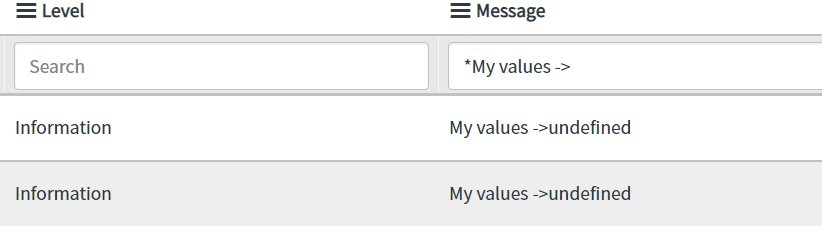
it means you are using incorrect variable name
use this directly; no need to query RITM table
var trnValArr = current.variables.trn.toString().split(',');

gs.info("My values ->" + trnValArr); // what came here

for(var i in trnValArr){
	gs.info("inside of for loop");
	var gr = new GlideRecord('u_transfer_order');
	gr.initialize();
	gr.u_trn = trnValArr[i];
	gr.insert();
}
Regards
Ankur
- Mark as New
- Bookmark
- Subscribe
- Mute
- Subscribe to RSS Feed
- Permalink
- Report Inappropriate Content
02-10-2022 04:27 AM



- Mark as New
- Bookmark
- Subscribe
- Mute
- Subscribe to RSS Feed
- Permalink
- Report Inappropriate Content
02-10-2022 07:01 AM
Hi,
it means you are using incorrect variable name
use this directly; no need to query RITM table
var trnValArr = current.variables.trn.toString().split(',');

gs.info("My values ->" + trnValArr); // what came here

for(var i in trnValArr){
	gs.info("inside of for loop");
	var gr = new GlideRecord('u_transfer_order');
	gr.initialize();
	gr.u_trn = trnValArr[i];
	gr.insert();
}
Regards
Ankur
- Mark as New
- Bookmark
- Subscribe
- Mute
- Subscribe to RSS Feed
- Permalink
- Report Inappropriate Content
02-11-2022 02:24 AM
Hi Ankur,
Thank you, the above code worked.
- Mark as New
- Bookmark
- Subscribe
- Mute
- Subscribe to RSS Feed
- Permalink
- Report Inappropriate Content
02-10-2022 07:02 AM
Hi
Please use the below code in your Run Script activity and let me know if you are still facing an issue:
var task = new GlideRecord('sc_task');
task.addQuery('request_item', current.sys_id);
task.query();
if(task.next()){
var str = current.variables.Variablename.toString(); //Replace your variable Name here which contains the the comma separated numbers
var splitSTR = str.split(',');
var getLength = splitSTR.length;
for(var i =0;i<getLength;i++){
createRecord(splitSTR[i]);
}
}


function createRecord(valuefetched){
var gr = new GlideRecord('Table Name here');
gr.initialize();
gr.FIELD_Name = valuefetched; // Replace your Field Name where you want to copy the number in your custom table field
gr.insert();
}
If the above code does not work then try below:
var task = new GlideRecord('sc_task');
task.addQuery('request_item', current.sys_id);
task.query();
if(task.next()){
var str = task.variables.Variablename.toString(); //Replace your variable Name here which contains the the comma separated numbers
var splitSTR = str.split(',');
var getLength = splitSTR.length;
for(var i =0;i<getLength;i++){
createRecord(splitSTR[i]);
}
}


function createRecord(valuefetched){
var gr = new GlideRecord('Table Name here');
gr.initialize();
gr.FIELD_Name = valuefetched; // Replace your Field Name where you want to copy the number in your custom table field
gr.insert();
}
Hope this helps. Please mark the answer as correct/helpful based on impact.
Regards,
Shloke
- Mark as New
- Bookmark
- Subscribe
- Mute
- Subscribe to RSS Feed
- Permalink
- Report Inappropriate Content
02-10-2022 08:59 PM
Hi
Did you try the approach suggested by me above. It is working for me in my PDI. Let me know if you are stuck.
Regards,
Shloke
