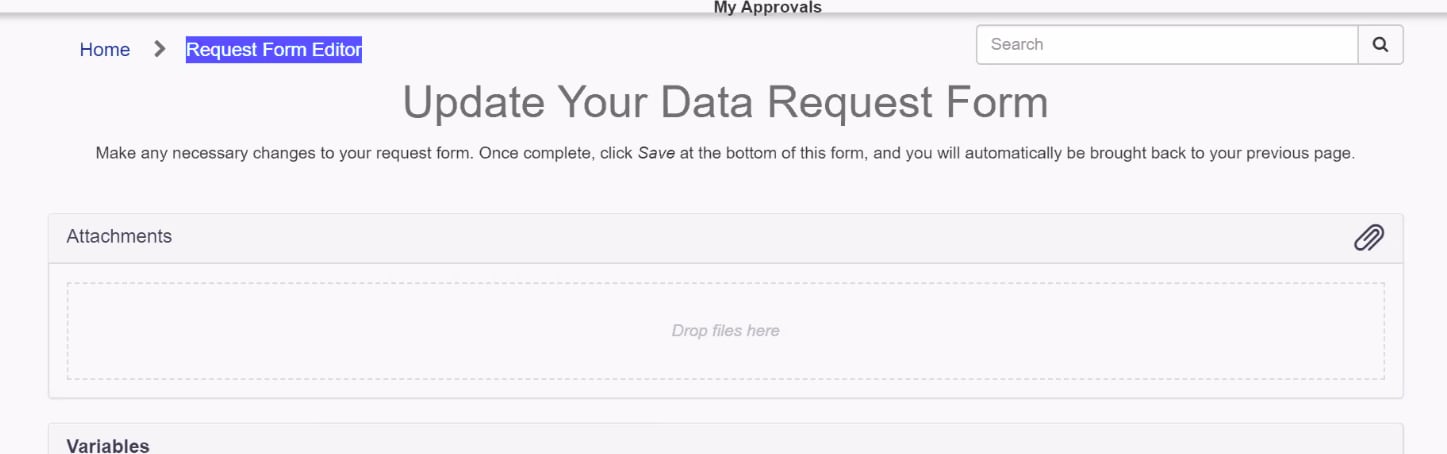
'Edit request form' widget in service portal

- Mark as New
- Bookmark
- Subscribe
- Mute
- Subscribe to RSS Feed
- Permalink
- Report Inappropriate Content
04-24-2020 11:38 PM
Hi All,
We have 'Edit request form' widget on portal , when we raising request variables are working as expected ( based on Catalog ui policy and client script , some are visible , few are mandatory etc...) ,
But when i click on 'Edit request form' its showing all variables (not worked ui policy/client script) , i want to hide few of variables , here CATALOG UI POLICY or CLIENT SCRIPTs are NOT working , please find related screen shots and used widgets ...
Kindly help on widget to hide few variables on portal view , I'm using attached widget in CSM portal view , when i click on "Edit Request Form" button all variables appearing in editable view.
I want to hide few variables , kindly suggest me server script where can i add code to hide those variables
Catalog form showing on below url
https://instance.service-now.com/csm?id=csm_cat_item&sys_id=4ea0287adbc13b047654273605961978
After click on 'edit form' button navigating to below url and appearing all variables
https://instance.service-now.com/csm?id=csm_request_edit&sys_id=aa7456f6db10d0d0765427360596190b&table=sn_customerservice_case
(function(){
var gr = $sp.getRecord();
var table = gr.getTableName();
data.canRead = gr.canRead();
if (!data.canRead)
return;
//determines editablity based on the request's stage
//request is not editable while pending approval or after being approved.
data.isEditable = checkStage(gr.u_stage);
var agent = "";
var a = $sp.getField(gr, 'assigned_to');
if (a != null)
agent = a.display_value;
var list = "approval";
var fields = $sp.getFields(gr, list);
if (gr.getValue("sys_mod_count") > 0)
fields.push($sp.getField(gr, 'sys_updated_on'));
data.tableLabel = gr.getLabel();
data.variables = $sp.getVariablesArray();
data.fields = fields;
data.approval = fields.approval;
data.table = table;
data.sys_id = gr.getUniqueValue();
})();
function checkStage(stage) {
var editableStages = gs.getProperty('custom.list.csm.request_editor.visibility_stages').toString();
if(editableStages.indexOf(stage) >= 0) {
return true;
}
return false;
}
-
DOC


- Mark as New
- Bookmark
- Subscribe
- Mute
- Subscribe to RSS Feed
- Permalink
- Report Inappropriate Content
04-25-2020 02:34 AM
Hi,
Is this custom widget? And which variables you dont want to show on this form for editing.
Thanks,
Ashutosh
- Mark as New
- Bookmark
- Subscribe
- Mute
- Subscribe to RSS Feed
- Permalink
- Report Inappropriate Content
04-25-2020 04:18 AM
Variable name - Cost , Final Price etc..
- Mark as New
- Bookmark
- Subscribe
- Mute
- Subscribe to RSS Feed
- Permalink
- Report Inappropriate Content
04-25-2020 02:56 AM
Add the below lines in for loop and check the variable you want to set read only in the condition.
//Add the below code to set variables read only
if(data.sc_cat_item._fields[f].displayValue == "Field Name1"){
data.sc_cat_item._fields[f].readonly = true;
}
for(var f in data.sc_cat_item._fields) {
			if (options.readonly_variable_editor == 'true')
				data.sc_cat_item._fields[f].sys_readonly = true;
			// Put the values into the cat item fields
			if (typeof values[f] != "undefined") {
				if (values[f].type == 12 || values[f].type == 19 || values[f].type == 20 || values[f].type == 24)
					continue;
				if (typeof values[f].value != "undefined") {
					if (values[f].type == 9 || values[f].type == 10)
						data.sc_cat_item._fields[f].value = values[f].displayValue;
					else if (values[f].type == 25 && data.sc_cat_item._fields[f].catalog_view_masked)
						data.sc_cat_item._fields[f].value = values[f].decrypted_value;
					else
						data.sc_cat_item._fields[f].value = values[f].value;
					data.sc_cat_item._fields[f].displayValue = values[f].displayValue;
					data.sc_cat_item._fields[f].display_value_list = values[f].display_value_list;


//Add the below code to set variables read only

      if(data.sc_cat_item._fields[f].displayValue == "Field Name1"){

         data.sc_cat_item._fields[f].readonly = true;

         }
}
- Mark as New
- Bookmark
- Subscribe
- Mute
- Subscribe to RSS Feed
- Permalink
- Report Inappropriate Content
04-25-2020 04:17 AM
Thank you for sharing details , those variable are confidential thats why customer want to hide those variables.
my kind request to give me code to hide the few variables list.