- Mark as New
- Bookmark
- Subscribe
- Mute
- Subscribe to RSS Feed
- Permalink
- Report Inappropriate Content
10-19-2020 02:39 PM
Hi,
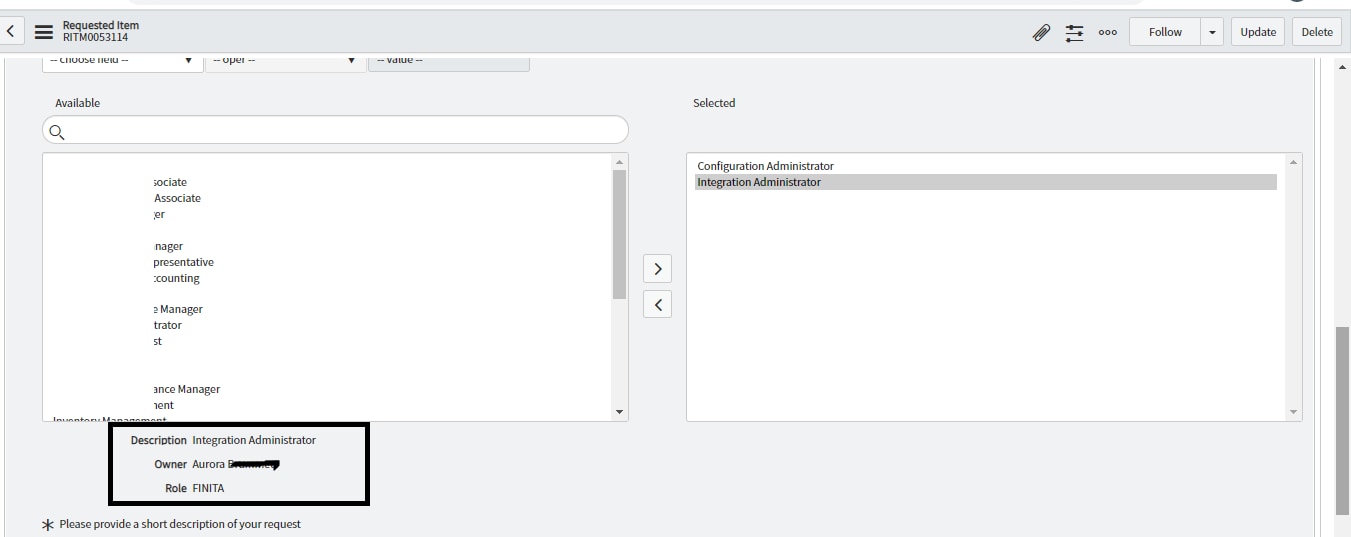
some one help me how to show below details in email notification

how to show Owner name in Notification body
template.print("<b>Summary of Requested items:\n</b>");
var item = new GlideRecord("sc_req_item");
if (item.get(current.document_id)) {
template.print("<b>"+item.number + ": " + item.cat_item.getDisplayValue() + "</b><br/>");
var keys = new Array();
var set = new GlideappVariablePoolQuestionSet();
set.setRequestID(item.sys_id);
set.load();
var vs = set.getFlatQuestions();
for (var i = 0; i < vs.size(); i++) {
if (vs.get(i).getDisplayValue() != '') {
template.print("<b>"+vs.get(i).getLabel() +"</b>"+ " : " + vs.get(i).getDisplayValue() + "<br/>");
}
}
}

Solved! Go to Solution.


- Mark as New
- Bookmark
- Subscribe
- Mute
- Subscribe to RSS Feed
- Permalink
- Report Inappropriate Content
10-25-2020 01:46 AM
As mentioned by Pradeep you need to query the table and get the value
Sample script below which is updated
Ensure you give valid table names, list variable name , field names, etc
template.print("<b>Summary of Requested items:\n</b>");
var item = new GlideRecord("sc_req_item");
if (item.get(current.document_id)) {
template.print("<b>"+item.number + ": " + item.cat_item.getDisplayValue() + "</b><br/>");
var keys = new Array();
var set = new GlideappVariablePoolQuestionSet();
set.setRequestID(item.sys_id);
set.load();
var vs = set.getFlatQuestions();
for (var i = 0; i < vs.size(); i++) {
if (vs.get(i).getDisplayValue() != '' && vs.get(i).getName() != 'listVariableName') {
template.print("<b>"+vs.get(i).getLabel() +"</b>"+ " : " + vs.get(i).getDisplayValue() + "<br/>");
}

if(vs.get(i).getName() == 'listVariableName'){

var gr = new GlideRecord('table name'); // give table name being referred by list variable

gr.addQuery('sys_id', 'IN', item.variables.<listVariable>);

gr.query();

while(gr.next()){

template.print('Owner is' + gr.<ownerField> + '<br/>');

}

}
}
}
Regards
Ankur
Ankur
✨ Certified Technical Architect || ✨ 10x ServiceNow MVP || ✨ ServiceNow Community Leader
- Mark as New
- Bookmark
- Subscribe
- Mute
- Subscribe to RSS Feed
- Permalink
- Report Inappropriate Content
11-22-2020 06:41 AM
Hope you are doing good.
Let me know if I have answered your question.
If so, please mark appropriate response as correct & helpful so that this thread can be closed and others can be benefited by this.
Regards
Ankur
Ankur
✨ Certified Technical Architect || ✨ 10x ServiceNow MVP || ✨ ServiceNow Community Leader
- Mark as New
- Bookmark
- Subscribe
- Mute
- Subscribe to RSS Feed
- Permalink
- Report Inappropriate Content
03-27-2024 07:28 AM
Hi
Can you please help me on the script. My requirement is based on the approver selected variables should get populated along with few common variables.
Example: I am having below checkboxes and few common variables like Requested For, Location, Manager, Department, Requested By and checkboxes like Finance, QA Finance, Sandbox, Corporate Planning and the approvals are different for those checkboxes. While submitting the request if I select Finance, Sandbox, Corporate Planning Finance Approver notification should see only Finance Variable checked. Below is the mail Script I have written but it is not working
- Mark as New
- Bookmark
- Subscribe
- Mute
- Subscribe to RSS Feed
- Permalink
- Report Inappropriate Content
03-27-2024 07:29 AM
Updating the mail script
- Mark as New
- Bookmark
- Subscribe
- Mute
- Subscribe to RSS Feed
- Permalink
- Report Inappropriate Content
03-27-2024 07:34 AM
I am getting as below I am not getting the common variables.