- Mark as New
- Bookmark
- Subscribe
- Mute
- Subscribe to RSS Feed
- Permalink
- Report Inappropriate Content
03-06-2019 06:00 AM
Hello everyone,
I am using the OOB 'Create Incident' feature from the 'Help' section of the Service Catalog. My users use this Service Catalog item to create incidents. I wanted to add a subcategory field to help users narrow down their issue and provide our service desk with more information.
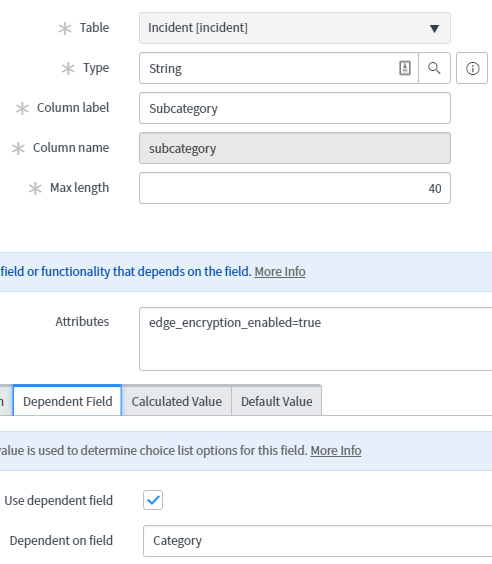
I've added the subcategory field and mapped it to subcategory field on the incident table. I made this variable a lookup select box, selected the incident table as the 'Lookup from table', and selected subcategory as the 'Lookup value field'. When users go to fill out an incident and select their category, it is not filtering their subcategory based on their category selection. Instead, it is showing all available subcategories for users to select. For example, when a user selects the category 'Phones', it should filter out the subcategories and only show 'Personal', 'Polycom', and 'Avaya Portal'. Instead, it is showing all available subcategories. What's strange is that the subcategory filter is working as intended when viewing an incident and an ITIL user decides to re-categorize an incident.
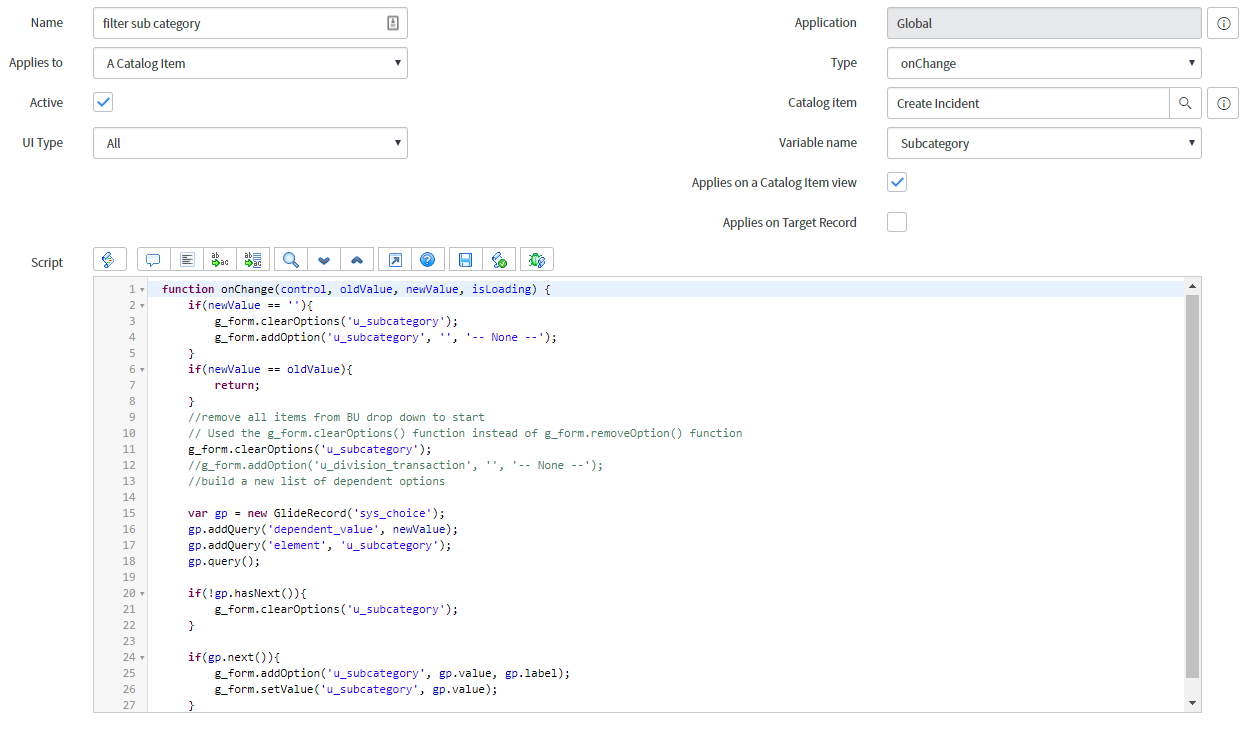
I've searched the community and found several different ways to approach this. I've tried using a reference qual and an on change client script but was unable to get anything working. Subcategory is dependent on category in the dictionary entry. All of my subcategories have dependent category values in the dictionary entry as well.
I've attached a few screenshots to help provide some context. Any and all help would be greatly appreciated. Thank you for your time!
Solved! Go to Solution.
- Labels:
-
Service Catalog
-
Service Desk

- Mark as New
- Bookmark
- Subscribe
- Mute
- Subscribe to RSS Feed
- Permalink
- Report Inappropriate Content
03-06-2019 07:31 AM
Best practice would say that you should call a script include since the above script will not work in Service Portal. Here is a slightly modified version of the script that will work in Service Portal but it is still not best practice. Also I noticed that the variable they refer to in the script is u_subcategory but since your screen shot shows you have check map filed it should match the variable name on the incident form which should just be subcategory.
function onChange(control, oldValue, newValue, isLoading) {
   if (isLoading || newValue == '') {
      return;
   }

   //Type appropriate comment here, and begin script below
	g_form.clearOptions('subcategory');
	g_form.addOption('subcategory', '', '-- None --');
	var gr = new GlideRecord ('sys_choice');
 	gr.addQuery('name', 'incident');
 	gr.addQuery('element', 'subcategory');
 	gr.addQuery('dependent_value', newValue);
	gr.addOrderBy('label');
	gr.query(function(gr){
		while (gr.next()){
			g_form.addOption('subcategory', gr.value, gr.label);
		}
	});
}- Mark as New
- Bookmark
- Subscribe
- Mute
- Subscribe to RSS Feed
- Permalink
- Report Inappropriate Content
03-06-2019 06:38 AM
I would change it to a select box and then use a client script. Can you share your on change client script?
- Mark as New
- Bookmark
- Subscribe
- Mute
- Subscribe to RSS Feed
- Permalink
- Report Inappropriate Content
03-06-2019 07:03 AM
Hey Brian,
Thank you for responding. I changed the variable type from a 'Look up Select Box' to a 'Select Box'. I used this client script from this article and it still shows all of the subcategories.

I attached a screenshot as well that shows the full picture. Thank you for your time!
- Mark as New
- Bookmark
- Subscribe
- Mute
- Subscribe to RSS Feed
- Permalink
- Report Inappropriate Content
03-06-2019 07:31 AM
Best practice would say that you should call a script include since the above script will not work in Service Portal. Here is a slightly modified version of the script that will work in Service Portal but it is still not best practice. Also I noticed that the variable they refer to in the script is u_subcategory but since your screen shot shows you have check map filed it should match the variable name on the incident form which should just be subcategory.
function onChange(control, oldValue, newValue, isLoading) {
   if (isLoading || newValue == '') {
      return;
   }

   //Type appropriate comment here, and begin script below
	g_form.clearOptions('subcategory');
	g_form.addOption('subcategory', '', '-- None --');
	var gr = new GlideRecord ('sys_choice');
 	gr.addQuery('name', 'incident');
 	gr.addQuery('element', 'subcategory');
 	gr.addQuery('dependent_value', newValue);
	gr.addOrderBy('label');
	gr.query(function(gr){
		while (gr.next()){
			g_form.addOption('subcategory', gr.value, gr.label);
		}
	});
}- Mark as New
- Bookmark
- Subscribe
- Mute
- Subscribe to RSS Feed
- Permalink
- Report Inappropriate Content
03-06-2019 08:25 AM
Hey Brian,
Thank you for your time. I went back to my original client script and changed the 'u_subcategory' to 'subcategory' as you suggested but that still did not work.
I tried your suggested script as a script include and tried to call it in the 'reference qual' on the subcategory variable in the catalog item but it did not work. Is there something else I should be doing?
Thank you!