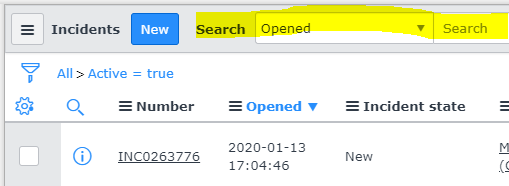
how do i remove/hide the SEARCH on the LIST VIEW

- Mark as New
- Bookmark
- Subscribe
- Mute
- Subscribe to RSS Feed
- Permalink
- Report Inappropriate Content
01-14-2020 06:46 AM

- Mark as New
- Bookmark
- Subscribe
- Mute
- Subscribe to RSS Feed
- Permalink
- Report Inappropriate Content
01-14-2020 06:56 AM
Thank you for your response, but i want the filters to be present and just hide the search icon on the header of list, is that possible?

- Mark as New
- Bookmark
- Subscribe
- Mute
- Subscribe to RSS Feed
- Permalink
- Report Inappropriate Content
01-14-2020 06:57 AM
try adding this attribute
text_search_only=false in the incident collection field
- Mark as New
- Bookmark
- Subscribe
- Mute
- Subscribe to RSS Feed
- Permalink
- Report Inappropriate Content
01-14-2020 07:22 AM
where do i need to add this attribute?which field?
- Mark as New
- Bookmark
- Subscribe
- Mute
- Subscribe to RSS Feed
- Permalink
- Report Inappropriate Content
01-14-2020 08:10 AM
Hello Riya,
I tried adding this attribute on incident collection field , But its not working. I think , its not possible to hide that Search box without DOM manipulation and doing it is not recommended.
I will update on this post once the solution ASAP
Please mark as Correct Answer and Helpful, if applicable.
Thank You!
Abhishek Gardade


- Mark as New
- Bookmark
- Subscribe
- Mute
- Subscribe to RSS Feed
- Permalink
- Report Inappropriate Content
01-14-2020 06:51 AM