- Mark as New
- Bookmark
- Subscribe
- Mute
- Subscribe to RSS Feed
- Permalink
- Report Inappropriate Content
04-26-2022 07:03 PM
Hi All,
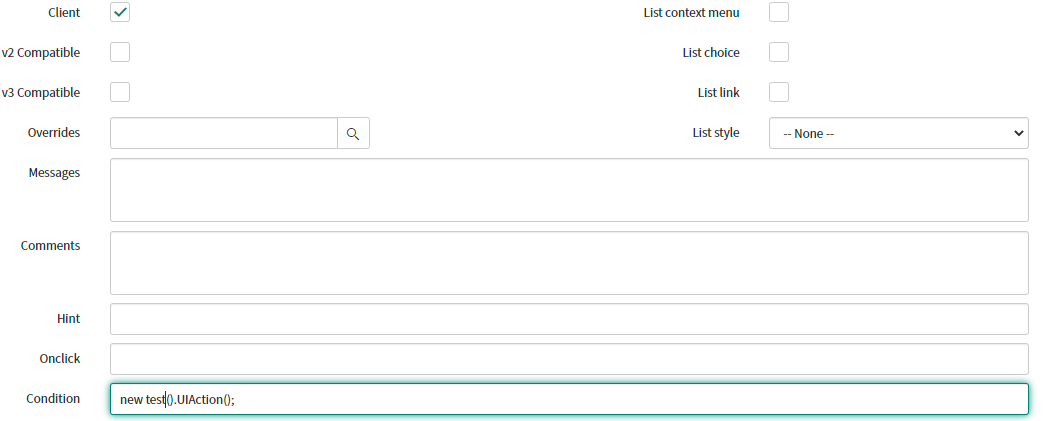
UI Action button i developed on task table. at that time i given some condition to display that button. now i am moving that condition to script include and call script include in ui action. but it's not working properly.
var test = Class.create();
test.prototype = Object.extendsObject(AbstractAjaxProcessor, {
UIAction: function() {
if ((current.request_item.cat_item == '9dce7cf41b2201104c51ed75604bcb69' || current.request_item.cat_item == '90179b371b6201104c51ed75604bcb70') && (current.state == '2' || current.state == '3')) {
}
},
type: 'test'
});

Solved! Go to Solution.
- Mark as New
- Bookmark
- Subscribe
- Mute
- Subscribe to RSS Feed
- Permalink
- Report Inappropriate Content
04-26-2022 09:37 PM
Hi Rama,
You need to make three changes to your scripts.
1. In UI Action - condition:: new test().UiAction(current);
2. In Script Include:
- line #4- UiAction: function(current){
- line #7 - return true;
Regards,
Snehangshu Sarkar
Please mark my answer as correct if it resolves your query.
- Mark as New
- Bookmark
- Subscribe
- Mute
- Subscribe to RSS Feed
- Permalink
- Report Inappropriate Content
04-26-2022 09:38 PM
Hi Rama,
You need to make three changes to your scripts.
1. In UI Action - condition:: new test().UiAction(current);
2. In Script Include:
- line #4- UiAction: function(current){
- line #7 - return true;
Regards,
Snehangshu Sarkar
Please mark my answer as correct if it resolves your query.