- Mark as New
- Bookmark
- Subscribe
- Mute
- Subscribe to RSS Feed
- Permalink
- Report Inappropriate Content
01-05-2024 01:48 AM - edited 01-05-2024 01:53 AM
Solved! Go to Solution.


- Mark as New
- Bookmark
- Subscribe
- Mute
- Subscribe to RSS Feed
- Permalink
- Report Inappropriate Content
01-07-2024 08:27 PM - edited 01-07-2024 08:32 PM
Typically, the Display value of the Metric (Question) is stored in the String Value field as per the Assessment Metric Definitions. But within the Assessment Instance Questions [asmt_assessment_instance_question] table currently used from your script, the String Value field is not fully populated.
You can try to pull data from the Metric Result [asmt_metric_result] table instead. This way, you can retrieve the answer along with the display value through the String Value field.

So your script could be like sample below.
(function executeRule(current, previous /*null when async*/ ) {

    var assessmentResponses = [];
    var assessmentQuestionGR = new GlideRecord('asmt_metric_result'); //replace the table
    assessmentQuestionGR.addQuery('instance', current.sys_id);
	assessmentQuestionGR.addNotNullQuery('actual_value'); //replace the field name
    //assessmentQuestionGR.addQuery('valueISNOTEMPTY');
    assessmentQuestionGR.query();
    while (assessmentQuestionGR.next()) {
        var question = assessmentQuestionGR.metric.getDisplayValue();
        var answer = assessmentQuestionGR.string_value.toString(); //replace to string_value

        assessmentResponses.push({
            question: question,
            answer:  answer
        });

    }
    // Update RITM Additional Comments with assessment responses
    var ritm = new GlideRecord('sc_req_item');
    if (ritm.get('sys_id', current.task_id)) {

        var additionalComments = "\nAssessment Responses:\n";
        for (var i = 0; i < assessmentResponses.length; i++) {
            additionalComments += assessmentResponses[i].question + ': ' + assessmentResponses[i].answer + '\n';
        }

        ritm.comments += additionalComments;
        ritm.update();
    }


})(current, previous);
Cheers,
Tai Vu

- Mark as New
- Bookmark
- Subscribe
- Mute
- Subscribe to RSS Feed
- Permalink
- Report Inappropriate Content
01-07-2024 06:48 AM - edited 01-07-2024 06:49 AM
Hello there,
some metrics like "Date", "DateTime", and "String" store their values in the String value (string_value) field, you can try grabbing that one.
As for the ones that have a "Metric Definition" table behind them, you can try something like this:
(function executeRule(current, previous /*null when async*/) {

    var assessmentResponses = [];

    var assessmentQuestionGR = new GlideRecord('asmt_assessment_instance_question');
    assessmentQuestionGR.addQuery('instance', current.sys_id);
    assessmentQuestionGR.addQuery('valueISNOTEMPTY');
    assessmentQuestionGR.query();

    while (assessmentQuestionGR.next()) {
        var question = assessmentQuestionGR.metric.getDisplayValue(); // Use getDisplayValue() for reference fields

        var metricDefGr = new GlideRecord('asmt_metric_definition');
        metricDefGr.addQuery('metric', assessmentQuestionGR.metric);
        metricDefGr.addQuery('value', assessmentQuestionGR.value);
        metricDefGr.query();

        var answer = metricDefGr.next() ? metricDefGr.display : "";

        assessmentResponses.push({
            question: question,
            answer: answer
        });

    }
    // Update RITM Additional Comments with assessment responses
    var ritm = new GlideRecord('sc_req_item');
    if (ritm.get('sys_id', current.task_id)) {

        var additionalComments = "\nAssessment Responses:\n";
        for (var i = 0; i < assessmentResponses.length; i++) {
            additionalComments += assessmentResponses[i].question + ': ' + assessmentResponses[i].answer + '\n';
        }

        ritm.comments += additionalComments;
        ritm.update();
    }

})(current, previous);
BUT, you need to get rid of the nested call first (e.g. by using a prefetch), as it's a bad practice for performance.
Regards, Ivan
- Mark as New
- Bookmark
- Subscribe
- Mute
- Subscribe to RSS Feed
- Permalink
- Report Inappropriate Content
01-07-2024 08:27 PM - edited 01-07-2024 08:32 PM
Typically, the Display value of the Metric (Question) is stored in the String Value field as per the Assessment Metric Definitions. But within the Assessment Instance Questions [asmt_assessment_instance_question] table currently used from your script, the String Value field is not fully populated.
You can try to pull data from the Metric Result [asmt_metric_result] table instead. This way, you can retrieve the answer along with the display value through the String Value field.
So your script could be like sample below.
(function executeRule(current, previous /*null when async*/ ) {

    var assessmentResponses = [];
    var assessmentQuestionGR = new GlideRecord('asmt_metric_result'); //replace the table
    assessmentQuestionGR.addQuery('instance', current.sys_id);
	assessmentQuestionGR.addNotNullQuery('actual_value'); //replace the field name
    //assessmentQuestionGR.addQuery('valueISNOTEMPTY');
    assessmentQuestionGR.query();
    while (assessmentQuestionGR.next()) {
        var question = assessmentQuestionGR.metric.getDisplayValue();
        var answer = assessmentQuestionGR.string_value.toString(); //replace to string_value

        assessmentResponses.push({
            question: question,
            answer:  answer
        });

    }
    // Update RITM Additional Comments with assessment responses
    var ritm = new GlideRecord('sc_req_item');
    if (ritm.get('sys_id', current.task_id)) {

        var additionalComments = "\nAssessment Responses:\n";
        for (var i = 0; i < assessmentResponses.length; i++) {
            additionalComments += assessmentResponses[i].question + ': ' + assessmentResponses[i].answer + '\n';
        }

        ritm.comments += additionalComments;
        ritm.update();
    }


})(current, previous);
Cheers,
Tai Vu
- Mark as New
- Bookmark
- Subscribe
- Mute
- Subscribe to RSS Feed
- Permalink
- Report Inappropriate Content
01-08-2024 02:17 AM
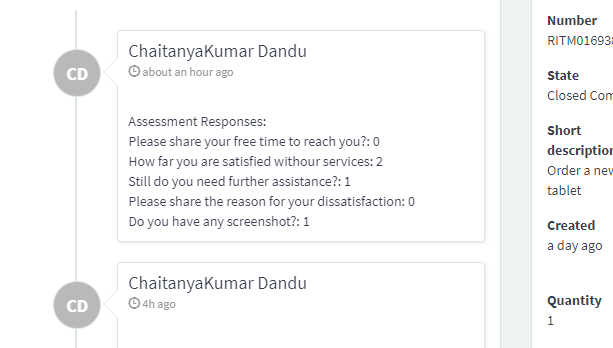
hi I have tried that also but it is not populating the results as desired even they are not reference fields also
thankyou for your response
- Mark as New
- Bookmark
- Subscribe
- Mute
- Subscribe to RSS Feed
- Permalink
- Report Inappropriate Content
01-08-2024 02:35 AM
For better understanding of the specific challenges you're encountering, can you provide more information in your business rule? Table, when to run, your advanced script, etc.
Cheers,
Tai Vu