- Mark as New
- Bookmark
- Subscribe
- Mute
- Subscribe to RSS Feed
- Permalink
- Report Inappropriate Content
06-29-2020 05:59 PM
I am new to flow designer and I am struggling to get the right format to pass the variables from a form to a catalog task. I have used the get variables action.
Basically i want to include the first_name and last_name variables in the short description of the task,
I used to do this in Workflows but the script seems to need a variation and I cannot find the right format.

Solved! Go to Solution.
- Labels:
-
Service Catalog

- Mark as New
- Bookmark
- Subscribe
- Mute
- Subscribe to RSS Feed
- Permalink
- Report Inappropriate Content
06-29-2020 06:41 PM
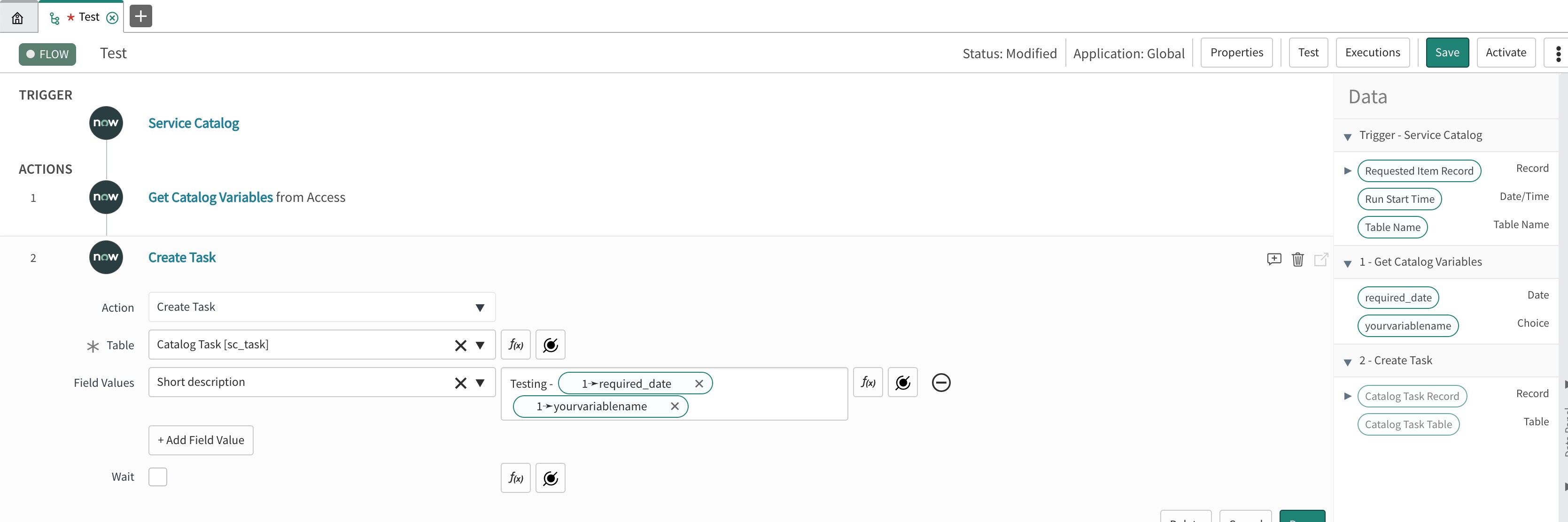
I mean to say do like below. Type what you want in short description then drag variables from right side.

- Mark as New
- Bookmark
- Subscribe
- Mute
- Subscribe to RSS Feed
- Permalink
- Report Inappropriate Content
06-29-2020 06:08 PM
did you tried
var shortDesc = "Review new vendor account - " + fd_data.trigger.current.variables.first_name + " " + fd_data.trigger.current.variables.last_name;
return shortDesc;- Mark as New
- Bookmark
- Subscribe
- Mute
- Subscribe to RSS Feed
- Permalink
- Report Inappropriate Content
06-29-2020 06:18 PM

- Mark as New
- Bookmark
- Subscribe
- Mute
- Subscribe to RSS Feed
- Permalink
- Report Inappropriate Content
06-29-2020 06:24 PM
can you just drag and drop from right side and see what you get?
- Mark as New
- Bookmark
- Subscribe
- Mute
- Subscribe to RSS Feed
- Permalink
- Report Inappropriate Content
06-29-2020 06:29 PM
I tried that too. Does not allow me to drag into the script box