- Mark as New
- Bookmark
- Subscribe
- Mute
- Subscribe to RSS Feed
- Permalink
- Report Inappropriate Content
12-16-2025 02:52 PM
Hello,
New to workspaces.Is there a way to create a UI action button on the form related list called "Export to PDF" so that when the user clicks the button it should export the related list records and user should be able to download. Is it possible to do in workspaces?
Thank you.
Solved! Go to Solution.
- Mark as New
- Bookmark
- Subscribe
- Mute
- Subscribe to RSS Feed
- Permalink
- Report Inappropriate Content
12-17-2025 01:19 AM - edited 12-17-2025 01:47 AM
It is possible with a custom UI action.
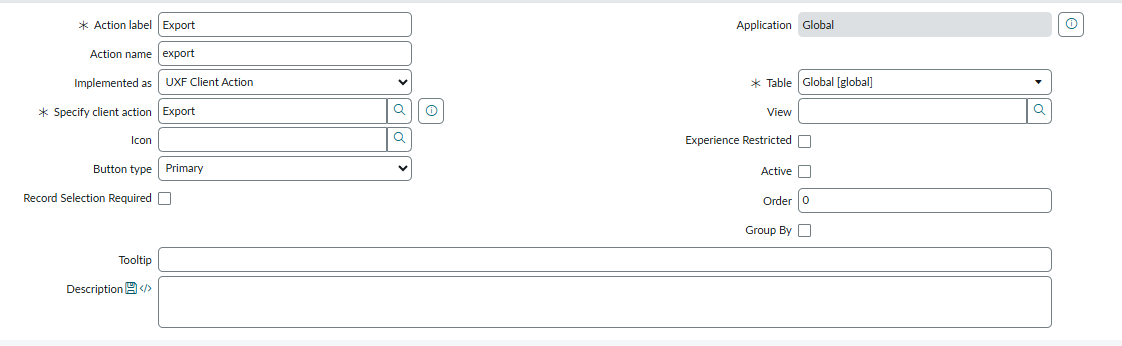
Create a Related List Declarative Action as shown in the screenshot. Enter your table name if you want this to be visible only on a specific related list table or set it to "Global" and add a condition for which table you want this to be visible on.
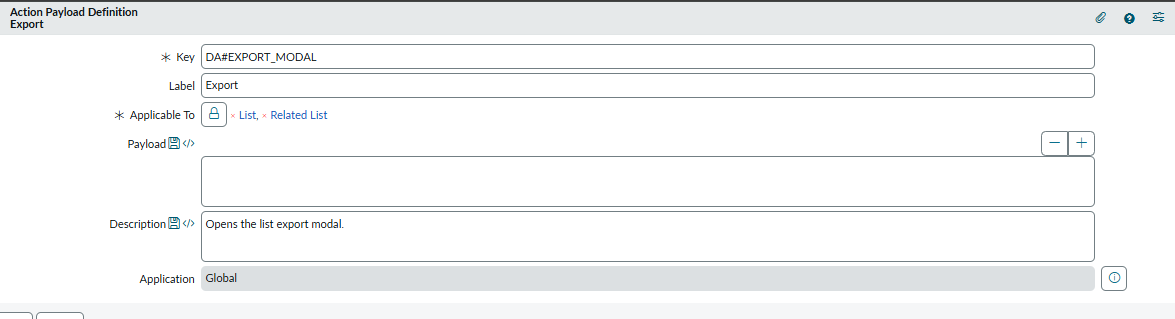
In the "Specify client script" field, use the OOB Action Payload Definition (Export) shown in the screenshot.
That's it.
A few things to remember:
- Since the action is on the Global table, this UI action will be visible on every related list. You will need to add a visibility condition to the UI action if you don't want to visible on all related list.
- Check if it follows the related list filter condition. We have implemented this in the Zurich version of ServiceNow. I'm not sure about previous versions.
For information only: The "Export" payload definition is used in the OOB "Export" button on the list view. We copied the same configuration to the related list button. You don't need to implement any API or script. I have added the screenshot for reference, copy the same.
Action Payload Definition (search, don't create/update)

Related List Declarative Action

Regards
----
If this response was helpful, please select "Accept as Solution" and "Helpful." This helps both the community and me.
- Mark as New
- Bookmark
- Subscribe
- Mute
- Subscribe to RSS Feed
- Permalink
- Report Inappropriate Content
12-16-2025 05:31 PM
Using a Workspace Custom Action / Widget (Recommended)
In ServiceNow Workspace, create a custom action button on a Related List Component.
Steps:
Go to Workspace Experience > Open the page containing your form/related list.
Add a Custom Action to the related list.
In the Action Script:
Query related records using GlideRecord.
Use a PDF library (e.g., GlidePDFDocument server-side or a client-side JS PDF library like jsPDF).
Return the PDF to the browser and trigger download.
Benefits:
Fully supported in Workspace.
Works regardless of the table or scope.
Provides better control over styling and content of the PDF.
Option C – Use Out-of-the-Box Reporting
You can create a Report on the related list table and enable “Export to PDF”.
Then, add a Report Widget or Related List Report Widget in Workspace.
This is the simplest solution and requires no coding.
Summary
Direct UI Actions on related lists may not always work in Workspace.
Best approach is to use Custom Workspace Actions or Widgets, or leverage Reports with PDF export.
Use GlidePDFDocument for server-side PDF generation if you need custom PDFs.


- Mark as New
- Bookmark
- Subscribe
- Mute
- Subscribe to RSS Feed
- Permalink
- Report Inappropriate Content
12-16-2025 07:11 PM
there is no direct way for this
you can use PDF Generation API
check this link which has script from Piyush and enhance to include related list data
Generate PDF file for catalog variables and attach it to RITM
you can check the PDF Generation API for this
Generating Custom PDFs - using the new PDFGenerationAPI
another method
Generate PDF and attach to the record
💡 If my response helped, please mark it as correct ✅ and close the thread 🔒— this helps future readers find the solution faster! 🙏
Ankur
✨ Certified Technical Architect || ✨ 10x ServiceNow MVP || ✨ ServiceNow Community Leader

- Mark as New
- Bookmark
- Subscribe
- Mute
- Subscribe to RSS Feed
- Permalink
- Report Inappropriate Content
12-16-2025 09:07 PM
Hi @swathi Gadde ,
Please refer to the below link:-
- https://www.servicenow.com/community/itsm-articles/export-to-pdf-in-agent-workspace-form-view-with-e...
- https://www.servicenow.com/community/next-experience-forum/export-button-on-the-workspace-form-that-...
If it is helpful, please hit the thumbs button and accept the correct solution by referring to this solution in the future it will be helpful to them.
Thanks & Regards,
Mohammed Mustaq Shaik
- Mark as New
- Bookmark
- Subscribe
- Mute
- Subscribe to RSS Feed
- Permalink
- Report Inappropriate Content
12-17-2025 01:19 AM - edited 12-17-2025 01:47 AM
It is possible with a custom UI action.
Create a Related List Declarative Action as shown in the screenshot. Enter your table name if you want this to be visible only on a specific related list table or set it to "Global" and add a condition for which table you want this to be visible on.
In the "Specify client script" field, use the OOB Action Payload Definition (Export) shown in the screenshot.
That's it.
A few things to remember:
- Since the action is on the Global table, this UI action will be visible on every related list. You will need to add a visibility condition to the UI action if you don't want to visible on all related list.
- Check if it follows the related list filter condition. We have implemented this in the Zurich version of ServiceNow. I'm not sure about previous versions.
For information only: The "Export" payload definition is used in the OOB "Export" button on the list view. We copied the same configuration to the related list button. You don't need to implement any API or script. I have added the screenshot for reference, copy the same.
Action Payload Definition (search, don't create/update)
Related List Declarative Action
Regards
----
If this response was helpful, please select "Accept as Solution" and "Helpful." This helps both the community and me.