- Mark as New
- Bookmark
- Subscribe
- Mute
- Subscribe to RSS Feed
- Permalink
- Report Inappropriate Content
11-23-2020 09:00 PM
Hi All,
I have written an onLoad() Catalog Client Script where I used GlideAjax which is calling a script include.
Script Include has the simple glide record query where it fetches a date time field value based on the query result.
When I execute the script via background script, its returning the date time field value correctly.
But returning null value during onload() of the record producer.
What I am doing wrong in this?
Any help is much appreciated.
Thanks,
Ram Prakash K R
Solved! Go to Solution.
- Mark as New
- Bookmark
- Subscribe
- Mute
- Subscribe to RSS Feed
- Permalink
- Report Inappropriate Content
11-24-2020 03:27 AM
Hi All,
Finally the below setting worked:
var test = task.getDisplayValue(fieldBackEndName);
Thanks all for your prompt replies.


- Mark as New
- Bookmark
- Subscribe
- Mute
- Subscribe to RSS Feed
- Permalink
- Report Inappropriate Content
11-23-2020 11:43 PM
Script Include
var scriptIncludeName = Class.create();
scriptIncludeName.prototype = Object.extendsObject(AbstractAjaxProcessor, {

    myFunction: function() {
        var tableName = '<table name>';  // used sys_user during test
        var userName = this.getParameter('sysparm_user_name');

        var task = new GlideRecord(tableName);
        task.addQuery("requested_for.sys_id",userName);
        //task.addQuery("sys_id", userName);  // used during test
        task.query();
        if (task.next()) {
            var test = task.fieldName.getDisplayValue().toString();
            //var test = task.getDisplayValue().toString();  // used during test
            return test;
        }
        return '';
    },
    type: 'scriptIncludeName'
});
Client script
function onLoad() {
    //Type appropriate comment here, and begin script below

    var userID = g_user.userID;
    alert("Logged In User ID:" + userID);

    var ga = new GlideAjax('scriptIncludeName');
    ga.addParam('sysparm_name', 'myFunction');
    ga.addParam('sysparm_user_name', userID);
    ga.getXML(HelloWorldParse);
}

function HelloWorldParse(response) {
    alert("Success");
    var answer = response.responseXML.documentElement.getAttribute("answer");
    alert("answer:" + answer);
    g_form.setValue("variablebackendname", answer);  // variable name is usually all in lowercase

}
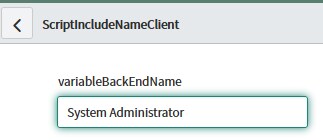
Output (using test)


- Mark as New
- Bookmark
- Subscribe
- Mute
- Subscribe to RSS Feed
- Permalink
- Report Inappropriate Content
11-24-2020 12:04 AM
Hi Hitoshi,
fieldName is of type "Date/Time".
I am getting that value as null.
What can be done to overcome this null issue?
Thanks,
Ram Prakash K R
- Mark as New
- Bookmark
- Subscribe
- Mute
- Subscribe to RSS Feed
- Permalink
- Report Inappropriate Content
11-24-2020 12:58 AM
I just changed my sample to return 'task.sys_created_on.getDisplayValue().toString();'
Script Include
var scriptIncludeName = Class.create();
scriptIncludeName.prototype = Object.extendsObject(AbstractAjaxProcessor, {

    myFunction: function() {
        var tableName = '<table name>';
        var userName = this.getParameter('sysparm_user_name');

        var task = new GlideRecord(tableName);
        task.addQuery("requested_for.sys_id=",this.getParameter('sysparm_user_name'));
        //task.addQuery("sys_id", userName);
        task.query();
        if (task.next()) {
            var test = task.fieldName.getDisplayValue().toString();
            //var test = task.sys_created_on.getDisplayValue().toString();
            return test;
        }
        return '';
    },

    type: 'scriptIncludeName'
});
Also changed data type of variable "variablebackendname" to date/time.
Execution output

- Mark as New
- Bookmark
- Subscribe
- Mute
- Subscribe to RSS Feed
- Permalink
- Report Inappropriate Content
11-24-2020 03:27 AM
Hi All,
Finally the below setting worked:
var test = task.getDisplayValue(fieldBackEndName);
Thanks all for your prompt replies.