- Mark as New
- Bookmark
- Subscribe
- Mute
- Subscribe to RSS Feed
- Permalink
- Report Inappropriate Content
01-06-2021 12:40 AM
Hi,
There is a reference field named as 'Asset' in my change form.

When we click on search icon we have below columns.

Right now we can able to search based on column 'Name'.
I want a user can able to search the asset directly by typing in refence field using column 'Name' - name and 'Asset Tag' - asset_tag. When he give name then also it will show the result and if the user give asset tag then also he can able to search.
Right now I am getting below error when I am trying to search using asset tag.

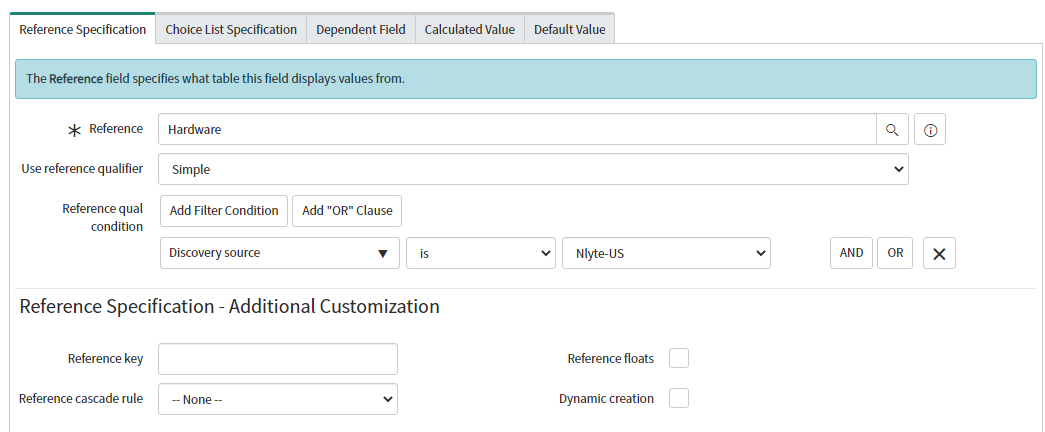
Below is the field dictionary :


What script I need to write and where? Please help?
Thanks.
Solved! Go to Solution.
- Labels:
-
Change Management


- Mark as New
- Bookmark
- Subscribe
- Mute
- Subscribe to RSS Feed
- Permalink
- Report Inappropriate Content
01-06-2021 02:24 AM
Hi,
then using this it should work
ref_auto_completer=AJAXTableCompleter,ref_ac_columns=name;asset_tag,ref_ac_columns_search=true
Are you checking with admin or non-admins
Regards
Ankur
Ankur
✨ Certified Technical Architect || ✨ 10x ServiceNow MVP || ✨ ServiceNow Community Leader

- Mark as New
- Bookmark
- Subscribe
- Mute
- Subscribe to RSS Feed
- Permalink
- Report Inappropriate Content
01-06-2021 01:20 AM
Hi,
Try like this and it will work.
ref_auto_completer=AJAXTableCompleter,ref_ac_columns=display_name;asset_tag,ref_ac_columns_search=true
Mark the comment as a correct answer and also helpful once worked.
- Mark as New
- Bookmark
- Subscribe
- Mute
- Subscribe to RSS Feed
- Permalink
- Report Inappropriate Content
01-06-2021 01:26 AM

- Mark as New
- Bookmark
- Subscribe
- Mute
- Subscribe to RSS Feed
- Permalink
- Report Inappropriate Content
01-06-2021 01:32 AM
It should work fine provided that name/record satisfied your reference qualifier condition
Below worked for searching on name

Below worked for searching on asset tag

Regards
Ankur
Ankur
✨ Certified Technical Architect || ✨ 10x ServiceNow MVP || ✨ ServiceNow Community Leader
- Mark as New
- Bookmark
- Subscribe
- Mute
- Subscribe to RSS Feed
- Permalink
- Report Inappropriate Content
01-06-2021 02:14 AM
Okay.
1. Can you go to hardware.list and take any 1 name and search here and show me what you get?
2. Even in hardware table, the column name is display_name.
Since there is additional filters check if the given name is meeting those ref qual filters or not as well.
Kindly mark the comment as a correct answer and also helpful once worked.
- Mark as New
- Bookmark
- Subscribe
- Mute
- Subscribe to RSS Feed
- Permalink
- Report Inappropriate Content
01-06-2021 02:23 AM
Hi Asif,
This is the field.

When you click on search then it will show below table.

This table is cmdb_ci_hardware.
Now, if I select any value in reference and open info

it opens below table

My dictionary :


Now please let me know where I am going wrong?
Thanks.