- Mark as New
- Bookmark
- Subscribe
- Mute
- Subscribe to RSS Feed
- Permalink
- Report Inappropriate Content
01-05-2022 02:02 PM
Trying to figure out issue with appointment booking time zone. The time zone for appointment slots displays timezone of the user time zone instead of Wu_Location or appointment location timezone which causing fraustration and confusion with customer desiring to book appointement within different timezone or location while they are traveling to different locations. Please advise possible fix. Thank you!
Solved! Go to Solution.
- Labels:
-
Walk-Up Experience

- Mark as New
- Bookmark
- Subscribe
- Mute
- Subscribe to RSS Feed
- Permalink
- Report Inappropriate Content
01-30-2022 05:40 AM
You need to follow 2 points:
1. In wu_appointment table , select timezone as location time zone.
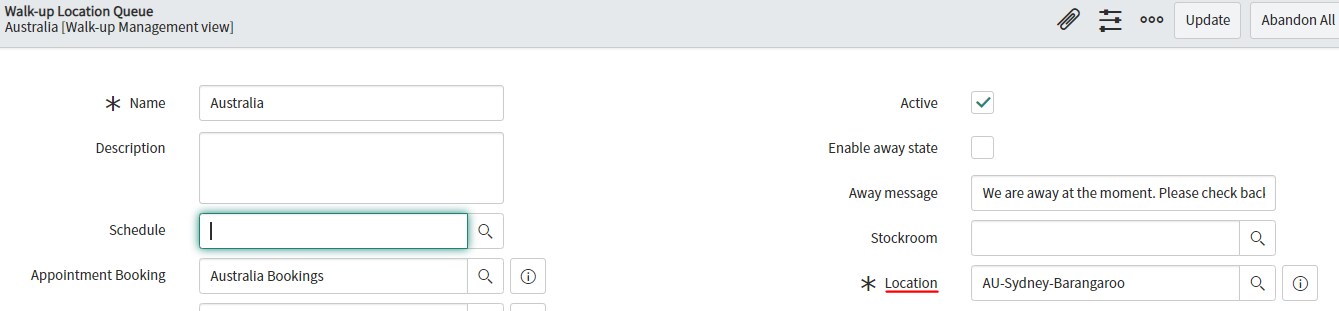
2. In walkup location related to the appointment select the location which has a valid required timezone.
Note : the timezone in location selected in walkup queue should not be empty.
- Mark as New
- Bookmark
- Subscribe
- Mute
- Subscribe to RSS Feed
- Permalink
- Report Inappropriate Content
01-25-2022 08:29 AM

- Mark as New
- Bookmark
- Subscribe
- Mute
- Subscribe to RSS Feed
- Permalink
- Report Inappropriate Content
01-30-2022 05:40 AM
You need to follow 2 points:
1. In wu_appointment table , select timezone as location time zone.
2. In walkup location related to the appointment select the location which has a valid required timezone.
Note : the timezone in location selected in walkup queue should not be empty.
- Mark as New
- Bookmark
- Subscribe
- Mute
- Subscribe to RSS Feed
- Permalink
- Report Inappropriate Content
02-02-2022 04:44 AM