- Mark as New
- Bookmark
- Subscribe
- Mute
- Subscribe to RSS Feed
- Permalink
- Report Inappropriate Content
11-15-2024 08:03 AM
Hi All
i have two variables type as check boxes
A and B
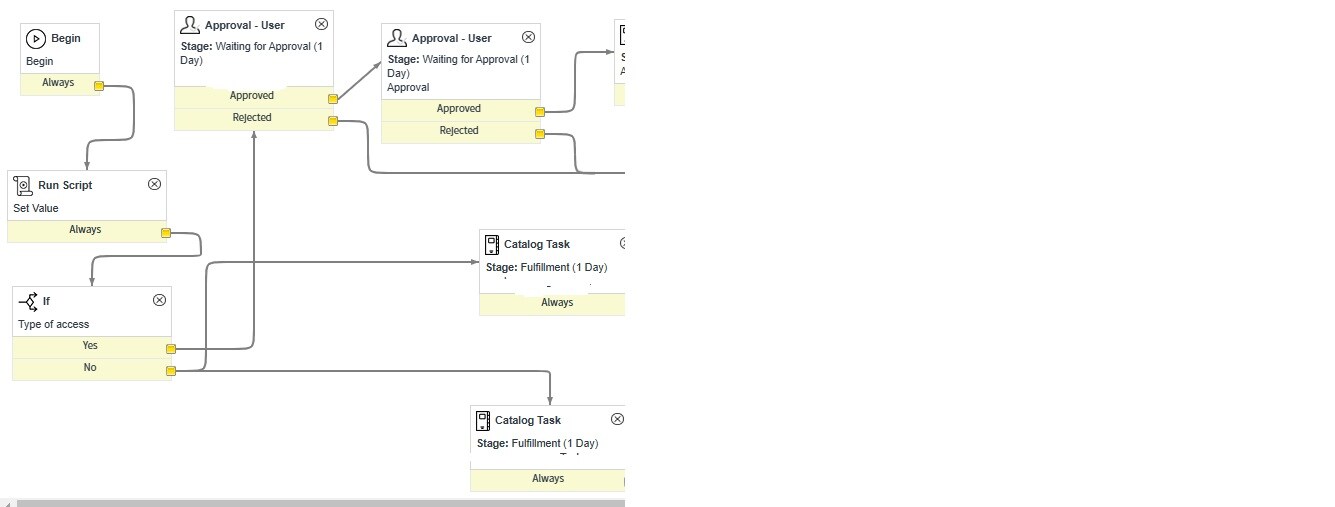
if supposed user select both option same time and submit the request it need to be trigger C & D two different tasks need to be trigger
if user select A option only C task need to be trigger
if user select B option only D task need to be trigger
Solved! Go to Solution.
- Mark as New
- Bookmark
- Subscribe
- Mute
- Subscribe to RSS Feed
- Permalink
- Report Inappropriate Content
11-16-2024 02:10 AM
Hi @poco ,
Please try the below approach, you will have to create 2 if condition blocks, for the first condition if the checkbox A is checked then you can create the catalog task, if the result is no , then you can move to the next if condition for checkbox B , so the workflow will look as below

The condition which you can use for the checkbox A is mentioned below. If true, create the catalog task

Similarly, you can give the condition for the checkbox B if it is checked

- Mark as New
- Bookmark
- Subscribe
- Mute
- Subscribe to RSS Feed
- Permalink
- Report Inappropriate Content
11-15-2024 09:45 AM
Hi @poco ,
From the above scenario it seems to be catalog item request. Are you using flow designer ? Also the tasks which you have mentioned as C and D are those parallel tasks or sequential tasks.
Can you please provide the above details
- Mark as New
- Bookmark
- Subscribe
- Mute
- Subscribe to RSS Feed
- Permalink
- Report Inappropriate Content
11-15-2024 11:35 AM
- Mark as New
- Bookmark
- Subscribe
- Mute
- Subscribe to RSS Feed
- Permalink
- Report Inappropriate Content
11-16-2024 02:10 AM
Hi @poco ,
Please try the below approach, you will have to create 2 if condition blocks, for the first condition if the checkbox A is checked then you can create the catalog task, if the result is no , then you can move to the next if condition for checkbox B , so the workflow will look as below
The condition which you can use for the checkbox A is mentioned below. If true, create the catalog task
Similarly, you can give the condition for the checkbox B if it is checked