Is Customer Service workspace rename to IT-service Desk workspace?

- Mark as New
- Bookmark
- Subscribe
- Mute
- Subscribe to RSS Feed
- Permalink
- Report Inappropriate Content
03-20-2026 04:36 AM
We have installed CSM Configurable workspace plugin but could not find the Customer Service Workspace. I tried to directly navigate to the link which is now/cwf/agent/home but in this new instance it is opening IT Service Desk Workspace. Not sure what is the issue here.


- Mark as New
- Bookmark
- Subscribe
- Mute
- Subscribe to RSS Feed
- Permalink
- Report Inappropriate Content
03-20-2026 05:32 AM
some screenshots will help
Ankur
✨ Certified Technical Architect || ✨ 10x ServiceNow MVP || ✨ ServiceNow Community Leader
- Mark as New
- Bookmark
- Subscribe
- Mute
- Subscribe to RSS Feed
- Permalink
- Report Inappropriate Content
03-20-2026 05:38 AM


- Mark as New
- Bookmark
- Subscribe
- Mute
- Subscribe to RSS Feed
- Permalink
- Report Inappropriate Content
03-20-2026 05:42 AM
Hi @gazalagrawa
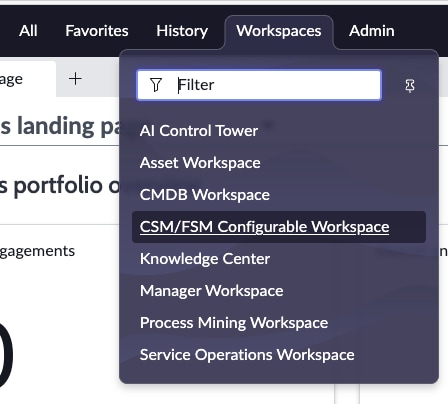
You should be able to see what I added in the screenshot. Also, try opening this work from the top and observe how it is behaving.
Regards
Dr. Atul G. - Learn N Grow Together
ServiceNow Techno - Functional Trainer
LinkedIn: https://www.linkedin.com/in/dratulgrover
YouTube: https://www.youtube.com/@LearnNGrowTogetherwithAtulG
****************************************************************************************************************

- Mark as New
- Bookmark
- Subscribe
- Mute
- Subscribe to RSS Feed
- Permalink
- Report Inappropriate Content
03-20-2026 05:47 AM
I think I understood now, it looks someone has made a lot of changes to CSM/FSM configurable. How can we revert it to OOB version? From where?
- Mark as New
- Bookmark
- Subscribe
- Mute
- Subscribe to RSS Feed
- Permalink
- Report Inappropriate Content
03-20-2026 05:50 AM
Hi @gazalagrawa
Good, we got one small win. Now it’s a revert, which is not an easy case—always being a process person, I would suggest the following approach:
-
First discussion with the business: Confirm if they want to go OOTB or if they are okay with a customer-specific solution.
-
Impact analysis: If they agree to proceed, perform an impact analysis. Identify what is included in OOTB and what is not, and discuss the gaps with the business.
-
Considerations for users: Going OOTB will be a significant change for users and agents, so proper training will be needed.
-
Implementation steps:
-
First, make the changes in the DEV environment.
-
Then test thoroughly before moving forward.
-
-
Plugin verification: When you install the plugin, check if you can see what I showed you. If yes, then everything is set. The only thing remaining is to hide the customer workspace and bring in the OOTB workspace for that. We need to take care of this step carefully.
Regards
Dr. Atul G. - Learn N Grow Together
ServiceNow Techno - Functional Trainer
LinkedIn: https://www.linkedin.com/in/dratulgrover
YouTube: https://www.youtube.com/@LearnNGrowTogetherwithAtulG
****************************************************************************************************************
