- Mark as New
- Bookmark
- Subscribe
- Mute
- Subscribe to RSS Feed
- Permalink
- Report Inappropriate Content
09-22-2020 05:58 AM
Hi,
I need to produce a report on our current open sc tasks and arrange it by department.
I can't select department from the options and can't find a way around this. Is this a case that a database view needs to be created? (I don't have admin rights so would need to ask our admin team if this is the case)
Thanks,
Charlotte
Solved! Go to Solution.
- Labels:
-
Reporting


- Mark as New
- Bookmark
- Subscribe
- Mute
- Subscribe to RSS Feed
- Permalink
- Report Inappropriate Content
09-22-2020 11:06 AM
HI,
You can dot walk request.requested_for.department and you are done.
Thanks,
Ashutosh
- Mark as New
- Bookmark
- Subscribe
- Mute
- Subscribe to RSS Feed
- Permalink
- Report Inappropriate Content
09-22-2020 10:05 AM
Hi Charlotte,
This should be easy enough for you to do. Try this:
- Create a report using the Catalog Task [sc_task] table
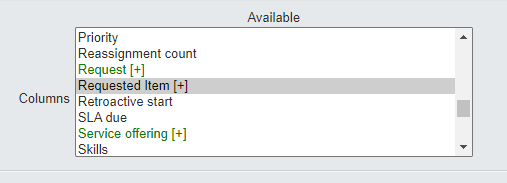
- Add an additional field, navigate to Requested Item [+] and dot-walk
- Then, navigate to Requested for [+] and dot-walk
- Finally, select Department and hit [>] to add


This will now give a column reporting the Department associated with the requestor 🙂
Thanks,
DJL
- Mark as New
- Bookmark
- Subscribe
- Mute
- Subscribe to RSS Feed
- Permalink
- Report Inappropriate Content
09-23-2020 03:00 AM
When you say 'add an additional field' what do you mean?
I have managed to find a way around as suggested below by Grouping by: Request> Requested for> Department
- Mark as New
- Bookmark
- Subscribe
- Mute
- Subscribe to RSS Feed
- Permalink
- Report Inappropriate Content
09-23-2020 04:20 AM
Hi Charlotte,
My guidance describes how you would pull the 'Department' field to display as an additional column, within a List report. This field is always helpful to have displayed against each record.
Ashutosh describes the same dot-walk if you just wanted to Group.
Thanks,
DJL
- Mark as New
- Bookmark
- Subscribe
- Mute
- Subscribe to RSS Feed
- Permalink
- Report Inappropriate Content
09-22-2020 11:06 AM
HI,
You can dot walk request.requested_for.department and you are done.
Thanks,
Ashutosh
- Mark as New
- Bookmark
- Subscribe
- Mute
- Subscribe to RSS Feed
- Permalink
- Report Inappropriate Content
09-23-2020 02:59 AM
Perfect thank you!